<?xml version="1.0" encoding="utf-8"?><feed xmlns="http://www.w3.org/2005/Atom" ><generator uri="https://jekyllrb.com/" version="3.10.0">Jekyll</generator><link href="https://webarchive.mindhub.top/atom.xml" rel="self" type="application/atom+xml" /><link href="https://webarchive.mindhub.top/" rel="alternate" type="text/html" /><updated>2025-03-26T21:04:54+00:00</updated><id>https://webarchive.mindhub.top/atom.xml</id><title type="html">Web Archive</title><subtitle>Personal web archive with a pretty UI and useful functionality
</subtitle><entry><title type="html">State Restoration in Flutter - Practical and Comprehensive Guide</title><link href="https://webarchive.mindhub.top/flutteris/blog/en/state_restoration/" rel="alternate" type="text/html" title="State Restoration in Flutter - Practical and Comprehensive Guide" /><published>2023-10-30T20:00:00+00:00</published><updated>2023-10-30T20:00:00+00:00</updated><id>https://webarchive.mindhub.top/flutteris/blog/en/state_restoration</id><content type="html" xml:base="https://webarchive.mindhub.top/flutteris/blog/en/state_restoration/"><![CDATA[<table>
<thead>
  <tr>
    <th>Last Reviewed</th>
    <th>Compatibility</th>
  </tr>
</thead>
<tbody>
  <tr>
    <td>30 Oct 2023</td>
    <td>Flutter 3.13.x <br /> Dart3.1.x</td>
  </tr>
</tbody>
</table>

<h2>Introduction</h2>
<p>We often talk about <strong>State Management</strong> but rather little about the notion of <strong>State Restoration</strong>.</p>
<p>This notion, often ignored, can be quite important in certain types of applications in order to provide comfort to users and avoid any frustration related to potentially having to restart what they had just done as a result of the application being put into background... by the receipt of a simple phone call, for example...</p>
<p>This article explains why to use, how it works and how to implement <strong>State Restoration</strong>.</p>
<hr />

<h3>Impact of backgrounding your application</h3>
<p>Suppose you were finalizing an order as well as the form that had taken you 2 minutes to complete, you were about to press the &quot;<em>Send</em>&quot; button and you get a phone call.... Your app goes into the background during your phone call, and when you come back to your app, your shopping cart is empty, and so is your form.... Wow... the frustration.</p>
<p>It's important to know that when your application is put into the background, whether as a result of a user action or involuntarily, when receiving a phone call, for example, <u>your application may be terminated by the operating system in order to free up resources</u>. When this happens and your application returns to the foreground, it restarts <u>from square zero</u>.</p>
<hr />

<h3>What is <strong>State Restoration</strong>?</h3>
<p>The <strong>State Restoration</strong> is a mechanism that allows you to ensure that certain data is <u>automatically</u> saved when the application is set to background and can be retrieved when the application is restarted.</p>
<p>By <em>data</em> we mean not only values but also parts of the user interface (Route, TextFields, Scrolling...) that help give users the impression that the application has never been killed.</p>
<p>To make this possible, your application must follow certain rules and thus be defined for this purpose <u><strong>from the beginning</strong></u>.</p>
<p>Let's see how to achieve this step by step.</p>
<hr />

<h3>Preliminary configuration for your tests</h3>
<p>In order to be able to test the <strong>State Restoration</strong> during your developments, it's essential to make sure that your application will be killed by the OS as soon as you put it in the background.</p>
<p>Here's how to do it, depending on whether you're working on Android or iOS.</p>
<h4>Android</h4>
<p>On Android, whether on a real phone or a simulator, it&#39;s pretty straightforward.</p>
<ol>
<li><p>Put the phone or simulator in <em>Development</em> mode.</p>
<p>a. Open the application &quot;<em>Settings</em>&quot;</p>
<p>b. Enter the &quot;<em>About phone / About emulated device</em>&quot;</p>
<p>c. Then in the &quot;<em>Software information</em>&quot;</p>
<p>d. Locate the &quot;<em>Build number</em>&quot; and press 7 times in a row.</p>
<p>After the 7 presses, you'll see a message informing you that your phone has switched to &quot;<em>Development</em>&quot; mode. A new &quot;<em>Developer options</em>&quot; menu is added to the application &quot;<em>Settings</em>&quot;</p>
</li>
<li><p>Enter the &quot;<em>Developer options</em>&quot; menu</p>
<p>a. Scroll to the end and locate the &quot;<em>Applications</em>&quot; group (&quot;<em>Apps</em>&quot;)</p>
<p>b. Enable the &quot;<em>Don't keep activities</em>&quot; option</p>
</li>
</ol>
<h4>iOS</h4>
<p>For iOS, this requires more preparation at XCode level. Please refer to this guide for the iOS part: <a href="https://api.flutter.dev/flutter/services/RestorationManager-class.html#state-restoration-on-ios" target="_blank">State Restoration on iOS</a>.</p>
<blockquote>
<p>I find it much easier to test <strong>State Restoration</strong> on Android than on iOS.</p>
<p>Therefore, I highly recommend that you use an Android phone or Android simulator when developing on a Mac and wish to test your <strong>State Restoration</strong> implementation.</p>
</blockquote>
<hr />

<h3>How does it work in broad terms?</h3>
<p>Before we get into the details of <strong>how</strong>, it's nevertheless interesting to understand the general mechanism of how it works.</p>
<h4>1. Operation in &#39;foreground&#39; mode.</h4>
<p>At the end of a <strong>Frame</strong> (<em>rendering</em>), <strong>ALL</strong> data <sup>(*)</sup> related to the <strong>State Restoration</strong> that have been the subject of a modification, are serialized and sent to the <strong>Engine</strong> (<em>flutter/restoration</em>) which puts them in <em>cache</em> until the OS asks for them. </p>
<p><sup>(*)</sup> <i>in fact these are the <em>Buckets</em> but we'll see all that in detail, later.</i></p>
<blockquote>
<p>Serialization and sending to the <strong>Engine</strong> are <strong>synchronous</strong> operations.</p>
<p>It is therefore important to <strong>limit</strong> the update frequency, the quantity and the size of the data that are part of this operation in order not to create &#39;jank&#39;.</p>
</blockquote>
<h4>2. When the Operating System terminates the application</h4>
<p>When the application is running in the background and <strong>IF</strong> the Operating System decides to terminate the application in order to free up resources, the <strong>OS</strong> will ask the <strong>Engine</strong> to provide <strong>the latest version</strong> of the data to be saved.  Once done it terminates the application.</p>
<blockquote>
<p>It should be noted that the size of data that can be saved is limited to a few K-bytes <sup>(*)</sup></p>
</blockquote>
<p><sup>(*)</sup> <em>despite extensive research, I have not been to find any precise limits</em></p>
<h4>3. Restarting the application</h4>
<p>On restart of an application that is designed for <strong>State Restoration</strong> <sup>(*)</sup>, data is retrieved from the <strong>Engine</strong> in a <strong>synchronous</strong> manner. Rendering of the application can then begin.</p>
<p><sup>(*)</sup> <i>we'll see how to prepare the application and when rendering actually starts later.</i></p>
<h4>4. Rendering application components</h4>
<p>During <strong>State Restoration</strong>, as components (Widgets...) are rendered, the data linked to them (<i>we'll see how later</i>) is retrieved and &quot;applied&quot;, which has the objective and consequence, of reconstructing the <strong>arborescence</strong> of the Widgets and, <strong>in part</strong> (I'll explain later), the visual content.</p>
<p>At the end of this operation, the visual appearance of the application should have been restored and the user can continue to use the application &quot;<em>as if nothing had happened</em>&quot;.</p>
<hr />

<blockquote>
<p><strong>Hot Reload, Hot Restart, Cold Start</strong></p>
<br />
<p>Simple remark before further down into the matter.</p>
<br />
<p>The notion of <strong>State Restoration</strong> does not apply during a <strong>Hot Reload</strong>, a <strong>Hot Restart</strong> or a <strong>Cold Start</strong> of the application.</p>
<p>In other words, any changes to the structure of your code relating to the notion of <strong>restoration</strong> are not &quot;taken into account&quot; during a Hot Reload.
For your modifications to be taken into account, you'll need to stop and restart your application.</p>
<br />
<p>I repeat: on &quot;<em>Cold Start</em>&quot; of an application, the <strong>State Restoration</strong> does <strong>NOT</strong> apply.</p>
<br />
<p>The <strong>State Restoration</strong> only applies to applications that have been terminated by the OS, which is why I use the term &quot;<em>Restart</em>&quot;.</p>
<br />
<p>It&#39;s quite confusing at first...</p>
</blockquote>
<p>Now that the broad outlines have been defined, it's high time to see how to put all this together...</p>
<hr />

<h2>What are the &quot;main components&quot;?</h2>
<p>Let&#39;s start by looking at the main components, involved in the <strong>State Restoration</strong>.</p>
<h3><strong>RestorationManager</strong> (the &quot;coordinator&quot;)</h3>
<p>The <strong>RestorationManager</strong> is the coordinator. It is unique in any Flutter application.</p>
<p>It is started as soon as the <strong>Bindings</strong> are initialized (see <a href="https://www.flutteris.com/blog/en/flutter-internals" target="_blank">Flutter Internals</a>).  It handles all communications with the <strong>Engine</strong> with regard to <strong>State Restoration</strong>.  It is also responsible for the management of the &quot;data&quot; to be sent to the <strong>Engine</strong> at the end of the next <em>Frame Rendering</em>.</p>
<hr />

<h3><strong>RestorationScope</strong> (the &quot;isolation&quot;)</h3>
<p>Visualize a <strong>RestorationScope</strong> as a way to structure your application by self-contained restoration blocks, hence the suffix &quot;<strong>~Scope</strong>&quot;.</p>
<p>A <strong>RestorationScope</strong> is a Widget that can itself contain other <strong>RestorationScope</strong> among its descendants. Each <strong>RestorationScope</strong> descendant is independent of its <strong>ancestors</strong>.</p>
<h4>The <strong>RootRestorationScope</strong></h4>
<p>The very first in the hierarchy is the <strong>RootRestorationScope</strong>, as its name suggests and should normally be unique within an application.</p>
<p>It is generally positioned as early as possible in the Widgets tree, as soon as the notion of <em>restoration</em> can make sense. It is therefore quite common to find it (but not obligatory) around the <strong>runApp()</strong> as illustrated below:</p>
<pre><code class="language-dart">void main(){
  runApp(
    const RootRestorationScope(
      restorationId: &#39;root&#39;,
      child: Application(),
    ),
  );
}
</code></pre>
<p>It is a special <strong>RestorationScope</strong> in that it is the one that prepares your application to support <strong>State Restoration</strong>.</p>
<p>Well, other things still need to be done but, thanks to the presence of a <strong>RootRestorationScope</strong>, the mechanism for recovering data saved at OS level is set up and the creation of the <em>Root</em> <strong>RestorationBucket</strong> is carried out.</p>
<h4>The <strong>RestorationScope</strong></h4>
<p>As mentioned above, the <strong>RestorationScope</strong> is a Widget whose sole purpose is to define a new isolated &quot;area&quot; (or <strong>Scope</strong>) of restoration and allow retrieval of the <em>main</em> <strong>RestorationBucket</strong> related to this &quot;area&quot;.</p>
<p>
<p>At its creation, a <strong>RestorationBucket</strong> is initialized and inserted into the Widgets tree, via a specialized <strong>InheritedWidget</strong>, called <strong>UnmanagedRestorationScope</strong>.</p>
<blockquote>
<p>The identity of a <strong>RestorationScope</strong> is <strong>ESSENTIAL</strong> and is mentioned via its property: <strong>restorationId</strong>.</p>
<p>A <strong>RestorationScope</strong> whose identity is not mentioned (= null) <strong>disables the &#39;State Restoration&#39; for its entire subtree</strong>.</p>
<p>This can be useful in some transitional cases, but in most cases you won&#39;t need to use this special feature.</p>
</blockquote>
<p><u>Personal note:</u><br />
  It's a pity that the property that is used to define the behavior is called <strong>restorationId</strong> or <strong>restorationScopeId</strong> and not <strong>enabled</strong> as this would have made the explanations easier, as you'll see later.
</p>
<h4>Is the <strong>RootRestorationScope</strong> essential?</h4>
<p>It depends.</p>
<p>You should know that when you use a <strong>MaterialApp</strong> or a <strong>CupertinoApp</strong>, a <strong>RootRestorationScope</strong> is automatically inserted.</p>
<p>So, if no data needs to be restored <strong>upstream</strong>, simply mentioning a <strong>restorationScopeId</strong> at MateriaApp/CupertinoApp level activates the <strong>State Restoration</strong> and so a prior <strong>RootRestorationScope</strong> is not necessary.</p>.
<p>On the other hand, if you were to retrieve session data, such as: language, currency, theme to be able to initialize your MateriaApp/CupertinoApp, then, you need a <strong>RootRestorationScope</strong> upstream.</p>
<blockquote>
<p><strong>ULTRA</strong> important!</p>
<p>If you have a <strong>RootRestorationScope</strong> upstream, you <strong>MUST</strong> mention a <strong>restorationScopeId</strong> at the level of your MateriaApp/CupertinoApp, because, as mentioned earlier, an absence of an identity disables the <strong>State Restoration</strong> for the entire subtree!!!</p>
</blockquote>
<hr />
<h3>The <strong>RestorationBucket</strong> (the &quot;memory&quot;)</h3>
<p>As its name suggests the <strong>RestorationBucket</strong> is a place where information is stored that is exchanged between your application and the OS as part of the <strong>State Restoration</strong>.</p>
<p>A <strong>RestorationBucket</strong> is nothing more than a class that:</p>
<ul>
<li>has a <strong>unique</strong> name for the same <strong>RestorationScope</strong> (<em>we'll see later</em>)</li>
<li>stores information (the <strong>RestorableProperty</strong>) in the format as <strong>Map&lt;Object?, Object?&gt;</strong>, in other words, a series of pairs: key - value</li>
<li>knew its position in the tree structure: parent - children</li>
</ul>
<p>While nothing prevents you from doing so, in general, you don't directly manipulate <strong>RestorationBuckets</strong> but delegate this to the <strong>RestorationMixin</strong>.</p>
<hr />
<h3>The <strong>RestorableProperty</strong> (the &quot;data&quot;)</h3>
<p>Finally, here are the last elements, the <strong>RestorableProperty</strong>, that is, the data used by the <strong>State Restoration</strong>.</p>
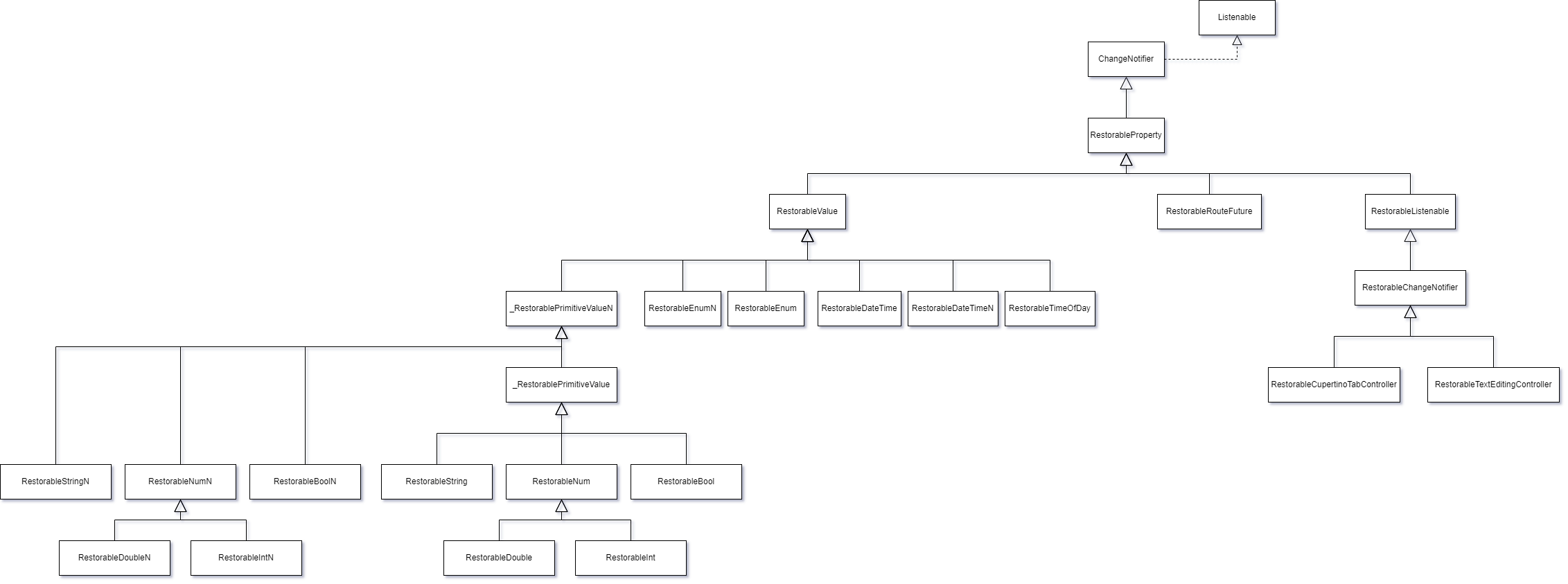
<p>The following diagram lists the different types of data that are &quot;<em>restorable</em>&quot; and provided for as basic by Flutter. You should already know that nothing prevents you from creating your own types (<em>we'll see how to do this later</em>).</p>
<p><img src="https://webarchive.mindhub.top/images/flutteris/state_restoration/state_restoration_restorable_property_schema.png" alt="RestorableProperty: different types" data-fancybox="" /></p>
<center><i>Click to Zoom</i></center>
<br />
<p>As you can see, a <strong>RestorableProperty</strong> is a <strong>ChangeNotifier</strong>. This is used by the <strong>RestorationMixin</strong> to know when a property has been changed and when it needs to be updated at the <strong>RestorableBucket</strong> level.</p>
<h4>Must we systematically use a <strong>RestorableProperty</strong> to save/restore data?</h4>
<p>No.</p><p>You can use any type of data without any problem nevertheless, there are 2 advantages to using <strong>RestorableProperty</strong>:</p>
<ol>
<li>You use a <strong>mixin</strong> that takes care of all the complexity involved in managing <strong>RestorationBucket</strong> and when it's necessary to &quot;save&quot; or &quot;retrieve&quot; this data.</li>
<li>Thanks to the use of a <strong>RestorableProperty</strong>, it is much easier to identify which data is part of the process.</li>
</ol>
<h4>What are the basic supported data types?</h4>
<p>The following table draws a parallel between data types and their <em>equivalent</em> restorable.</p>
<table class="table table-striped table-bordered">
<thead>
<tr>
<th>Type</th>
<th>Restorable</th>
</tr>
</thead>
<tbody>
<tr>
<td>String</td>
<td>RestorableString</td>
</tr>
<tr>
<td>String?</td>
<td>RestorableStringN</td>
</tr>
<tr>
<td>int</td>
<td>RestorableInt</td>
</tr>
<tr>
<td>int?</td>
<td>RestorableIntN</td>
</tr>
<tr>
<td>double</td>
<td>RestorableDouble</td>
</tr>
<tr>
<td>double?</td>
<td>RestorableDoubleN</td>
</tr>
<tr>
<td>num</td>
<td>RestorableNum</td>
</tr>
<tr>
<td>num?</td>
<td>RestorableNumN</td>
</tr>
<tr>
<td>bool</td>
<td>RestorableBool</td>
</tr>
<tr>
<td>bool?</td>
<td>RestorableBoolN</td>
</tr>
<tr>
<td>Enum</td>
<td>RestorableEnum</td>
</tr>
<tr>
<td>Enum?</td>
<td>RestorableEnumN</td>
</tr>
<tr>
<td>DateTime</td>
<td>RestorableDateTime</td>
</tr>
<tr>
<td>DateTime?</td>
<td>RestorableDateTimeN</td>
</tr>
<tr>
<td>TimeOfDay</td>
<td>RestorableTimeOfDay</td>
</tr>
</tbody>
</table>
<p>Other types of <strong>RestorableProperty</strong> exist, but you won't be using them very often. For the sake of completeness, here they are:</p>
<ul>
<li>RestorableRouteFuture</li>
<li>RestorableCupertinoTabController</li>
<li>RestorableTextEditingController</li>
</ul>
<hr />
<h2>State Restoration in practice</h2>
<p>Now that we know the <strong>State Restoration</strong> players, it's time to see how to use them together.</p>
<h3>Simple case - l&#39;application &quot;counter&quot;</h3>
<p>To get started, let's start with the basic application: the &quot;counter&quot; and adapt its code so that it supports <strong>State Restoration</strong>.</p>
<!-- highlight="4-5,17,35-36,40,59,73-74,76-79" -->
<pre><code class="language-dart">import &#39;package:flutter/material.dart&#39;;

void main() {
  runApp(const RootRestorationScope(
    restorationId: &#39;root&#39;,
    child: MyApp(),
  ));
}

class MyApp extends StatelessWidget {
  const MyApp({super.key});

  @override
  Widget build(BuildContext context) {
    return MaterialApp(
      title: &#39;Restorable Counter&#39;,
      restorationScopeId: &#39;application&#39;,
      theme: ThemeData(
        colorScheme: ColorScheme.fromSeed(seedColor: Colors.deepPurple),
        useMaterial3: true,
      ),
      home: const MyHomePage(),
    );
  }
}

class MyHomePage extends StatefulWidget {
  const MyHomePage({super.key});

  @override
  State&lt;MyHomePage&gt; createState() =&gt; _MyHomePageState();
}

class _MyHomePageState extends State&lt;MyHomePage&gt;
    with RestorationMixin&lt;MyHomePage&gt; {
  final RestorableInt _counter = RestorableInt(0);

  void _incrementCounter() {
    setState(() {
      _counter.value++;
    });
  }

  @override
  Widget build(BuildContext context) {
    return Scaffold(
      appBar: AppBar(
        backgroundColor: Theme.of(context).colorScheme.inversePrimary,
        title: const Text(&#39;Restorable Demo&#39;),
      ),
      body: Center(
        child: Column(
          mainAxisAlignment: MainAxisAlignment.center,
          children: &lt;Widget&gt;[
            const Text(
              &#39;You have pushed the button this many times:&#39;,
            ),
            Text(
              &#39;${_counter.value}&#39;,
              style: Theme.of(context).textTheme.headlineMedium,
            ),
          ],
        ),
      ),
      floatingActionButton: FloatingActionButton(
        onPressed: _incrementCounter,
        tooltip: &#39;Increment&#39;,
        child: const Icon(Icons.add),
      ),
    );
  }

  @override
  String? get restorationId =&gt; &#39;counter_page&#39;;

  @override
  void restoreState(RestorationBucket? oldBucket, bool initialRestore) {
    registerForRestoration(_counter, &#39;counter&#39;);
  }
}
</code></pre>

<p>Explanations:</p>
<ul>
<li>lines 4-5: We define the <strong>RootRestorationScope</strong> and give it a name (as I told you before, in this example we didn't need to insert one, but it's simply to make it more &quot;visible&quot; in terms of explanations)</li>
<li>line 17: As we&#39;ve seen, we also need to give a restoration name to a MaterialApp</li>
<li>line 35: We include the <strong>RestorationMixin</strong> to help us</li>
<li>line 36: Instead of using an <strong>int</strong>, we use its <em>restorable</em> version <strong>RestorableInt</strong> and initialize it to 0</li>
<li>line 40: Incrementing takes place at its &quot;<strong>value</strong>&quot;</li>
<li>line 59: We retrieve its <strong>value</strong></li>
<li>lines 73-74: We give a name to the <strong>RestorationBucket</strong> relative to our <strong>StatefulWidget</strong> that uses the state restoration.</li>
<li>line 78: We inform the <strong>RestorationMixin</strong> that the <strong>RestorationInt</strong> is part of the properties to be saved/restored.</li>
</ul>
<p>As you can see, it wasn't necessary to make a huge number of changes to make the code compatible.</p>
<hr />
<h3>What about Routes?</h3>
<p>Any self-respecting application is not limited to a single &quot;page&quot; and the user will navigate through the application and open &quot;pages&quot; (= <strong>Route</strong>).</p>
<p>It is therefore also necessary to be able to save these <strong>Routes</strong> in order to restore them on restart.</p>
<p><strong>Flutter</strong> has provided for this possibility and offers variations on the usual <strong>Navigator.of(context)</strong>.xxx():</p>

<table class="table table-striped table-bordered">
<thead>
<tr>
<th>Non-Restorable</th>
<th>Restorable</th>
</tr>
</thead>
<tbody>
<tr>
<td>.pushNamed&lt;T&gt;(...)</td>
<td>.restorablePushNamed&lt;T&gt;(...)</td>
</tr>
<tr>
<td>.pushReplacementNamed&lt;T&gt;(...)</td>
<td>.restorablePushReplacementNamed&lt;T&gt;(...)</td>
</tr>
<tr>
<td>.popAndPushNamed&lt;T&gt;(...)</td>
<td>.restorablePopAndPushNamed&lt;T&gt;(...)</td>
</tr>
<tr>
<td>.pushNamedAndRemoveUntil&lt;T&gt;(...)</td>
<td>.restorablePushNamedAndRemoveUntil&lt;T&gt;(...)</td>
</tr>
<tr>
<td>.push&lt;T&gt;(...)</td>
<td>.restorablePush&lt;T&gt;(...)</td>
</tr>
<tr>
<td>.pushReplacement&lt;T&gt;(...)</td>
<td>.restorablePushReplacement&lt;T&gt;(...)</td>
</tr>
<tr>
<td>.pushAndRemoveUntil&lt;T&gt;(...)</td>
<td>.restorablePushAndRemoveUntil&lt;T&gt;(...)</td>
</tr>
<tr>
<td>.replace&lt;T&gt;(...)</td>
<td>.restorableReplace&lt;T&gt;(...)</td>
</tr>
<tr>
<td>.replaceRouteBelow&lt;T&gt;(...)</td>
<td>.restorableReplaceRouteBelow&lt;T&gt;(...)</td>
</tr>
</tbody>
</table>
<br />
<p>Of course, only methods relating to adding or modifying the list of routes are taken into consideration. Removing a route (<em>pop</em>) does not require the route to be saved, as it is no longer there.
<p>So, if you want a page to be restored on startup, use the <strong>restorable</strong>xxx&lt;T&gt;(...) methods.</p>
<p>Here's an example:</p>
<pre><code class="language-dart">class BasketPage extends StatefulWidget {
  const BasketPage({super.key});

  @override
  State&lt;BasketPage&gt; createState() =&gt; _BasketPageState();

  //
  // Static Routing
  //
  static Route&lt;Object?&gt; restorableRoute(BuildContext context, Object? arguments) {
    return BasketPage.route();
  }

  static Route&lt;void&gt; route() =&gt; MaterialPageRoute(
    settings: BasketPage.routeSettings,
    builder: (BuildContext context) =&gt; const BasketPage(),
  );

  static RouteSettings routeSettings = const RouteSettings(name: &#39;/basket_page&#39;);
}

class _BasketPageState extends State&lt;BasketPage&gt; {
  ...
}

//
// Code to push the new Route
//
Navigator.of(context).restorablePush&lt;void&gt;(BasketPage.restorableRoute);
</code></pre>
<hr />
<h3>Creating a specific type</h3>
<p>Suppose you want to store session data in a specific class instance. Since this isn&#39;t a basic supported type, how do you go about it?</p>
<p>To illustrate the case, let&#39;s look at the code and additional explanations will follow:</p>
<pre><code class="language-dart">class ApplicationSession extends ChangeNotifier {
  String? _language;

  String? get language =&gt; _language;

  set language(String? value){
    if (value != _language){
      _language = value;
      notifyListeners();
    }
  }

  // -------------------------------
  // Serialization
  // -------------------------------
  Map&lt;String, dynamic&gt; toJson() =&gt; {
    &quot;language&quot;: _language,
  };

  // -------------------------------
  // Deserialization
  // -------------------------------
  void loadFromJson(Map&lt;String, dynamic&gt; json) {
    _language = json[&quot;language&quot;] as String?;
  }
}

class RestorableApplicationSession extends RestorableListenable&lt;ApplicationSession&gt; {
  // ---------------------------------------------------------------------
  // Called at cold start up of the application to define a default value
  // ---------------------------------------------------------------------
  @override
  ApplicationSession createDefaultValue() {
    // Let&#39;s simply return the default value
    return ApplicationSession();
  }

  // ------------------------------------------------------------------
  // Called when the application resumes so that we have to restore
  // the initial state
  // ------------------------------------------------------------------
  @override
  ApplicationSession fromPrimitives(Object? data) {
    final Map&lt;String, dynamic&gt; savedData = Map&lt;String, dynamic&gt;.from(data as Map&lt;Object?, Object?&gt;);

    // We set a new instance
    final ApplicationSession session = ApplicationSession();

    // and initialize it with the restored values
    session.loadFromJson(savedData);

    return session;
  }

  // ------------------------------------------------------------------
  // Called after EITHER createDefaultValue() OR fromPrimitives(...)
  // or at any time a new &quot;value&quot; has been provided by the RestorationMixin
  // Any previous &quot;content&quot; should be replaced by the new &quot;value&quot;
  // IMPORTANT -- If we override this method:
  //    As the internal &quot;.value&quot; is initialized by the RestorableListenable
  //    we absolutely need to invoke the super.initWithValue(value)
  // ------------------------------------------------------------------
  @override
  void initWithValue(ApplicationSession value) {
    super.initWithValue(value);
    // Do whatever you want to do with the instance
  }

  // ------------------------------------------------------------------
  // Called when we need to save the status to allow potential
  // restoration.  Also called after initialization is done.
  // ------------------------------------------------------------------
  @override
  Object? toPrimitives() {
    // Serialization
    return value.toJson();
  }

  // ------------------------------------------------------------------
  // Called when we need to dispose the instance
  // ------------------------------------------------------------------
  @override
  void dispose() {
    // Free up resource, if necessary
    super.dispose();
  }
}
</code></pre>
<br />
<p>The following table summarizes the life cycles of our <em>RestorableApplicationSession</em>:</p>
<table class="table table-striped table-bordered">
<thead>
<tr>
<th>Cold start</th>
<th>Restart</th>
</tr>
</thead>
<tbody>
<tr>
<td>1. createDefaultValue</td>
<td>1. fromPrimitives</td>
</tr>
<tr>
<td>2. initWithValue</td>
</tr>
<tr>
<td>3. toPrimitives</td>
<td>-</td>
</tr>
</tbody>
</table>
<br />
<p>The following code shows in an ultra-simplistic way how to use this new type:</p>
<pre><code class="language-dart">void main(){
  runApp(
    const RootRestorationScope(
      restorationId: &#39;root&#39;,
      child: const Application(),
    ),
  );
}

class Application extends StatefulWidget {
  const Application({super.key});

  @override
  State&lt;Application&gt; createState() =&gt; _ApplicationState();
}

class _ApplicationState extends State&lt;Application&gt; with RestorationMixin {
  late RestorableApplicationSession restorableApplicationSession;

  // ------------------------------------------------------------------
  // Unique identifier of the RestorationBucket
  // ------------------------------------------------------------------
  @override
  String get restorationId =&gt; &#39;application&#39;;

  // ------------------------------------------------------------------
  // Initializes or restores the RestorableProperty used by this State
  // ------------------------------------------------------------------
  @override
  void restoreState(RestorationBucket? oldBucket, bool initialRestore) {

    // Let&#39;s initialize the type
    restorableApplicationSession = RestorableApplicationSession();

    // Tell the system that this instance is part of the State Restoration
    registerForRestoration(restorableApplicationSession, &#39;restoration_application_session&#39;);
  }

  ...
}
</code></pre>
<br />
<p>Nothing else is required in order to integrate this new data type into the restoration mechanism.</p>
<p>You've almost certainly noticed that I didn't instantiate the RestorableApplicationSession directly but used a &quot;<strong>late</strong>&quot; and that the initialization took place at the level of the <strong>restoreState(...)</strong> method. Why and is it necessary to do this?</p>
<p>To be able to understand exactly why I did it, we now need to take a look at the <strong>RestorationMixin</strong> and analyze how everything works.</p>
<h3>How does the <strong>RestorationMixin</strong> work?</h3>
<p>If you remember, a <strong>RestorationScope</strong> simply defines a restoration block isolated from the others. Nothing else.</p>
<p>To be able to save/retrieve data, you need to use <strong>RestorationBucket</strong> and this is where the <strong>RestorationMixin</strong> comes in.</p>
<p>The <strong>RestorationMixin</strong> is responsible for managing the <strong>RestorationBucket</strong> within the direct <strong>RestorationScope</strong> to which the StatefulWidget belongs.</p>
<h4>1. <strong>restorationId</strong></h4>
<p>The <strong>RestorationMixin</strong> requests a <strong>UNIQUE</strong> <em>restorationId</em> (or a null value) for the <strong>RestorationScope</strong> direct to which the Widget belongs.</p>
<p>If the <em>restorationId</em> is not null, the <strong>RestorationMixin</strong> instantiates a <strong>RestorationBucket</strong> which will be identified by this <em>restorationId</em>.</p>
<p>Data related to <strong>THAT</strong> Widget and part of the backup/restoration will be saved in <strong>THAT</strong> bucket.</p>
<h5>a. Importance of <em>restorationId</em> being unique</h5>
<p>Why is it important for <em>restorationId</em> to be unique?</p>
<p>Simply because</p>
<blockquote>
<p>There can NOT be 2 <strong>RestorationBuckets</strong> with the same name within a <strong>RestorationScope</strong>.</p>
</blockquote>
<p>This uniqueness constraint is important. Therefore, if you have several instances of the same StatefulWidget within the same RestorationScope, you'll need to make sure you use a <strong>unique</strong> and <strong>constant</strong> name, as the restorationId will be used as an identifier when saving data, and reused to identify the &quot;owner&quot; of the data when restoring!!!</p>
<blockquote>
<p>Tip for multi-instantiable StatefulWidget.</p>
<p>Add a property to your StatefulWidget to control their <em>restorationId</em> and avoid hardcoding the <em>restorationId</em> within the StatefulWidget.</p>
</blockquote>
<p>Prefer this kind of signature in order to have better control over the <em>restorationId</em>.</p>
<pre><code class="language-dart">class MyRestorableMultiInstantiableWidget extends StatefulWidget {
  const MyRestorableMultiInstantiableWidget({
    super.key,
    this.restorationId,
    ...
  });

  final String? restorationId;
  ...
}
</code></pre>
<br />
<p>If it should ever happen to you that it is not possible to know in advance whether 2 instances of Widgets carry the same <em>restorationId</em> within the same <em>RestorationScope</em>, nothing prevents you from creating a new area by inserting a <strong>RestorationScope</strong>, like this:</p>
<br />
<pre><code class="language-dart">@override
Widget build(BuildContext context){
  return Column(
    children: [
      MyRestorableMultiInstantiableWidget(
        restorationId: &#39;myRestorationId&#39;,
      ),
      RestorationScope(
        restorationId: &#39;zone2&#39;,
        child: MyRestorableMultiInstantiableWidget(
          restorationId: &#39;myRestorationId&#39;,
        ),
      ),
    ],
  );
}
</code></pre>
<p>As you can see, thanks to having added a <strong>RestorationScope</strong>, we have created a segmentation that allows me to use the same <em>restorationId</em>.</p>
<hr />
<h5>b. <em>restorationId</em> as activation/deactivation flag</h5>
<p>As mentioned above, the same property name &quot;<strong>restorationId</strong>&quot; is used for RestorationScope and RestorationBucket, which is a shame as it can lead to confusion.</p>
<blockquote>
<p>As a reminder, a <strong>restorationId</strong> that is <strong>null</strong> is equivalent to disabling restoration.</p>
<p>For a <strong>RestorationScope</strong>, deactivation takes place at the <strong>tree structure</strong> started by the <strong>RestorationScope</strong>.</p>
<p>For a <strong>RestorationMixin</strong>, deactivation is limited to the <strong>StatefulWidget</strong>, only.</p>
</blockquote>
<hr />
<h4>2. <strong>restoreState(...)</strong></h4>
<p>Among the methods added by the <strong>RestorationMixin</strong>, we'll find the <strong>restoreState(...)</strong> which is called just after the <strong>initState()</strong>.</p>
<p>This is where you mention (and save) the list of <strong>RestorableProperty</strong> linked to the StatefulWidget instance.</p>
<p>Typical example of use:</p>
<pre><code class="language-dart">@override
void restoreState(RestorationBucket? oldBucket, bool initialRestore) {
  // Let&#39;s initialize the type
  restorableApplicationSession = RestorableApplicationSession();

  // Tell the system that this instance is part of the State Restoration
  registerForRestoration(restorableApplicationSession, &#39;restoration_application_session&#39;);
}
</code></pre>
<p>It is important to remember that the &quot;<strong>registerForRestoration</strong>&quot; method is executed <strong>synchronously</strong> by the mixin and that it will be at the end of this execution that the content of the <strong>RestorableProperty</strong> will either be initialized or restored, as the case may be.</p>
<p>This explains why</p>
<blockquote>
<p>It is generally considered good practice to instantiate all <em>RestorableProperty</em> at the <strong>restoreState(...)</strong> level in order to be able to manage their potential interdependencies but also other dependencies.</p>
</blockquote>
<h4>3. StatefulWidget - workflow change</h4>
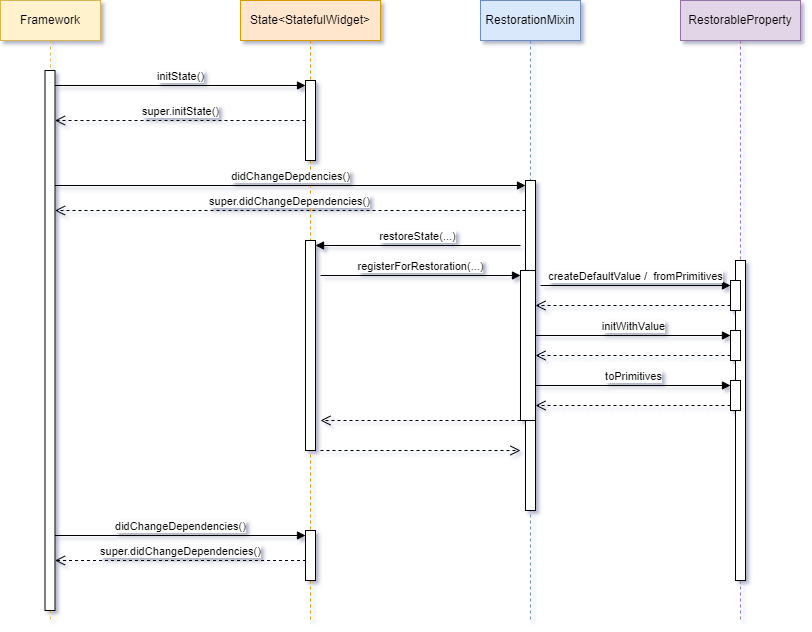
<p>Here's what the &quot;start&quot; workflow looks like for a StatefulWidget that makes use of State Restoration.</p>
<p><img src="https://webarchive.mindhub.top/images/flutteris/state_restoration/state_restoration_mixin_flow.png" data-fancybox="" /></p>
<p>Of course, this considers the fact that you respect and call the <strong>super.initState()</strong> and <strong>super.didChangeDependencies()</strong> immediately as intended by the framework, that is:</p>
<pre><code class="language-dart">@override
void initState(){
  super.initState();
  // Other initializations
}

@override
void didChangeDependencies(){
  super.didChangeDependencies();
  // Other initializations
}
</code></pre>
<h4>4. The RestorationMixin is listening...</h4>
<p>When you register a <em>RestorableProperty</em> via the <strong>registerForRestoration(...)</strong> method, the <strong>RestorationMixin</strong> will start &quot;<em>listening</em>&quot; for changes that might be applied to the <em>RestorationProperty</em> content. This explains why <em>RestorableProperty</em> are <strong>ChangeNotifier</strong>.</p>
<p>This also explains why:</p>
<ul>
<li>any new type of <em>RestorableProperty</em> must refer to a <strong>ChangeNotifier</strong></li>
<li>it's important that you call the <strong>dispose()</strong> for each <em>RestorationProperty</em> you instantiate.</li>
</ul>
<br />
<p>So, why is it important to know that the mixin is listening?</p>
<p>This is thanks to the fact that the mixin reacts to changes in the contents of the <em>RestorableProperty</em>, that their &quot;value&quot; is saved.</p>
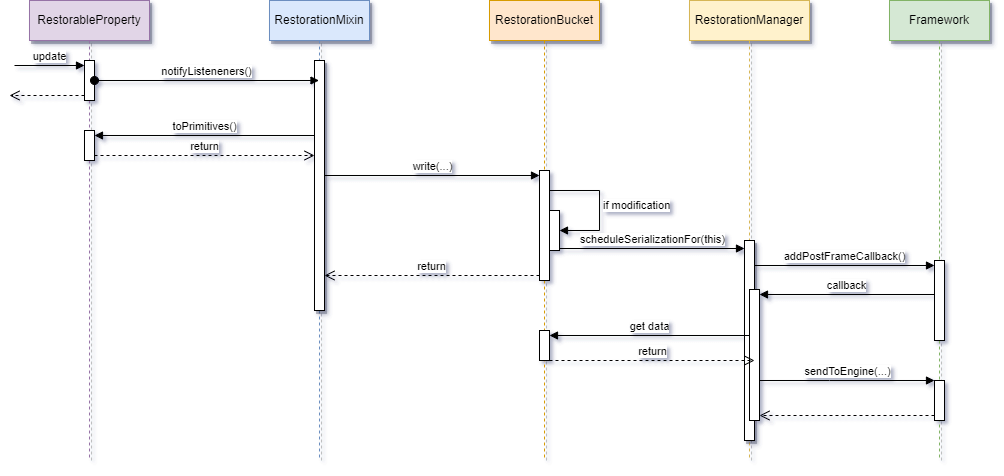
<p>Here's how...</p>
<p><img src="https://webarchive.mindhub.top/images/flutteris/state_restoration/state_restoration_update.png" data-fancybox="" /></p>
<p>In clear:</p>
<ul>
<li>When the content of a <em>RestorableProperty</em> is modified, it notifies all its listeners, including the <strong>RestorationMixin</strong>.</li>
<li>The latter retrieves the new content and stores it at the <em>RestorationBucket</em>.</li>
<li>This warns the <em>RestorationManager</em> that at the end of the next <em>Frame Rendering</em>, it will be necessary to send an update of the data to be restored to the <strong>Engine</strong>.</li>
</ul>
<hr />
<h3>Frame Rending (the &quot;trigger&quot;)</h3>
<p>As we have just seen, saving the data (i.e., sending it to the <em>Engine</em>) is done at the end of the next <em>Frame Rendering</em>.</p>
<p>In 99.9% of cases, we don&#39;t need to worry about this however, there may be circumstances where we should modify a <em>RestorableProperty</em> outside of any layout refresh.</p>
<p>This is notably the case with the <strong>Scrollable</strong> where at the end of a scrolling activity the final scrolling position (offset) is determined between 2 frames, without having to plan a new one.</p>
<p>To cover this extremely rare case, the <strong>RestorationManager</strong> exposes a method for forcing this save and send to the Engine:</p>
<pre><code class="language-dart">ServicesBinding.instance.restorationManager.flushData();
</code></pre>
<hr />
<h3>How to restore the complete layout</h3>
<p>At the very beginning of this article, I told you that the size of data that can be saved was limited to a few K-bytes.</p>
<p>This means that you should limit yourself to essential data, and therefore not store all the information.</p>
<p>Suppose the user was in the middle of a product search displayed in an endless ListView. How can we make it look like the user is right back where he was?</p>
<p>Of course, we'll most certainly have saved his identifiers, his language, the search criteria, his scrolling position in the ListView and the key to the product for which he was looking at the details, but it's out of the question to have saved the list of products, their details, their photos, .... So how do you do it?</p>
<p>There&#39;s no one-size-fits-all solution, but here&#39;s a clue.</p>
<h4>1. Identify complex restoration cases</h4>
<p>When establishing the architecture of your application, it's important that you think about the case(s) where it would be complex to restore the user interface.</p>
<h4>2. Restore mode or not?</h4>
<p>How do you determine whether you're in &quot;restore&quot; mode or not?</p>
<p>As we'll see a little further on, from time to time it can be interesting to know whether you're in &quot;restore&quot; mode and to act accordingly.</p>
<p>The most obvious way is based on the existence of the <em>restorationId</em>. If this parameter is null, at least there&#39;s no room for doubt. On the other hand, its presence in itself means nothing.</p>
<p>The most obvious way is to check for the existence of a <em>RestorableProperty</em> in the <strong>RestorationBucket</strong>.</p>
<pre><code class="language-dart">@override
void restoreState(RestorationBucket? oldBucket, bool initialRestore) {
  isRestoring = initialRestore &amp;&amp; (bucket?.contains(&#39;oneOfMyRestorationId&#39;) ?? false);
  ...
}
</code></pre>
<p>Although this is the most common way of doing things, there are cases where the restoration of a Widget would be postponed (by, for example not passing the <em>restorationId</em> directly but later).  In this case, the <strong>restorationState</strong> method will not be called.  So how do you go about it?</p>
<p>A trick I use from time to time is a &quot;flag&quot; that I position directly at the <em>Root</em> <strong>RestorationBucket</strong> and remove when my StatefulWidget is laid out.</p>
<p>If I am in &quot;restoration&quot; mode, this means that I didn't have time to remove this flag because the <em>dispose()</em> method hadn't been called. So, if this flag is present at root <em>RestorationBucket</em> level, it means I am in <em>restoration</em> mode.</p>
<p>Here is how I happen to implement it:</p>
<pre><code class="language-dart">class _MyStatefulPageState extends State&lt;MyStatefulPage&gt; with RestorationMixin {
  final String _restorationFlagName = &quot;flag_my_stateful_page&quot;;

  bool isRestoring = false;
  RestorationBucket? rootRestorationBucket;

  @override
  void initState() {
    super.initState();
    _determineIfInRestorationMode();
  }

  /// ------------------------------------------------------------------
  /// This routine SYNCHRONOUSLY validates whether we are in Restoration
  /// mode or not, via the presence of a certain flag in the
  /// Root RestorationBucket
  /// ------------------------------------------------------------------
  void _determineIfInRestorationMode() {
    //
    // Prevents the first Frame rendering
    //
    RendererBinding.instance.deferFirstFrame();

    //
    // Retrieve the Root RestorationBucket, if any
    //
    ServicesBinding.instance.restorationManager.rootBucket.then((RestorationBucket? bucket) {
      //
      // Save the RestorationBucket for later re-use
      //
      rootRestorationBucket = bucket;

      //
      // Check if the flag is present
      //
      final bool? flagPresence = bucket?.read(_restorationFlagName);

      //
      // If yes, this means that we are in Restoration mode
      //
      isRestoring = flagPresence == true;

      //
      // Otherwise, let&#39;s create the flag
      //
      if (isRestoring == false) {
          bucket?.write(_restorationFlagName, true);
      }

      //
      // Now, we can allow the frame rendering
      //
      RendererBinding.instance.allowFirstFrame();
    });
  }

  @override
  void dispose() {
    //
    // If we dispose the page, we no longer need the flag
    //
    rootRestorationBucket?.remove(_restorationFlagName);
    super.dispose();
  }
}
</code></pre>
<br />
<p>I agree with you that this implementation is rather tricky... as it is imperative to know the mode at the level of the <strong>initState()</strong> and that I cannot wait for the <strong>didChangeDependencies()</strong> as the <strong>RestorationMixin</strong> will have already called the <strong>restoreState(...)</strong> (see above).</p> <p>As the root <em>RestorationBucket</em> is an asynchronous function, and we know very well that restoring the root bucket has already taken place long ago, there is no risk at the level of the <strong>initState()</strong>.
<p>Since retrieving the root <em>RestorationBucket</em> is an asynchronous function, <strong>and we know for a fact that restoring the root bucket has already taken place</strong> at the time I am executing my code, in order to bypass this asynchronous call, I <em>postpone</em> the <em>Frame Rendering</em> during my verification, via the call to <strong>RendererBinding. instance.deferFirstFrame();</strong>.</p>
<p>As soon as I have my information, I re-enable the <em>Frame Rendering</em> via the call to <strong>RendererBinding.instance.allowFirstFrame();</strong>.</p>
<p>So, now I know what mode I am in, which allows me to make the &quot;right&quot; decisions about when to register <em>RestorableProperties</em>...</p>
<h4>3. Registering <em>RestorableProperty</em> at the right time</h4>
<p>Remember</p>
<blockquote>
<p>The contents of <em>RestorableProperties</em> are restored at the time they are &quot;registered&quot; via the call to <strong>registerForRestoration(...)</strong>.</p>
</blockquote>
<p>Thus, if you restore them at the wrong time, you won&#39;t be able to do so (easily) later.</p>
<p>This is particularly the case with <strong>Scrollable</strong> whose position in a list would not be (re)set correctly because... your list would be empty at that moment. So how do you go about it?</p>
<blockquote>
<p>Restore the <em>RestorableProperty</em> that give you the information you need to recompose complex data and POSTPONE the other <em>RestorableProperty</em>.</p>
</blockquote>
<h4>4. Recover &quot;heavy&quot;data</h4>
<p>Once you've registered the <em>RestorableProperty</em> that lets you know the <strong>status of the data</strong> and <strong>NOT</strong> those that provide the display, you can start retrieving the &#39;<em>heavy</em>&#39; data (for example, via calls to the server).</p>
<p>A good place to launch this function might be at the <strong>restoreState</strong>.</p>
<p>Here's an example:</p>
<pre><code class="language-dart">@override
void restoreState(RestorationBucket? oldBucket, bool initialRestore) {
  restorableSearchCriteria = RestorableSearchCriteria();
  registerForRestoration(restorableSearchCriteria, &#39;restorable_search_criteria&#39;);

  //
  // Once we have the search criteria AND we are in restoration mode,
  // let&#39;s retrieve the items
  //
  if (isRestoring == true) {
    unawaited(_fetchItemsFromServer(oldBucket, initialRestore));
  } else {
    _restoreStateLayoutRelated(oldBucket, initialRestore)
  }
}

void _restoreStateLayoutRelated(RestorationBucket? oldBucket, bool initialRestore){
  //
  // Proceed with the other registration
  //
  registerForRestoration(restorableStatus, &#39;restorable_status&#39;);
}

/// -------------------------------------------------------
/// Restores the data from the server, then, once done,
/// registers the RestorableProperty linked to the layout
/// -------------------------------------------------------
Future&lt;void&gt; _fetchItemsFromServer(RestorationBucket? oldBucket, bool initialRestore) async {
  //
  // Fetch the items from server, for example
  //
  ...

  //
  // Once done, retrieve the _RestorableProperty_ responsible for the layout (if any)
  //
  _restoreStateLayoutRelated(oldBucket, initialRestore);

  //
  // Here, most probably, we will have to force a rebuild but also to tell that you are no
  // longer restoring
  //
  if (mounted){
    setState((){
      isRestoring = false;
    });
  }
}
</code></pre>

<h4>5. Display lists only after everything has been retrieved</h4>
<p>Since all <strong>Scrollables</strong> (ListView, GridView, SingleChildScrollView, ...) only save the <strong>scrollOffset</strong>, it becomes obvious that you can only display them once you've retrieved all the data so that repositioning is correct.</p>
<p>From then on, don&#39;t forget to use the <strong>isRestoring</strong> flag to make sure you only display these elements when the data is ready.</p>
<hr />
<h3>Before concluding</h3>
<p>Before concluding, it's important to remember that <strong>Controllers</strong>, including <strong>AnimationController</strong>, are not saved at all.</p>
<blockquote>
<p><strong>More importantly...</strong></p>
<p>Unfortunately, most plugins/packages don't support State Restoration!</p>
</blockquote>
<p>I can't advise you enough to check which plugins/packages you're using if you want your application to fully support this notion of State Restoration.</p>
<hr />
<h2>Conclusion</h2>
<p>Once again a long article and yet there would still be a lot to say especially about <strong>UnmanagedRestorationScope</strong> but you can perfectly use State Restoration without this additional knowledge...</p>
<p>I hope this article has served to demystify or simply introduce you to this important and so little-used notion, which is <strong>State Restoration</strong>.</p>
<p>Stay tuned for future articles and until then, happy coding!</p>


</p></p></p>]]></content><author><name>Didier Boelens</name></author><category term="flutter" /><summary type="html"><![CDATA[Last Reviewed Compatibility 30 Oct 2023 Flutter 3.13.x Dart3.1.x]]></summary></entry><entry><title type="html">Flutter internals</title><link href="https://webarchive.mindhub.top/flutteris/blog/en/flutter-internals/" rel="alternate" type="text/html" title="Flutter internals" /><published>2019-09-30T21:01:00+00:00</published><updated>2019-09-30T21:01:00+00:00</updated><id>https://webarchive.mindhub.top/flutteris/blog/en/flutter-internals</id><content type="html" xml:base="https://webarchive.mindhub.top/flutteris/blog/en/flutter-internals/"><![CDATA[<table>
<thead>
  <tr>
    <th>Last Reviewed</th>
    <th>Compatibility</th>
  </tr>
</thead>
<tbody>
  <tr>
    <td>24 Mar 2023</td>
    <td>Flutter 3.13.x <br /> Dart3.1.x</td>
  </tr>
</tbody>
</table>

<h2 id="introduction">Introduction</h2>
<p>When I started up my journey into the fabulous world of Flutter beginning 2018, very little documentation could be found on Internet compared to what exists today.
Despite the number of articles that have been written, very few talk about how Flutter actually works.</p>
<p>What are finally the Widgets, the Elements, the BuildContext ? Why is Flutter fast and why does it sometimes work differently than expected? What are the trees?</p>
<p>When you are writing an application, in 95% of the cases, you will only deal with <em>Widgets</em> to either display something or interact with the screen.
But haven&#39;t you ever wondered how all this magic actually works? How does the system know when to update the screen and which parts need to be updated?</p>
<hr />

<h2 id="part-1-the-background">Part 1: The background</h2>
<p>This first part of the article introduces some key concepts that will be then used to better understand the second part of this post.</p>
<hr />

<h3 id="back-to-the-device">Back to the device</h3>
<p>For once, let&#39;s start from the end and let&#39;s get back to the basics.</p>
<p>When you look at your device, or more specifically at your application running on your device, you only see a screen.</p>
<p>In fact, all what you see is a series of pixels, which together compose a flat image (2 dimensions) and when you are touching the screen with your finger, the device only recognizes the position of your finger on the glass.</p>
<p>All the magic of the application (from a visual perspective) consists in having that flat image updated based on, most of the time, interactions with:</p>
<ul>
<li>the device screen (e.g. finger on the glass)</li>
<li>the network (e.g. communication with a server)</li>
<li>the time (e.g. animations)</li>
<li>other external sensors</li>
</ul>
<p>The rendering of the image on the screen is ensured by the <strong>hardware</strong> (<em>display device</em>), which at regular interval (usually 60 times per second), refreshes the display.  This refresh frequency is also called &quot;<strong>refresh rate</strong>&quot; and is expressed in <strong>Hz</strong> (Hertz).</p>
<p>The <em>display device</em> receives the information to be displayed on the screen from the <strong>GPU</strong> (<em>Graphics Processing Unit</em>), which is a specialized electronic circuit, optimized and designed to rapidly generate an image from some data (polygons and textures).
The number of times per second the <em>GPU</em> is able to generate the &quot;<em>image</em>&quot; (=<em>frame buffer</em>) to be displayed and to send it to the <em>hardware</em> is called the <strong>frame rate</strong>.  This is measured with the <strong>fps</strong> unit (e.g. 60 frames per second or 60 fps).</p>
<p>You will maybe ask me why did I start this article with the notions of 2-dimension flat image rendered by the GPU/hardware and the physical glass sensor... and what is the relationship with the usual Flutter Widgets?</p>
<p>Simply because one of the main objectives of a Flutter application is to compose that 2-dimensional flat image and to make it possible to interact with it, I think it might be easier to understand how Flutter actually works if we look at it from that perspective.</p>
<p>...but also because in Flutter, believe it or not, almost everything is driven by the needs of having to refresh the screen... quickly and at the right moment !</p>
<hr />

<h3 id="interface-between-the-code-and-the-physical-device">Interface between the code and the physical device</h3>
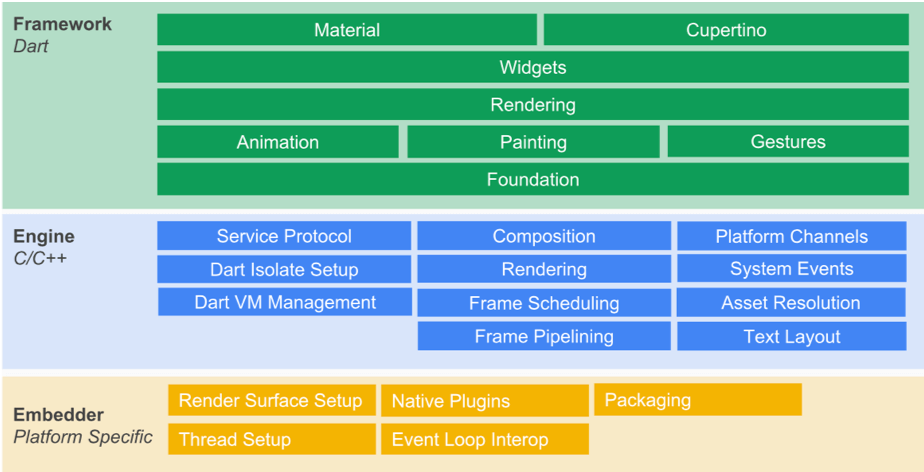
<p>One day or another, everyone interested in Flutter already saw the following picture which describes the Flutter high-level architecture.</p>

<p><br />
<img src="https://webarchive.mindhub.top/images/flutteris/flutter-internals/internals_archi_overview.png" alt="Flutter Architecture (c) Flutter" data-fancybox="" />
<br /></p>

<p>When we are writing an Flutter application, using Dart, we remain at the level of the <em>Flutter Framework</em> (in green).</p>
<p>The <em>Flutter Framework</em> interacts with the <em>Flutter Engine</em> (in blue), via an abstraction layer, called <a href="https://api.flutter.dev/flutter/dart-ui/FlutterWindow-class.html" target="_blank">Window</a>.
This abstraction layer exposes a series of APIs to communicate, indirectly, with the device.</p>
<p>This is also via this abstraction layer that the <em>Flutter Engine</em> notifies the <em>Flutter Framework</em> when, among others:</p>
<ul>
<li>an event of interest happens at the device level (orientation change, settings changes, memory issue, application running state...)</li>
<li>some event happens at the glass level (= gesture)</li>
<li>the platform channel sends some data</li>
<li>but also and mainly, when the <strong>Flutter Engine is ready to render a new frame</strong></li>
</ul>
<hr />

<h3 id="flutter-framework-is-driven-by-the-flutter-engine-frame-rendering">Flutter Framework is driven by the Flutter Engine frame rendering</h3>
<p>This statement is quite hard to believe, but it is the truth.</p>
<p>Except in some cases (see below), no Flutter Framework code is executed without having been triggered by the Flutter Engine frame rendering.</p>
<p>These exceptions are:</p>
<ul>
<li><em>Gesture</em> (= an event on the glass)</li>
<li><em>Platform</em> messages (= messages that are emitted by the device, e.g. GPS)</li>
<li><em>Device</em> messages (= messages that refer to a variation to the device state, e.g. orientation, application sent to background, memory warnings, device settings...)</li>
<li><em>Future</em> or <em>http responses</em></li>
</ul>
<blockquote>
<p>The Flutter Framework will <strong>not</strong> apply any visual changes without having been requested by the Flutter Engine frame rendering.</p>
</blockquote>
<p><em>(between us, it is however possible to apply a visual change without having been invited by the Flutter Engine, but this is really <strong>not advised</strong> to do so)</em></p>
<p>But you will ask me, if some code related to the <em>gesture</em> is executed and causes a visual change to happen, or if I am using a <em>timer</em> to rythm some task, which leads to visual changes (such as an animation, for example), how does this work then?</p>
<blockquote>
<p>If you want a visual change to happen, or if you want some code to be executed based on a timer, you need to <strong>tell the Flutter Engine</strong> that something needs to be rendered.</p>
<p>Usually, at next <em>refresh</em>, the Flutter Engine will <strong>then</strong> request the Flutter Framework to run some code and eventually provide the new scene to render.</p>
</blockquote>
<p>Therefore, the big question is how does Flutter Engine orchestrate the whole application behavior, based on the rendering?</p>
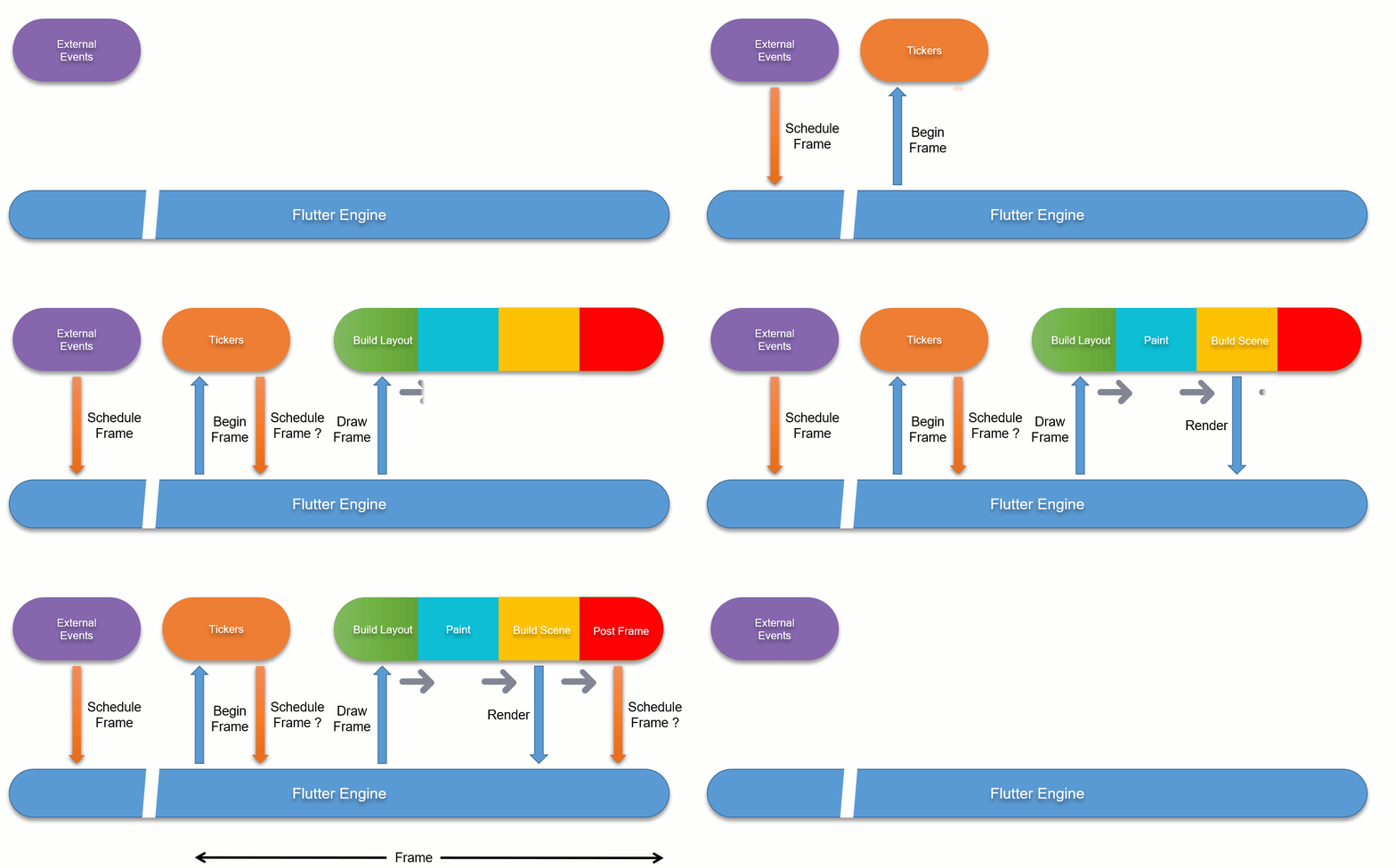
<p>To give you a flavor of the internal mechanisms, have a look at the following animation...</p>

<p><br />
<img src="https://webarchive.mindhub.top/images/flutteris/flutter-internals/internals_flow.gif" alt="Flutter Internals flow" thumbnailheight="350px" data-fancybox="" />
<br /></p>

<p>Short explanation (further details will come later):</p>
<ul>
<li>Some external events (gesture, http responses, ...) or even <em>futures</em>, can launch some tasks which lead to having to update the rendering.  A message is sent to the <em>Flutter Engine</em> to notify it ( = <em>Schedule Frame</em>)</li>
<li>When the <em>Flutter Engine</em> is ready to proceed with the rendering update, it emits a <em>Begin Frame</em> request</li>
<li>This <em>Begin Frame</em> request is intercepted by the <em>Flutter Framework</em>, which runs any task mainly related to <em>Tickers</em> (such as Animations, e.g.)</li>
<li>These tasks could re-emit a request for a later frame rendering... (example: an animation is not complete and to move forward, it will need to receive another <em>Begin frame</em> at a later stage)</li>
<li>Then, the <em>Flutter Engine</em> emits a <em>Draw Frame</em>.</li>
<li>This <em>Draw Frame</em> is intercepted by the <em>Flutter Framework</em>, which will look for any tasks linked to updating the layout in terms of structure and size.</li>
<li>Once all these tasks are done, it goes on with the tasks related to updating the layout in terms of painting.</li>
<li>If there is something to be drawn on the screen, it then sends the new <em>Scene</em> to be rendered to the <em>Flutter Engine</em> which will update the screen.</li>
<li>Then, the <em>Flutter Framework</em> executes all tasks to be run after the rendering is complete (= <em>PostFrame callbacks</em>) and any other sub-sequent other tasks not rendering related.</li>
<li>... and this flow starts again and again.</li>
</ul>
<hr />

<h3 id="renderview-and-renderobject">RenderView and RenderObject</h3>
<p>Before going into the details related to the flow of actions, it is the right time to introduce the notion of <em>Rendering Tree</em>.</p>
<p>As previously said, everything eventually turns out to become a series of pixels to be displayed on the screen and the <em>Flutter Framework</em> converts the <em>Widgets</em> we are using to develop the application into visual parts which will be rendered on the screen.</p>
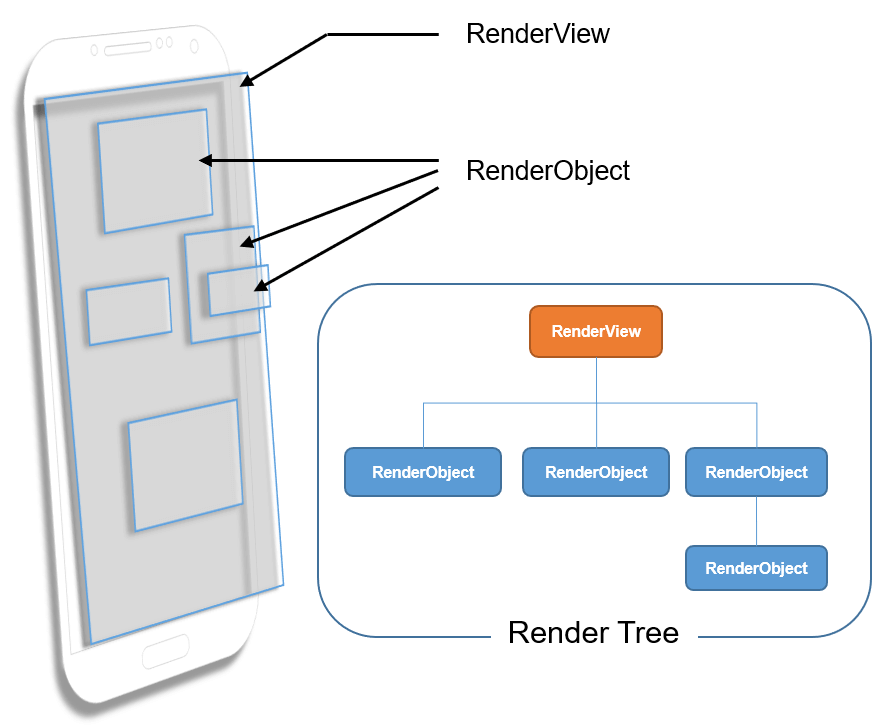
<p>These visual parts which are rendered on the screen correspond to objects, called <a href="https://api.flutter.dev/flutter/rendering/RenderObject-class.html" target="_blank">RenderObject</a>s, which are used to:</p>
<ul>
<li>define some area of the screen in terms of dimensions, position, geometry but also in terms of &quot;<em>rendered content</em>&quot;</li>
<li>identify zones of the screen potentially impacted by the gestures (= <em>finger</em>)</li>
</ul>
<p>The set of all the <em>RenderObject</em> forms a tree, called <em>Render Tree</em>.  At the top of that tree (= <em>root</em>), we find a <a href="https://api.flutter.dev/flutter/rendering/RenderView-class.html" target="_blank">RenderView</a>.</p>
<p>The <em>RenderView</em> represents the total output surface of the <em>Render Tree</em> and is itself a special version of a <em>RenderObject</em>.</p>
<p>Visually speaking we could represent all this as follows:</p>

<p><br />
<img src="https://webarchive.mindhub.top/images/flutteris/flutter-internals/internals_renderView.png" alt="RenderView - RenderObject" data-fancybox="" />
<br /></p>

<p>The relationship between Widgets and RenderObjects will be discussed later in this article.</p>
<p>It is now time to go a bit deeper...</p>
<hr />

<h3 id="first-things-first-initialization-of-the-bindings">First things first - initialization of the bindings</h3>
<p>When you start a Flutter application, the system invokes the <em>main()</em> method which will eventually call the <strong>runApp(Widget app)</strong> method.</p>
<p>During that call to the <em>runApp()</em> method, Flutter Framework initializes the interfaces between the <em>Flutter Framework</em> and the <em>Flutter Engine</em>.  These interfaces are called <strong>bindings</strong>.</p>
<h4 id="the-bindings-introduction">The Bindings - Introduction</h4>
<p>The <strong>bindings</strong> are meant to be some kind of glue between the <em>Flutter Engine</em> and the <em>Flutter Framework</em>.  It is only through these <em>bindings</em> that data can be exchanged between the two Flutter parts (Engine and Framework).
<br /><small>(There is only one exception to this rule: the <em>RenderView</em> but we will see this later).</small></p>
<p>Each <strong>Binding</strong> is responsible for handling a set of specific tasks, actions, events, regrouped by domain of activities.</p>
<p>At time of writing this article, <em>Flutter Framework</em> counts 8 bindings.</p>
<p>Below, the 4 ones that will be discussed in this article:</p>
<ul>
<li><em>SchedulerBinding</em></li>
<li><em>GestureBinding</em></li>
<li><em>RendererBinding</em></li>
<li><em>WidgetsBinding</em></li>
</ul>
<p>For sake of completeness, the last 4 ones (which will not be addressed in this article):</p>
<ul>
<li><em>ServicesBinding</em>: responsible for handling messages sent by the <em>platform</em> channel</li>
<li><em>PaintingBinding</em>: responsible for handling the image cache</li>
<li><em>SemanticsBinding</em>: reserved for later implementation of everything related to <em>Semantics</em></li>
<li><em>TestWidgetsFlutterBinding</em>: used by widgets tests library</li>
</ul>
<p>I could also mention the <em>WidgetsFlutterBinding</em> but the latter is not really a binding but rather some kind of &quot;<em>binding initializer</em>&quot;.</p>
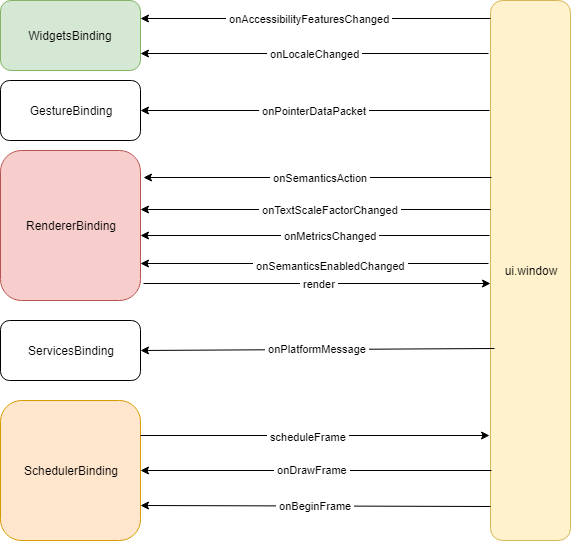
<p>The following diagram shows the interactions between the bindings I am going to cover a bit later in this article and the <em>Flutter Engine</em>.</p>

<p><br />
<img src="https://webarchive.mindhub.top/images/flutteris/flutter-internals/internals_bindings.png" alt="Bindings interactions" data-fancybox="" />
<br /></p>

<p>Let&#39;s have a look at each of these &quot;main&quot; bindings.</p>
<hr />

<h5 id="schedulerbinding">SchedulerBinding</h5>
<p>This <em>binding</em> has 2 main responsibilities:</p>
<ul>
<li>the first one is to tell the <em>Flutter Engine</em>: &quot;<em>Hey! next time you are not busy, wake me up so that I can work a bit and tell you either what to render or if I need you to call me again later...</em>&quot;;</li>
<li>the second one is to listen and react to such &quot;<em>wake up calls</em>&quot; (see later)</li>
</ul>
<p>When does the SchedulerBinding request for a <em>wake-up call</em>?</p>
<ul>
<li><p>When a <em>Ticker</em> needs to <em>tick</em>
<br />For example, suppose you have an animation and you start it.  An animation is cadenced by a <em>Ticker</em>, which at regular interval (= <em>tick</em>) is called to run a <em>callback</em>.
To run such <em>callback</em>, we need to tell the <em>Flutter Engine</em> to wake up us at next refresh (= <em>Begin Frame</em>).  This will invoke the <em>ticker</em> callback to perform its task.
At the end of that task, if the <em>ticker</em> still needs to move forward, it will call the <em>SchedulerBinding</em> to schedule another frame.</p>
</li>
<li><p>When a change applies to the layout
<br />When for example, you are responding to an event that leads to a visual change (e.g. updating the color of a part of the screen, scrolling, adding/removing something to/from the screen), we need to take the necessary steps to eventually render it on the screen.
In this case, when such change happens, the <em>Flutter Framework</em> will invoke the <em>SchedulerBinding</em> to schedule another frame with the <em>Flutter Engine</em>. (we will see later how it actually works)</p>
</li>
</ul>
<hr />

<h5 id="gesturebinding">GestureBinding</h5>
<p>This <em>binding</em> listens to interactions with the Engine in terms of &quot;<em>finger</em>&quot; (= <em>gesture</em>).</p>
<p>In particular, it is responsible for accepting data related to the <em>finger</em> and to determine which part(s) of the screen is/are impacted by the gestures.  It then notifies this/these parts accordingly.</p>
<hr />

<h5 id="rendererbinding">RendererBinding</h5>
<p>This <em>binding</em> is the glue between the <em>Flutter Engine</em> and the <em>Render Tree</em>.  It has 2 distinct responsibilities:</p>
<ul>
<li>the first one is to listen to events, emitted by the Engine, to inform about changes applied by the user via the device settings, which impact the visuals and/or the <em>semantics</em></li>
<li>the second one is to provide the Engine with the modifications to be applied to the display.</li>
</ul>
<p>In order to provide the modifications to be rendered on the screen, this <em>Binding</em> is responsible for driving the <a href="https://api.flutter.dev/flutter/rendering/PipelineOwner-class.html" target="_blank">PipelineOwner</a> and initializing the <strong>RenderView</strong>.</p>
<p>The <strong>PipelineOwner</strong> is a kind of <em>orchestrator</em> that knows which <em>RenderObject</em>&#39;s need to do something in relation with the layout and coordinates these actions.</p>
<hr />

<h5 id="widgetsbinding">WidgetsBinding</h5>
<p>This <em>binding</em> listens to changes applied by the user via the device settings, which impact the language (= <em>locale</em>) and the <em>semantics</em>.</p>
<blockquote>
<p>Side note</p>
<p>At a later stage, I suppose that all events related to the <em>Semantics</em> will be migrated to the <em>SemanticsBinding</em> but at time of writing this article, this is not yet the case.</p>
</blockquote>
<p>Besides this, the <em>WidgetsBinding</em> is the glue between the Widgets and the <em>Flutter Engine</em>.  It has 2 distinct main responsibilities:</p>
<ul>
<li>the first main one is to drive the process in charge of handling the Widgets structure changes</li>
<li>the second one is to trigger the rendering</li>
</ul>
<p>The handling of the Widgets Structure changes is done via the <a href="https://api.flutter.dev/flutter/widgets/BuildOwner-class.html" target="_blank">BuildOwner</a>.</p>
<p>The <em>BuildOwner</em> tracks which Widgets need rebuilding, and handles other tasks that apply to widget structures as a whole.</p>
<hr />

<h2 id="part-2-from-widgets-to-pixels">Part 2: from Widgets to pixels</h2>
<p>Now that we have introduced the basics of the internal mechanics, it is time to talk about <em>Widgets</em>.</p>
<p>In all <em>Flutter</em> documentation, you will read that <em>everything is Widgets</em>.</p>
<p>Well, it is almost correct but in order to be a bit more precise, I would rather say: </p>
<blockquote>
<p>From a <strong>Developer perspective</strong>, everything related to the User Interface in terms of layout and interaction, is done via Widgets.</p>
</blockquote>
<p>Why this precision?  Because a <em>Widget</em> allows a developer to define a part of the screen in terms of dimensions, content, layout and interaction <strong>BUT</strong> there is so much more.  So what is a Widget, actually?</p>
<hr />

<h3 id="immutable-configuration">Immutable Configuration</h3>
<p>When you read the <em>Flutter</em> source code, you will notice the following definition of the <em>Widget</em> class.</p>

<pre><code class="language-dart">@immutable
abstract class Widget extends DiagnosticableTree {
  const Widget({ this.key });

  final Key? key;

  ...
}
</code></pre>

<p>What does this mean?</p>
<p>The annotation &quot;<strong>@immutable</strong>&quot; is very important and tells us that <strong>any variable in a Widget class has to be FINAL</strong>, in other words: &quot;<em>is defined and assigned <strong>ONCE FOR ALL</strong></em>&quot;.
So, once instantiated, the <em>Widget</em> will no longer be able to adapt its <em>inner variables</em>.</p>
<blockquote>
<p>A Widget is a kind of constant configuration since it is <strong>IMMUTABLE</strong></p>
</blockquote>
<hr />

<h3 id="the-widgets-hierarchical-structure">The Widgets hierarchical structure</h3>
<p>When you develop with <em>Flutter</em>, you define the structure of your screen(s), using <em>Widgets</em>...  Something like:</p>

<pre><code class="language-dart">Widget build(BuildContext context){
  return SafeArea(
      child: Scaffold(
          appBar: AppBar(
              title: Text('My title'),
          ),
          body: Container(
              child: Center(
                  child: Text('Centered Text'),
              ),
          ),
      ),
  );
}
</code></pre>

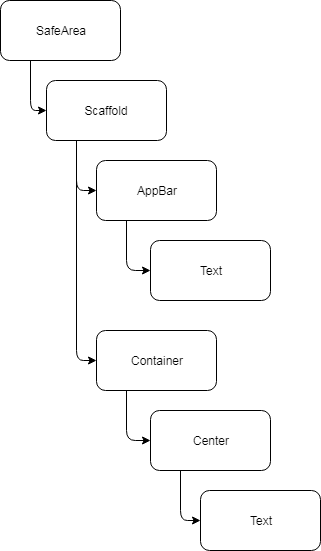
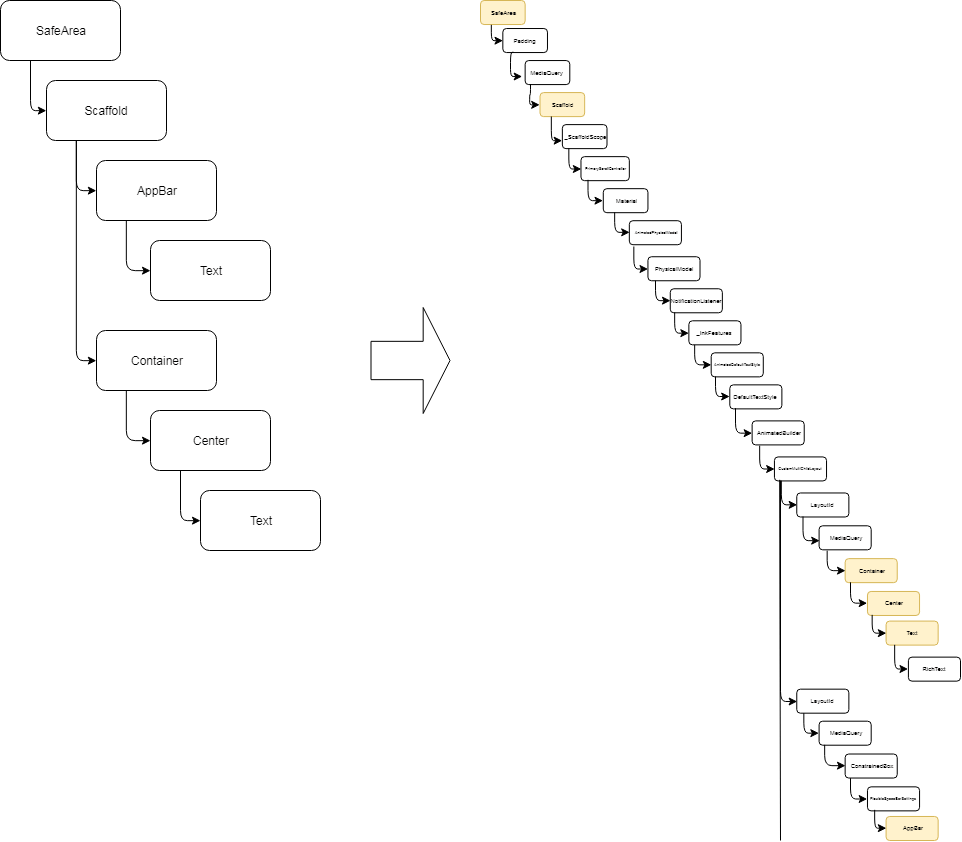
<p>This sample uses 7 Widgets, which together form a hierarchical structure.  The <em>very simplified</em> structure, based on the code, is the following:</p>

<p><br />
<img src="https://webarchive.mindhub.top/images/flutteris/flutter-internals/internals_widgets_tree.png" alt="Simplified Widgets Tree" data-fancybox="" />
<br /></p>

<p>As you can see, this looks like a tree, where the <em>SafeArea</em> is the root of the tree.</p>
<hr />

<h4 id="the-forest-behind-the-tree">The forest behind the tree</h4>
<p>As a you already know, a <em>Widget</em> may itself be an aggregation of other <em>Widgets</em>.  As an example, I could have written the previous code the following way:</p>

<pre><code class="language-dart">Widget build(BuildContext context){
  return MyOwnWidget();
}
</code></pre>

<p>This assumes that the widget &quot;<em>MyOwnWidget</em>&quot; would itself render the SafeArea, Scaffold... but the most important with this example is that</p>
<blockquote>
<p>a Widget maybe a leaf, a node in a tree, even a tree itself or why not a forest of trees...</p>
</blockquote>
<hr />

<h4 id="the-notion-of-element-in-the-tree">The notion of Element in the tree</h4>
<p>Why did I mention this?</p>
<p>As we will see later how, in order to be able to generate the pixels that compose the image to be rendered on the device, <em>Flutter</em> needs to know in details all the little parts that compose the screen and, to determine all the parts, it will request to <strong>inflate</strong> all the <em>Widgets</em>.  </p>
<p>In order to illustrate this, consider the russian dolls principle: closed you only see 1 doll but the latter contains another one which in turn contains another one and so on...</p>

<p><br />
<img src="https://webarchive.mindhub.top/images/flutteris/flutter-internals/internals_russian_dolls.png" alt="Russian dolls" thumbnailheight="250" data-fancybox="" />
<br /></p>

<p>When <em>Flutter</em> will have inflated all the <em>widgets</em>, part of the screen, it will be similar to obtaining all the different russian dolls, part of the whole.</p>
<p>The following diagram shows <strong>a part</strong> of the final Widget hierarchical structure that corresponds to the previous code.  In yellow, I have highlighted the Widgets that were mentioned in the code so that you can spot them in the resulting partial widgets tree.</p>

<p><br />
<img src="https://webarchive.mindhub.top/images/flutteris/flutter-internals/internals_inflated_widgets.png" alt="Inflated Widgets" data-fancybox="" />
<br /></p>

<blockquote>
<p><strong>Important clarification</strong></p>
<p>The wording &quot;Widget tree&quot; only exists for sake of making it easier to understand since programmers are using Widgets but, in Flutter there is NO Widget tree!</p>
<p>In fact, to be correct, we should rather say: &quot;<strong>tree of Elements</strong>&quot;</p>
</blockquote>
<p>It is now time to introduce the notion of <a href="https://api.flutter.dev/flutter/widgets/Element-class.html" target="_blank">Element</a>...</p>
<blockquote>
<p>To <strong>each</strong> widget corresponds <strong>one</strong> element.
Elements are linked to each other and form a tree.
Therefore an <strong>element</strong> is a reference of something in the tree.</p>
</blockquote>
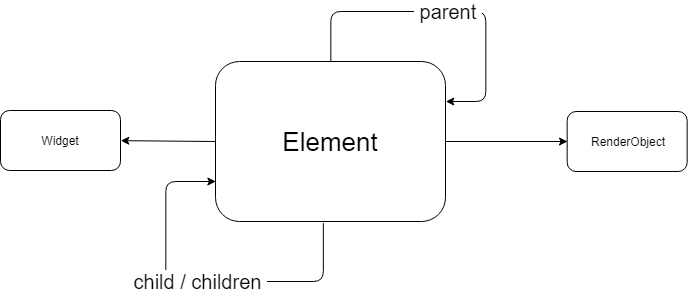
<p>At first, think of an <strong>element</strong> as a node which has a <em>parent</em> and potentially a <em>child</em>.  Linked together via the <em>parent</em> relationship, we obtain a tree structure.</p>

<p><br />
<img src="https://webarchive.mindhub.top/images/flutteris/flutter-internals/internals_element.png" alt="An Element" data-fancybox="" />
<br /></p>

<p>As you can see in the picture above, the <em>Element</em> <strong>points to</strong> one <em>Widget</em> and <strong>may</strong> also point to a <em>RenderObject</em>.</p>
<blockquote>
<p>Even better... the Element points to the Widget which <strong>created the</strong> element !</p>
</blockquote>
<p>Let me recap...</p>
<ul>
<li>there is no Widgets tree but a tree of Elements</li>
<li>Elements are created by the Widgets</li>
<li>an Element references the Widget that created it</li>
<li>Elements are linked together with the <em>parent</em> relationship</li>
<li>Elements could have a child or children</li>
<li>Elements could also point to a <em>RenderObject</em></li>
</ul>
<blockquote>
<p><strong>Elements</strong> define how parts of the visuals are linked to each other</p>
</blockquote>
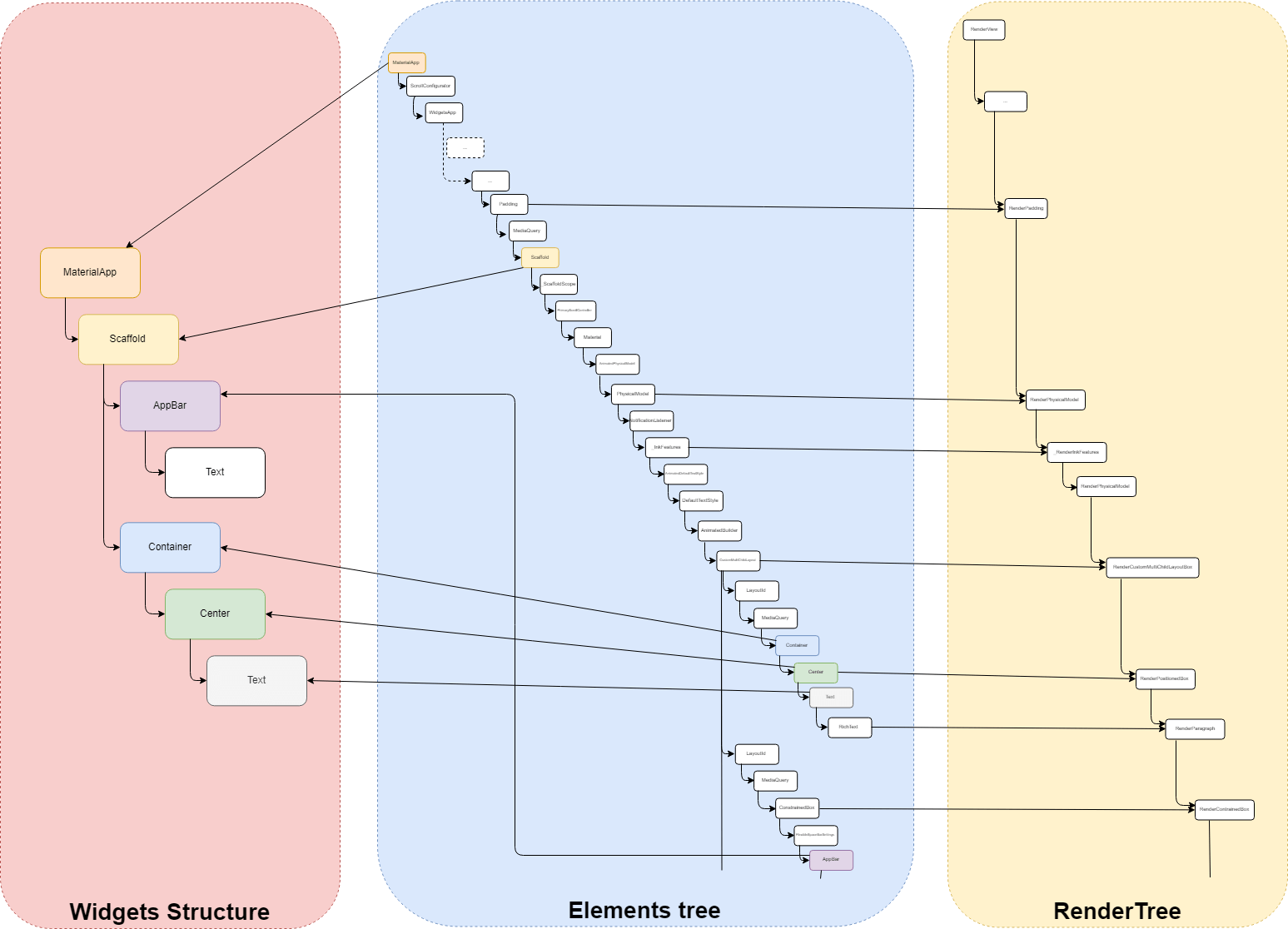
<p>In order to better visualize where the notion of <em>element</em> fits, let&#39;s consider the following visual representation:</p>

<p><br />
<img src="https://webarchive.mindhub.top/images/flutteris/flutter-internals/internals_3_trees.png" alt="The 3 trees" data-fancybox="" />
<br /></p>

<p>As you can see the <strong>elements tree</strong> is the actual link between the <em>Widgets</em> and the <em>RenderObjects</em>.</p>
<p>But, why does the Widget create the Element?</p>
<hr />

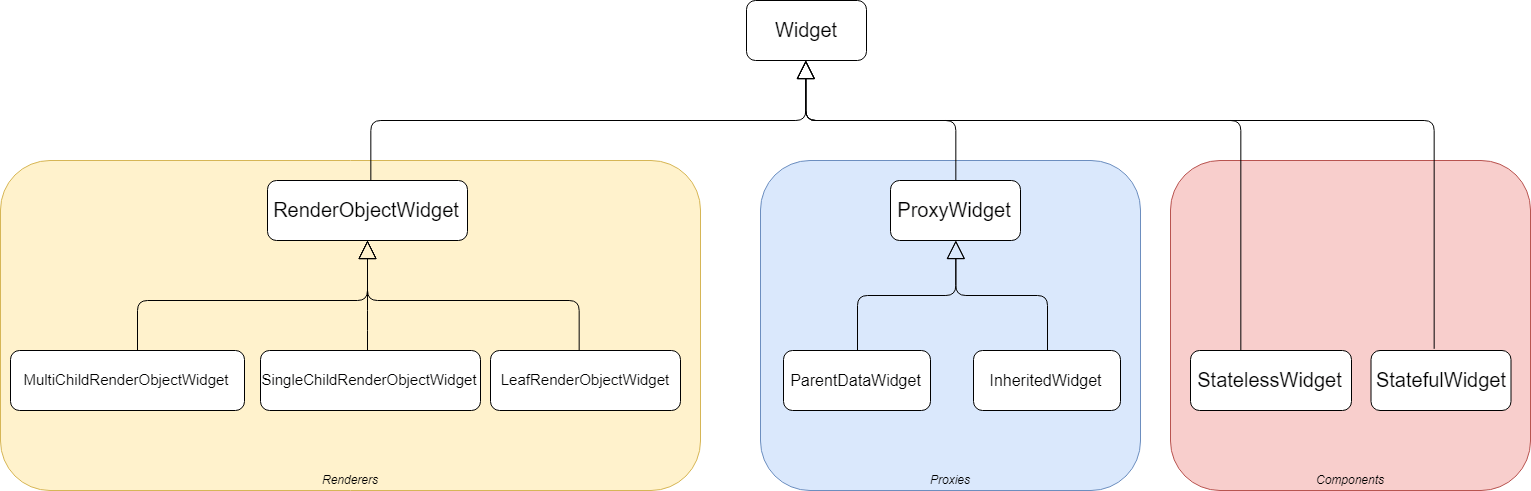
<h3 id="3-main-categories-of-widgets">3 main categories of Widgets</h3>
<p>In <em>Flutter</em>, Widgets are split into 3 main categories, I personally call these categories:
<br /><small><em>(but this is only my way of categorizing them)</em></small></p>
<ul>
<li><p>the proxies</p>
<p>  The main role of these Widgets is to hold some piece of information which needs to be made available to the <em>Widgets</em>, part of the tree structure, rooted by the <em>proxies</em>.  A typical example of such <em>Widgets</em> is the <strong>InheritedWidget</strong> or <strong>LayoutId</strong>.</p>
<p>  These <em>Widgets</em> do not directly take part of the User Interface but are used by others to fetch the information they can provide.</p>
</li>
<li><p>the renderers</p>
<p>  These <em>Widgets</em> have a <strong>direct</strong> involvement with the layout of the screen as they define (or are used to infer) either:</p>
<ul>
<li>the dimensions;</li>
<li>the position;</li>
<li><p>the layout, rendering.</p>
<p>Typical examples are: <strong>Row</strong>, <strong>Column</strong>, <strong>Stack</strong> but also <strong>Padding</strong>, <strong>Align</strong>, <strong>Opacity</strong>, <strong>RawImage</strong>...</p>
</li>
</ul>
</li>
<li><p>the components.</p>
<p>  These are the other <em>Widgets</em> which are not directly providing the <strong>final</strong> information related to dimensions, positions, look but rather data (or <em>hint</em>) which will be used to obtain the final information.  These <em>Widgets</em> are commonly named <strong>components</strong>.</p>
<p>  Examples are: <strong>RaisedButton</strong>, <strong>Scaffold</strong>, <strong>Text</strong>, <strong>GestureDetector</strong>, <strong>Container</strong>...</p>
</li>
</ul>

<p><br />
<img src="https://webarchive.mindhub.top/images/flutteris/flutter-internals/internals_widgets_categories.png" alt="Widgets Categories" data-fancybox="" />
<br /></p>

<p>The following <a href="https://www.flutteris.com/_image_/internals_widget_categories.pdf" target="_blank">PDF</a> lists most of the Widgets, regrouped by categories.</p>
<p>Why is that split important? Because depending on the Widget category, a corresponding <em>Element</em> type is associated...</p>
<hr />

<h3 id="the-element-types">The Element types</h3>
<p>Here are the different <em>element types</em>:</p>

<p><br />
<img src="https://webarchive.mindhub.top/images/flutteris/flutter-internals/internals_element_types.png" alt="Internals Element Types" data-fancybox="" />
<br /></p>

<p>As you can see in the picture above, <strong>Elements</strong> are split into 2 main types:</p>
<ul>
<li><p>ComponentElement</p>
<p>  These elements do not <strong>directly</strong> correspond to any visual rendering part.</p>
</li>
<li><p>RenderObjectElement</p>
<p>  These elements correspond to a part of the rendered screen.</p>
</li>
</ul>
<p>Great!  Lots of information so far but how is everything linked together and why was it interesting to introduce all this?</p>
<hr />

<h3 id="how-do-widgets-and-elements-work-together-">How do Widgets and Elements work together?</h3>
<blockquote>
<p>In <em>Flutter</em>, the whole mechanics relies on <strong>invalidating</strong> either an <em>element</em> or a <em>renderObject</em>.</p>
</blockquote>
<p>Invalidating an <em>element</em> can be done in different ways:</p>
<ul>
<li>by using <strong>setState</strong>, which invalidates the whole <strong>StatefulElement</strong> (notice that I am intentionally not saying <em>StatefulWidget</em>)</li>
<li>via <em>notifications</em>, handled by other <strong>proxyElement</strong> (such as <em>InheritedWidget</em>, for example), which invalidates any <em>element</em> that depends on that <em>proxyElement</em></li>
</ul>
<p>The outcome of an <em>invalidation</em> is that the corresponding <em>element(s)</em> is/are referenced in a list of <strong>dirty</strong> elements.</p>
<p>Invalidating a <em>renderObject</em> means that no changes are applied to the structure of the <em>elements</em> but a modification at the level of a <em>renderObject</em> happens, such as</p>
<ul>
<li>changes to its dimensions, position, geometry...</li>
<li>needs to be repainted, for example when you simply change the background color, the font style...</li>
</ul>
<p>The outcome of such invalidation is that the corresponding <em>renderObject</em> is referenced in a list of renderObjects that need to be rebuilt or repainted.</p>
<p>Whatever the type of invalidation, when this happens, the <strong>SchedulerBinding</strong> (remember it?) is requested to ask the <strong>Flutter Engine</strong> to schedule a new <strong>frame</strong>.</p>
<p>It is when the <em>Flutter Engine</em> wakes up the <em>SchedulerBinding</em> that all the magics happens...</p>
<h4 id="ondrawframe-">onDrawFrame()</h4>
<p>Earlier in this article, we mentioned that the <em>SchedulerBinding</em> had 2 main responsibilities, one of which was to be ready to handle requests emitted by the <em>Flutter Engine</em>, related to frame rebuild.  This is the perfect moment to focus on this now...</p>
<p>The partial sequence diagram below shows what happens when the <em>SchedulerBinding</em> receives a request <em>onDrawFrame()</em> from the <em>Flutter Engine</em>.</p>

<p><br />
<img src="https://webarchive.mindhub.top/images/flutteris/flutter-internals/internals_ondrawframe.png" alt="Internals onDrawFrame() - Elements" data-fancybox="" />
<br /></p>

<h5 id="step-1-the-elements">Step 1: the elements</h5>
<p>The <em>WidgetsBinding</em> is invoked and the latter first considers the changes related to the <em>elements</em>.</p>
<p>As the <strong>BuildOwner</strong> is responsible for handling the <em>elements tree</em>, the <em>WidgetsBinding</em> invokes the <em>buildScope</em> method of the <em>buildOwner</em>.</p>
<p>This method iterates the list of <em>invalidated elements</em> (= dirty) and requests them to <strong>rebuild</strong>.</p>
<p>The main principles of this <em>rebuild()</em> method are:</p>
<ol>
<li>request the element to <em>rebuild()</em> which leads to most of the time, invoking the <strong>build()</strong> method of the widget referenced by that <em>element</em> (= method <em>Widget build(BuildContext context)&#123;...&#125;</em>).  This <em>build()</em> method returns a new widget.</li>
<li>if the element has no child, the new widget is inflated (see just after), otherwise</li>
<li>the new widget is compared to the one referenced by the child of the element.<ul>
<li>If they could be exchanged (=<em>same widget type and key</em>), the update is made, the child element is kept.</li>
<li>If they could not be exchanged, the child element is unmounted (~ <em>discarded</em>) and the new widget is inflated.</li>
</ul>
</li>
<li>The inflating of the widget leads to creating a new element, which is mounted as new child of the element. (<em>mounted</em> = inserted into the elements tree)</li>
</ol>
<p>The following animation tries to make this explanation a bit more visual.</p>

<p><br />
<img src="https://webarchive.mindhub.top/images/flutteris/flutter-internals/internals_ondrawframe.png" alt="onDrawFrame() - Elements" data-fancybox="" />
<br /></p>

<p><strong>Note on Widget inflating</strong></p>
<p>When the widget is inflated, it is requested to create a new <em>element</em> of a certain type, defined by the <em>widget</em> category.</p>
<p>Therefore,</p>
<ul>
<li>an <em>InheritedWidget</em> will generate an <em>InheritedElement</em></li>
<li>a <em>StatefulWidget</em> will generate a <em>StatefulElement</em></li>
<li>a <em>StatelessWidget</em> will generate a <em>StatelessElement</em></li>
<li>an <em>InheritedModel</em> will generate an <em>InheritedModelElement</em></li>
<li>an <em>InheritedNotifier</em> will generate an <em>InheritedNotifierElement</em></li>
<li>a <em>LeafRenderObjectWidget</em> will generate a <em>LeafRenderObjectElement</em></li>
<li>a <em>SingleChildRenderObjectWidget</em> will generate a <em>SingleChildRenderObjectElement</em></li>
<li>a <em>MultiChildRenderObjectWidget</em> will generate a <em>MultiChildRenderObjectElement</em></li>
<li>a <em>ParentDataWidget</em> will generate a <em>ParentDataElement</em></li>
</ul>
<p>Each of these <em>element</em> types has a distinct behavior. </p>
<p>For example</p>
<ul>
<li>a <em>StatefulElement</em> will invoke the <em>widget.createState()</em> method at initialization, which will create the <em>State</em> and link it to the <em>element</em></li>
<li>a <em>RenderObjectElement</em> type will create a <em>RenderObject</em> when the element will be mounted, this <em>renderObject</em> will be added to the <em>render tree</em> and linked to the <em>element</em>.</li>
</ul>
<hr />

<h5 id="step-2-the-renderobjects">Step 2: the renderObjects</h5>
<p>Once all actions related to <em>dirty</em> elements have been completed, the <em>elements tree</em> is now stable and it is time to consider the <em>rendering</em> process.</p>
<p>As the <strong>RendererBinding</strong> is responsible for handling the <em>rendering tree</em>, the <em>WidgetsBinding</em> invokes the <em>drawFrame</em> method of the <em>RendererBinding</em>.</p>
<p>The partial diagram below shows the sequence of actions performed during a <em>drawFrame()</em> request.</p>

<p><br />
<img src="https://webarchive.mindhub.top/images/flutteris/flutter-internals/internals_drawframe_rendering.png" alt="Internals onDrawFrame() - RenderObjects" data-fancybox="" />
<br /></p>

<p>During this step, the following activities are performed:</p>
<ul>
<li>each <em>renderObject</em> marked as <em>dirty</em> is requested to perform its layout (meaning calculating its dimensions and geometry)</li>
<li>each <em>renderObject</em> marked as <em>needs paint</em> is repainted, using the <em>renderObject&#39;s layer</em>.</li>
<li>the resulting <strong>scene</strong> is built and sent to the <em>Flutter Engine</em> so that the latter transmits it to the device screen.</li>
<li>finally the <em>Semantics</em> is also updated and sent to the <em>Flutter Engine</em></li>
</ul>
<p>At the end of this flow of actions, the device screen is updated.</p>
<hr />

<h2 id="part-3-gesture-handling">Part 3: Gesture handling</h2>
<p>The gestures (= events related to the finger on the glass) is handled by the <strong>GestureBinding</strong>.</p>
<p>When the <em>Flutter Engine</em> sends information related to a gesture-related event, through the <em>window.onPointerDataPacket</em> API, the <strong>GestureBinding</strong> intercepts it, proceeds with some buffering and:</p>
<ol>
<li>converts the coordinates emitted by the <em>Flutter Engine</em> to match the device pixel ratio, then</li>
<li>requests the <strong>renderView</strong> to provide a list of <strong>ALL</strong> <em>RenderObjects</em> which cover a part of screen containing the coordinates of the event</li>
<li>then iterates that list of <em>renderObjects</em> and dispatches the related event to each of them.</li>
<li>when a <em>renderObject</em> is waiting for this kind of event, it processes it.</li>
</ol>
<p>From this explanation, we directly see how important <em>renderObjects</em> are...</p>
<hr />

<h2 id="part-4-animations">Part 4: Animations</h2>
<p>This last part of the article focuses on the notion of <strong>Animations</strong> and more specifically on the notion of <strong>Ticker</strong>.</p>
<p>When you initiate an animation, you generally use an <a href="https://api.flutter.dev/flutter/animation/AnimationController-class.html" target="_blank">AnimationController</a> or any similar Widget or component.</p>
<p>In <em>Flutter</em>, everything which is related to animation refers to the notion of <a href="https://api.flutter.dev/flutter/scheduler/Ticker-class.html" target="_blank">Ticker</a>.</p>
<p>A <strong>Ticker</strong> does only one thing, when active: &quot;<em>it requests the <strong>SchedulerBinding</strong> to register a callback and ask the Flutter Engine to wake it up when next available</em>&quot;.</p>
<p>When the <em>Flutter Engine</em> is ready, it then invokes the <em>SchedulerBinding</em> via a request: &quot;<em>onBeginFrame</em>&quot;.</p>
<p>The <em>SchedulerBinding</em> intercepts this request then iterates the list of ticker callbacks and invokes each of them.</p>
<p>Each ticker tick is intercepted by any controller interested in this event to process it.  If the animation is complete, the ticker is &quot;<em>disabled</em>&quot;, otherwise, the ticker requests the <em>SchedulerBinding</em> to schedule another callback.  And so on...</p>
<hr />

<h2 id="global-picture">Global Picture</h2>
<p>Now that we have seen how the <em>Flutter internals</em> work, here is the global picture:</p>

<p><br />
<img src="https://webarchive.mindhub.top/images/flutteris/flutter-internals/internals_big_picture.png" alt="Internals Big Picture" data-fancybox="" />
<br /></p>

<hr />

<h2 id="buildcontext">BuildContext</h2>
<p>Final word...</p>
<p>If you recall the diagram that shows the different <em>element types</em>, you most probably noticed the signature of the base <em>Element</em>:</p>

<pre><code class="language-dart">abstract class Element extends DiagnosticableTree implements BuildContext {
  ...
}
</code></pre>

<p>Here is the famous <a href="https://api.flutter.dev/flutter/widgets/BuildContext-class.html" target="_blank">BuildContext</a>.</p>
<p>What is a <em>BuildContext</em>? </p>
<p>The <strong>BuildContext</strong> is an <strong>interface</strong> that defines a series of <strong>getters</strong> and <strong>methods</strong> that could be implemented by an <strong>element</strong>, in an harmonized manner.</p>
<p>In particular, the <strong>BuildContext</strong> is mainly used in the <em>build()</em> method of a <strong>StatelessWidget</strong> and <strong>StatefulWidget</strong> or in a <em>StatefulWidget</em> <strong>State</strong> object.</p>
<blockquote>
<p>The <strong>BuildContext</strong> is nothing else but the <strong>Element</strong> itself which corresponds to</p>
<ul>
<li>the <em>Widget</em> being rebuilt (inside the build or builder methods)</li>
<li>the <em>StatefulWidget</em> linked to the <strong>State</strong> where you are referencing the <strong>context</strong> variable.</li>
</ul>
</blockquote>
<p>This means that most developers are constantly handling <em>elements</em> even without knowing it.</p>
<h3 id="how-useful-the-buildcontext-can-be-">How useful the BuildContext can be?</h3>
<p>As the <em>BuildContext</em> corresponds to the <em>element</em> related to the <em>widget</em> but also to a location of the widget in the tree, this <em>BuildContext</em> is very useful to:</p>
<ul>
<li>obtain the reference of the <em>RenderObject</em> that corresponds to the <em>widget</em> (or if the <em>widget</em> is not a <em>renderer</em>, the <em>descendant widget</em>)</li>
<li>obtain the size of the <em>RenderObject</em></li>
<li>visit the tree.  This is actually used by all the Widgets which usually implement the <strong>of</strong> method (e.g. <em>MediaQuery.of(context), Theme.of(context)...</em>)</li>
</ul>
<h3 id="just-for-the-fun-">Just for the fun...</h3>
<p>Now that we have understood that the <em>BuildContext</em> is the <em>element</em>, for the fun I wanted to show you another way of using it...</p>
<p>The following <u><strong>totally useless</strong></u> code makes possible for a <em>StatelessWidget</em> to update itself (as if it was a <em>StatefulWidget</em> but without using any <em>setState()</em>), by using the <em>BuildContext</em> ...</p>
<blockquote>
<p><strong>WARNING</strong></p>
<p><strong>Please do not use this code!</strong></p>
<p>Its sole purpose is to demonstrate that a StatelessWidget <u>is able to</u> request to be rebuilt.</p>
<p>If you need to consider some state with a Widget, please <u>use a StatefulWidget</u></p>
</blockquote>

<pre><code class="language-dart">void main() {
  runApp(MaterialApp(
    home: TestPage(),
  ));
}

class TestPage extends StatelessWidget {
  // final because a Widget is immutable (remember?)
  final bag = {&quot;first&quot;: true};

  @override
  Widget build(BuildContext context) {
    return Scaffold(
      appBar: AppBar(title: const Text(&#39;Stateless ??&#39;)),
      body: Center(
        child: GestureDetector(
            child: Container(
              width: 50.0,
              height: 50.0,
              color: bag[&quot;first&quot;]! ? Colors.red : Colors.blue,
            ),
            onTap: () {
              bag[&quot;first&quot;] = !bag[&quot;first&quot;]!;
              //
              // This is the trick
              //
              (context as Element).markNeedsBuild();
            }),
      ),
    );
  }
}
</code></pre>

<p><small>Between us, when you are invoking the <strong>setState()</strong> method, the latter ends up doing the very same thing: <code>_element.markNeedsBuild()</code>.</small></p>
<hr />

<h2 id="conclusions">Conclusions</h2>
<p>Yet another long article, will you tell me.</p>
<p>I thought it could be interesting to know how <em>Flutter</em> has been architectured and to remind that everything has been designed to be efficient, scalable and open to future extensions.</p>
<p>Also, key concepts such as <em>Widget</em>, <em>Element</em>, <em>BuildContext</em>, <em>RenderObject</em> are not always obvious to apprehend.</p>
<p>I hope that this article might have been useful.</p>
<p>Stay tuned for new articles, soon.  Meanwhile, let me wish you a happy coding.</p>]]></content><author><name>Didier Boelens</name></author><category term="flutter" /><summary type="html"><![CDATA[Last Reviewed Compatibility 24 Mar 2023 Flutter 3.13.x Dart3.1.x]]></summary></entry><entry><title type="html">Futures - Isolates - Event Loop</title><link href="https://webarchive.mindhub.top/flutteris/blog/en/futures-isolates-event-loop/" rel="alternate" type="text/html" title="Futures - Isolates - Event Loop" /><published>2019-01-20T21:01:00+00:00</published><updated>2019-01-20T21:01:00+00:00</updated><id>https://webarchive.mindhub.top/flutteris/blog/en/futures-isolates-event-loop</id><content type="html" xml:base="https://webarchive.mindhub.top/flutteris/blog/en/futures-isolates-event-loop/"><![CDATA[<table>
<thead>
  <tr>
    <th>Last Reviewed</th>
    <th>Compatibility</th>
  </tr>
</thead>
<tbody>
  <tr>
    <td>23 Mar 2023</td>
    <td>Flutter 3.13.x <br /> Dart3.1.x</td>
  </tr>
</tbody>
</table>

<h2 id="introduction">Introduction</h2>
<p>I recently received a couple of questions related to the notions of <em>Future</em>, <em>async</em>, <em>await</em>, <em>Isolate</em> and parallel processing.</p>
<p>Along with these questions, some people experienced troubles with the sequence order of the processing of their code.</p>
<p>I thought that it would be quite useful to take the opportunity of an article to cover these topics and remove any ambiguity, mainly around the notions of <em>asynchronous</em> and <em>parallel</em> processings.</p>
<hr />

<h2 id="dart-is-a-single-threaded-language">Dart is a Single Threaded language</h2>
<p>First things first, everyone needs to bear in mind that <em>Dart</em> is <strong>Single Thread</strong> and <em>Flutter</em> relies on <em>Dart</em>.</p>
<blockquote>
<p><strong>IMPORTANT</strong></p>
<p><em>Dart</em> executes <strong>one operation at a time, one after the other</strong> meaning that as long as one operation is executing, it <strong>cannot</strong> be interrupted by any other Dart code.</p>
</blockquote>
<p>In other words, if you consider a <strong>purely synchronous</strong> method, the latter will be the <strong>only one</strong> to be executed until it is done.</p>

<pre><code class="language-dart">void myBigLoop(){
  for (int i = 0; i &lt; 1000000; i++){
    _doSomethingSynchronously();
  }
}
</code></pre>

<p>In the example above, the execution of the <em>myBigLoop()</em> method will never be interrupted until it completes. As a consequence, if this method takes some time, the application will be &quot;<em>blocked</em>&quot; during the whole method execution.</p>
<hr />

<h2 id="the-dart-execution-model">The <em>Dart</em> execution model</h2>
<p>Behind the scene, how does <em>Dart</em> actually manage the sequence of operations to be executed?</p>
<p>In order to answer this question, we need to have a look at the <em>Dart</em> code sequencer, called the <strong>Event Loop</strong>.</p>
<p>When you start a <em>Flutter</em> (or any <em>Dart</em>) application, a new <strong>Thread</strong> process (in <em>Dart</em> language = &quot;<em>Isolate</em>&quot;) is created and launched.This <em>thread</em> will be the only one that you will have to care for the entire application.</p>
<p>So, when this thread is created, Dart automatically </p>
<ol>
<li>initializes 2 <em>Queues</em>, namely &quot;<strong>MicroTask</strong>&quot; and
&quot;<strong>Event</strong>&quot; FIFO queues;</li>
<li>executes the <strong>main()</strong> method and, once this code execution is completed,</li>
<li>launches the <strong>Event Loop</strong></li>
</ol>
<p>During the whole life of the thread, a <strong>single</strong> internal and invisible process, called the &quot;<strong>Event Loop</strong>&quot;, will drive the way your code will be executed and in which sequence order, depending on the content of both <em>MicroTask</em> and <em>Event</em> Queues.</p>
<p>The <em>Event Loop</em> corresponds to some kind of <em>infinite</em> loop, cadenced by an internal clock which, at each <em>tick</em>, <strong>if no other Dart code is being executed</strong>, does something like the following:</p>

<pre><code class="language-dart">void eventLoop(){
  while (microTaskQueue.isNotEmpty){
    fetchFirstMicroTaskFromQueue();
    executeThisMicroTask();
    return;
  }

  if (eventQueue.isNotEmpty){
    fetchFirstEventFromQueue();
    executeThisEventRelatedCode();
  }
}
</code></pre>

<p>As we can see the <em>MicroTask</em> Queue has precedence over the <em>Event</em> Queue but what are those 2 queues used for?</p>
<h3 id="microtask-queue">MicroTask Queue</h3>
<p>The <em>MicroTask</em> Queue is used for <strong>very short</strong> internal actions that need to be run <em>asynchronously</em>, right after something else completes <strong>and before</strong> giving the hand back to the <em>Event</em> Queue. </p>
<p>As an example of a <em>MicroTask</em> you could imagine having to dispose a resource, right after it has been closed. As the closure process could take some time to complete, you could write something like this:</p>

<pre><code class="language-dart">MyResource myResource;

...

void closeAndRelease() {
  scheduleMicroTask(_dispose);
  _close();
}

void _close(){
  // The code to be run synchronously
  // to close the resource
  ...
}

void _dispose(){
  // The code which has to be run
  // right after the _close()
  // has completed
}
</code></pre>

<p>This is something that most of the time, you will not have to work with. As an example, the whole <em>Flutter</em> source code references the <code>scheduleMicroTask()</code> method only 7 times.</p>
<p>It is always preferable to consider using the <em>Event</em> Queue.</p>
<h3 id="event-queue">Event Queue</h3>
<p>The <em>Event</em> Queue is used to reference operations that result from </p>
<ul>
<li>external events such as<ul>
<li>I/O;</li>
<li>gesture;</li>
<li>drawing;</li>
<li>timers;</li>
<li>streams;</li>
<li>...</li>
</ul>
</li>
<li>futures</li>
</ul>
<p>In fact, each time an <strong>external</strong> event is triggered, the corresponding code to be executed is referenced into the <em>Event</em> Queue.</p>
<p>As soon as there is no longer any <em>micro task</em> to run, the <em>Event Loop</em> considers the first item in the <em>Event</em> Queue and will execute it.</p>
<p>It is very interesting to note that <strong>Futures</strong> are also handled via the <em>Event</em> Queue.</p>
<hr />

<h3 id="futures">Futures</h3>
<p>A <em>Future</em> corresponds to a <em>task</em> that runs <em>asynchronously</em> and completes (or fails) some point in time in the future.</p>
<p>When you instantiate a new <em>Future</em>:</p>
<ul>
<li>an instance of that <em>Future</em> is created and recorded in an internal array, managed by <em>Dart</em>;
</li>
<li>the code that needs to be executed by this <em>Future</em> is directly pushed into the <em>Event</em> Queue;
</li>
<li>the <em>future instance</em> is returned with a status (=incomplete);</li>
<li>if any, the next synchronous code is executed (<strong>NOT the code of the Future</strong>)</li>
</ul>
<p>The code referenced by the <em>Future</em> will be executed like any other <em>Event</em>, as soon as the <em>Event Loop</em> will pick it up from the <em>Event</em> loop.</p>
<p>When that code will be executed and will complete (or fail) its <strong>then()</strong> or <strong>catchError()</strong> will directly be executed.</p>
<p>In order to illustrate this, let&#39;s take the following example:</p>

<pre><code class="language-dart">void main(){
  print('Before the Future');

    Future((){
      print('Running the Future');
    }).then((_){
      print('Future is complete');
    });

  print('After the Future');
}
</code></pre>

<p>If we run this code, the output will be the following:</p>

<pre><code class="language-dart">Before the Future
After the Future
Running the Future
Future is complete
</code></pre>

<p>This is totally normal as the flow of execution is the following:</p>
<ol>
<li>print(&#39;Before the Future&#39;)</li>
<li>add &quot;<em>()&#123;print(&#39;Running the Future&#39;);&#125;</em>&quot; to the Event Queue;</li>
<li>print(&#39;After the Future&#39;)</li>
<li>the <em>Event Loop</em> fetches the code (referenced in bullet 2) and runs it</li>
<li>when the code is executed, it looks for the <em>then()</em> statement and runs it</li>
</ol>
<p>Something very important to keep in mind:</p>
<blockquote>
<p>A <strong>Future</strong> is <strong>NOT</strong> executed in parallel but following the regular sequence of events, handled by the <strong>Event Loop</strong></p>
</blockquote>
<hr />

<h3 id="async-methods">Async methods</h3>
<p>When you are suffixing the declaration of a method with the <strong>async</strong> keyword, <em>Dart</em> knows that:</p>
<ul>
<li>the outcome of the method is a <em>Future</em>;</li>
<li>it runs <em>synchronously</em> the code of that method <strong>up to the very first await</strong> keyword, then it pauses the execution of the remainder of that method;</li>
<li>the next line of code will be run as soon as the <em>Future</em>, referenced by the <em>await</em> keyword, will have completed.</li>
</ul>
<p>This is <strong>very important</strong> to understand this since many developers think that <strong>await</strong> pauses the execution if the whole flow <em>until</em> it completes but this is <strong>not the case</strong>. They forget how the <strong>Event Loop</strong> works...</p>
<p>To better illustrate this statement, let&#39;s take the following sample and let&#39;s try to figure out the outcome of its execution.</p>

<pre><code class="language-dart">void main() async {
  methodA();

  await methodB();
  await methodC(&#39;main&#39;);

  methodD();
}

methodA(){
  print(&#39;A&#39;);
}

methodB() async {
  print(&#39;B start&#39;);

  await methodC(&#39;B&#39;);

  print(&#39;B end&#39;);
}

methodC(String from) async {

  print(&#39;C start from $from&#39;);

  Future((){ // &lt;== This code will be executed some time in the future
    print(&#39;C running Future from $from&#39;);
  }).then((_){
    print(&#39;C end of Future from $from&#39;);
  });
  print(&#39;C end from $from&#39;);
}

methodD(){
  print(&#39;D&#39;);
}
</code></pre>

<p>The correct sequence is the following:</p>
<ol>
<li>A</li>
<li>B start</li>
<li>C start from B</li>
<li>C end from B</li>
<li>B end</li>
<li>C start from main</li>
<li>C end from main</li>
<li>D</li>
<li>C running Future from B</li>
<li>C end of Future from B</li>
<li>C running Future from main</li>
<li>C end of Future from main</li>
</ol>
<p>Now, let&#39;s consider that &quot;<em>methodC()</em>&quot; from the code above would correspond to a call to a server which might take uneven time to respond. I believe it is obvious to say that it might become very difficult to predict the exact flow of execution.</p>
<p>If your initial expectation from the sample code would have been to only execute <em>methodD()</em> at the end of everything, you should have written the code, as follows:</p>

<pre><code class="language-dart">void main() async {
  methodA();
  await methodB();
  await methodC(&#39;main&#39;);
  methodD();
}

methodA(){
  print(&#39;A&#39;);
}

methodB() async {
  print(&#39;B start&#39;);
  await methodC(&#39;B&#39;);
  print(&#39;B end&#39;);
}

methodC(String from) async {
  print(&#39;C start from $from&#39;);

  await Future((){ // &lt;== modification is here
    print(&#39;C running Future from $from&#39;);
  }).then((_){
    print(&#39;C end of Future from $from&#39;);
  });
  print(&#39;C end from $from&#39;);
}

methodD() {
  print(&#39;D&#39;);
}
</code></pre>

<p>This gives the following sequence:</p>
<ol>
<li>A</li>
<li>B start</li>
<li>C start from B</li>
<li>C running Future from B</li>
<li>C end of Future from B</li>
<li>C end from B</li>
<li>B end</li>
<li>C start from main</li>
<li>C running Future from main</li>
<li>C end of Future from main</li>
<li>C end from main</li>
<li>D</li>
</ol>
<p>The fact of adding a simple <strong>await</strong> at the level of the <em>Future</em> in <em>methodC()</em> changes the whole behavior.</p>
<p>Also very important to keep in mind:</p>
<blockquote>
<p>An <strong>async</strong> method is <strong>NOT</strong> executed in parallel but following the regular sequence of events, handled by the <strong>Event Loop</strong>, too.</p>
</blockquote>
<p>A last example I wanted to show you is the following.<br />What will be the output of running <em>method1</em> and the one of <em>method2</em>? Will they be the same?</p>

<pre><code class="language-dart">void method1() {
  List&lt;String&gt; myArray = &lt;String&gt;[&#39;a&#39;,&#39;b&#39;,&#39;c&#39;];

  print(&#39;before loop&#39;);

  myArray.forEach((String value) async {
    await delayedPrint(value);
  });

  print(&#39;end of loop&#39;);
}

void method2() async {
  List&lt;String&gt; myArray = &lt;String&gt;[&#39;a&#39;,&#39;b&#39;,&#39;c&#39;];

  print(&#39;before loop&#39;);

  for(int i=0; i&lt;myArray.length; i++) {
    await delayedPrint(myArray[i]);
  }

  print(&#39;end of loop&#39;);
}

Future&lt;void&gt; delayedPrint(String value) async {
  await Future.delayed(Duration(seconds: 1));
  print(&#39;delayedPrint: $value&#39;);
}
</code></pre>

<p>Answer:</p>
<table>
<thead>
<tr>
<th>method1()</th>
<th>method2()</th>
</tr>
</thead>
<tbody>
<tr>
<td>
<ol>
<li>before loop</li>
<li>end of loop</li>
<li>delayedPrint: a (after 1 second)</li>
<li>delayedPrint: b (directly after)</li>
<li>delayedPrint: c (directly after)</li>
</ol>
</td>
<td>
<ol>
<li>before loop</li>
<li>delayedPrint: a (after 1 second)</li>
<li>delayedPrint: b (1 second later)</li>
<li>delayedPrint: c (1 second later)</li>
<li>end of loop (right after)</li>
</ol>
</td>
</tr>
</tbody>
</table>

<p>Did you see the difference and the reason why their behavior is not the same?</p>
<p>The solution resides in the fact that <em>method1</em> uses a function <em>forEach()</em> to iterate the array. Each time it iterates, it invokes a new callback which is flagged as an <strong>async</strong> (thus a <em>Future</em>). It executes it until it gets to the <em>await</em> then it pushes the remainder of the code into the <em>Event</em> queue. As soon as the iteration is complete, it executes the next statement &quot;print(&#39;end of loop&#39;)&quot;. Once done, the <em>Event Loop</em> will process the 3 callbacks.</p>
<p>As regard <em>method2</em>, everything runs inside the same code &quot;block&quot; and therefore runs (in this example), line after line.</p>
<p>As you can see, even in a code that looks like very simple, we still need to keep in mind how the <em>Event Loop</em> works...</p>
<hr />

<h2 id="multi-threading">Multi-Threading</h2>
<p>Therefore, how could we run parallel codes in Flutter? Is this possible?</p>
<p><strong>Yes</strong>, thanks to the notion of <a href="https://api.dartlang.org/stable/2.1.0/dart-isolate/Isolate-class.html" target="_blank">Isolates</a>.</p>
<hr />

<h3 id="what-is-an-isolate-">What is an <strong>Isolate</strong>?</h3>
<p>An <em>Isolate</em> corresponds to the <em>Dart</em> version of the notion of <em>Thread</em>, as already explained earlier.</p>
<p>However, there is a major difference with the usual implementation of &quot;<em>Threads</em>&quot; and this is why they are named &quot;<strong>Isolates</strong>&quot;.</p>
<blockquote>
<p>&quot;Isolates&quot; in Flutter <strong>do not share memory</strong>. Interaction between different &quot;Isolates&quot; is made via &quot;<strong>messages</strong>&quot; in terms of communication.</p>
</blockquote>
<hr />

<h3 id="each-isolate-has-its-own-event-loop-">Each Isolate has its own &quot;<em>Event Loop</em>&quot;</h3>
<p>Each &quot;<em>Isolate</em>&quot; has its own &quot;<em>Event Loop</em>&quot; and Queues (MicroTask and Event). This means that the code runs inside in an <em>Isolate</em>, independently of another <em>Isolate</em>.</p>
<p>Thanks to this, we can obtain <strong>parallel processing</strong>.</p>
<hr />

<h3 id="how-to-launch-an-isolate-">How to launch an <strong>Isolate</strong>?</h3>
<p>Depending on the needs you have to run an <em>Isolate</em>, you might need to consider different approaches.</p>
<h4 id="1-low-level-solution">1. Low-Level solution</h4>
<p>This first solution does not use any package and fully relies on the low-level API, offered by <em>Dart</em>.</p>
<h5 id="1-1-step-1-creation-and-hand-shaking">1.1. Step 1: creation and hand-shaking</h5>
<p>As I said earlier, <em>Isolates</em> do not share any memory and communicate via messages, therefore, we need to find a way to establish this communication between the &quot;caller&quot; and the new <em>isolate</em>.</p>
<p>Each <em>Isolate</em> exposes a <strong>port</strong> which is used to convey a message to that <em>Isolate</em>. This port is called &quot;<strong>SendPort</strong>&quot; (I personally find the name is bit misleading since it is a port aimed at <em>receiving/listening</em>, but this is the official name).</p>
<p>This means that both &quot;<em>caller</em>&quot; and &quot;<em>new isolate</em>&quot; need to know the port of each other to be able to communicate. This hand-shaking process is shown here below:</p>

<pre><code class="language-dart">//
// The port of the new isolate
// this port will be used to further
// send messages to that isolate
//
SendPort newIsolateSendPort;

//
// Instance of the new Isolate
//
Isolate newIsolate;

//
// Method that launches a new isolate
// and proceeds with the initial
// hand-shaking
//
void callerCreateIsolate() async {
  //
  // Local and temporary ReceivePort to retrieve
  // the new isolate&#39;s SendPort
  //
  ReceivePort receivePort = ReceivePort();

  //
  // Instantiate the new isolate
  //
  newIsolate = await Isolate.spawn(
    callbackFunction,
    receivePort.sendPort,
  );

  //
  // Retrieve the port to be used for further
  // communication
  //
  newIsolateSendPort = await receivePort.first;
}

//
// The entry point of the new isolate
//
static void callbackFunction(SendPort callerSendPort){
  //
  // Instantiate a SendPort to receive message
  // from the caller
  //
  ReceivePort newIsolateReceivePort = ReceivePort();

  //
  // Provide the caller with the reference of THIS isolate&#39;s SendPort
  //
  callerSendPort.send(newIsolateReceivePort.sendPort);

  //
  // Further processing
  //
}
</code></pre>

<blockquote>
<p> <strong>CONSTRAINTS</strong></p>
<p>The &quot;<em>entry point</em>&quot; of an isolate <strong>MUST</strong> be a top-level function or a <strong>STATIC</strong> method.</p>
</blockquote>
<h5 id="1-2-step-2-submission-of-a-message-to-the-isolate">1.2. Step 2: submission of a Message to the Isolate</h5>
<p>Now that we have the port to be used to send a message to the Isolate, let&#39;s see how to do it:</p>

<pre><code class="language-dart">//
// Method that sends a message to the new isolate
// and receives an answer
//
// In this example, I consider that the communication
// operates with Strings (sent and received data)
//
Future&lt;String&gt; sendReceive(String messageToBeSent) async {
  //
  // We create a temporary port to receive the answer
  //
  ReceivePort port = ReceivePort();

  //
  // We send the message to the Isolate, and also
  // tell the isolate which port to use to provide
  // any answer
  //
  newIsolateSendPort.send(
    CrossIsolatesMessage&lt;String&gt;(
      sender: port.sendPort,
      message: messageToBeSent,
    )
  );

  //
  // Wait for the answer and return it
  //
  return port.first;
}

//
// Extension of the callback function to process incoming messages
//
static void callbackFunction(SendPort callerSendPort) {
  //
  // Instantiate a SendPort to receive message
  // from the caller
  //
  ReceivePort newIsolateReceivePort = ReceivePort();

  //
  // Provide the caller with the reference of THIS isolate&#39;s SendPort
  //
  callerSendPort.send(newIsolateReceivePort.sendPort);

  //
  // Isolate main routine that listens to incoming messages,
  // processes it and provides an answer
  //
  newIsolateReceivePort.listen((dynamic message){
    CrossIsolatesMessage incomingMessage = message as CrossIsolatesMessage;

    //
    // Process the message
    //
    String newMessage = &quot;complemented string &quot; + incomingMessage.message;

    //
    // Sends the outcome of the processing
    //
    incomingMessage.sender.send(newMessage);
  });
}

//
// Helper class
//
class CrossIsolatesMessage&lt;T&gt; {
  final SendPort sender;
  final T message;

  CrossIsolatesMessage({
    required this.sender,
    this.message,
  });
}
</code></pre>

<h5 id="1-3-step-3-destruction-of-the-new-isolate">1.3. Step 3: destruction of the new Isolate</h5>
<p>When you do no longer need the new Isolate instance, it is a good practice to release it, the following way:</p>

<pre><code class="language-dart">//
// Routine to dispose an isolate
//
void dispose() {
    newIsolate?.kill(priority: Isolate.immediate);
    newIsolate = null;
}
</code></pre>

<h5 id="1-4-special-note-single-listener-streams">1.4. Special note - Single-Listener Streams</h5>
<p>You might have certainly noticed that we are using <em>Streams</em> to communicate between the &quot;<em>caller</em>&quot; and the new <em>isolate</em>. These <em>Streams</em> are of type: &quot;<strong>Single-Listener</strong>&quot; Streams.</p>
<hr />

<h4 id="2-one-shot-computation">2. One-shot computation</h4>
<p>If you only need to run some piece of code to do some specific job and do not need to interact with that <em>Isolate</em> once the job is done, there exists a very convenient <em>Helper</em>, called <a href="https://docs.flutter.io/flutter/foundation/compute.html" target="_blank">compute</a>.</p>
<p>This function:</p>
<ul>
<li>spawns an <em>Isolate</em>, </li>
<li>runs a <em>callback</em> function on that isolate, passing it some data, </li>
<li>returns the value, outcome the callback,</li>
<li>and kills the <em>Isolate</em> at the end of the execution of the callback.</li>
</ul>
<blockquote>
<p><strong>CONSTRAINTS</strong></p>
<p>The &quot;callback&quot; function <strong>MUST</strong> be a top-level function and
<strong>CANNOT</strong> be a closure or a method of a class (static or not).</p>
</blockquote>
<hr />

<h4 id="3-important-limitation-">3. <strong>IMPORTANT LIMITATION</strong></h4>
<p>At time of writing this article, it is important to note that</p>
<blockquote>
<p>Platform-Channel communication <strong>ARE ONLY SUPPORTED</strong> by the <strong>main isolate</strong>. This <em>main isolate</em> corresponds to the one which is created when your application is launched.</p>
</blockquote>
<p>In other words, <em>Platform-Channel</em> communication is not possible via instances of isolates you programmatically create...</p>
<p>There is however a work-around... Please refer to this <a href="https://github.com/flutter/flutter/issues/13937" target="_blank">link</a> for a discussion on this topic.</p>
<hr />

<h3 id="when-should-i-use-futures-and-isolates-">When should I use Futures and Isolates?</h3>
<p>Users will evaluate the quality of an application based on different factors, such as:</p>
<ul>
<li>features</li>
<li>look</li>
<li>user friendliness</li>
<li>...</li>
</ul>
<p>Your application could meet all of these factors but if the user experiences <strong>lags</strong> in the course of some processing, it is most likely that this will go against you.</p>
<p>Therefore, here are some hints you should systematically take into consideration in your developments:</p>
<ol>
<li>If pieces of codes <strong>MAY NOT</strong> be interrupted, use a <em>normal</em> synchronous process (one method or multiple methods that call each other);</li>
<li>If pieces of codes could run independently <strong>WITHOUT</strong> impacting the fluidity of the
application, consider using the <strong>Event Loop</strong> via the use of <strong>Futures</strong>;
</li>
<li>If heavy processing might take some time to complete and could potentially impact the fluidity of the application, consider using <strong>Isolates</strong>.</li>
</ol>
<p>In other words, it is advisable to try to use as much as possible the notion of <strong>Futures</strong> (directly or indirectly via <strong>async</strong> methods) as the code of these <em>Futures</em> will be run as soon as the <em>Event Loop</em> has some time. This will give the user the <em>feeling</em> that things are being processed in parallel (while we now know it is not the case).</p>
<p>Another factor that could help you decide whether to use a <em>Future</em> or an <em>Isolate</em> is the average time it takes to run some code.</p>
<ul>
<li>If a method takes a couple of <em>milliseconds</em> =&gt; <strong>Future</strong></li>
<li>If a processing might take several hundreds of <em>milliseconds</em> =&gt; <strong>Isolate</strong>
</li>
</ul>
<p>Here are some good candidates for <em>Isolates</em>:</p>
<ul>
<li>
<p><em>JSON</em> decoding</p>
<p> decoding a JSON, result of an HttpRequest, might take some time =&gt; use <strong>compute</strong>
</p>
</li>
<li>
<p>encryption</p>
<p> encryption might be very consuming =&gt; <strong>Isolate</strong></p>
</li>
<li>
<p>image processing</p>
<p> processing an image (cropping, e.g.) does take some time to complete =&gt; <strong>Isolate</strong>
</p>
</li>
<li>
<p>load an image from the Web</p>
<p> in this case, why not delegating this to an <strong>Isolate</strong> which will return the complete image, once fully loaded?</p>
</li>
</ul>
<hr />

<h2 id="conclusions">Conclusions</h2>
<p>I think that understanding how the <em>Event Loop</em> works is essential.</p>
<p>It is also important to keep in mind that <em>Flutter</em> (<em>Dart</em>) is <em>Single-Thread</em> therefore, in order to please the users, developers must make sure that the application will run as smoothly as possible. <em>Futures</em> and <em>Isolates</em> are very powerful tools that can help you achieve this goal.</p>
<p>Stay tuned for new articles and meanwhile... I wish you a happy coding !</p>]]></content><author><name>Didier Boelens</name></author><category term="flutter" /><summary type="html"><![CDATA[Last Reviewed Compatibility 23 Mar 2023 Flutter 3.13.x Dart3.1.x]]></summary></entry><entry><title type="html">Reactive Programming - Streams - BLoC - Practical Use Cases</title><link href="https://webarchive.mindhub.top/flutteris/blog/en/reactive-programming-streams-bloc-practical-use-cases/" rel="alternate" type="text/html" title="Reactive Programming - Streams - BLoC - Practical Use Cases" /><published>2018-12-01T20:00:00+00:00</published><updated>2018-12-01T20:00:00+00:00</updated><id>https://webarchive.mindhub.top/flutteris/blog/en/reactive-programming-streams-bloc-practical-use-cases</id><content type="html" xml:base="https://webarchive.mindhub.top/flutteris/blog/en/reactive-programming-streams-bloc-practical-use-cases/"><![CDATA[<table>
<thead>
  <tr>
    <th>Last Reviewed</th>
    <th>Compatibility</th>
  </tr>
</thead>
<tbody>
  <tr>
    <td>27 Mar 2023</td>
    <td>Flutter 3.13.x <br /> Dart3.1.x</td>
  </tr>
</tbody>
</table>

<h2 id="introduction">Introduction</h2>
<p>Following the introduction to the notions of <strong>BLoC</strong>, <strong>Reactive Programming</strong> and <strong>Streams</strong>, I made some time ago, I though it might be interesting to share with you some  patterns I regularly use and personally find very useful (at least to me).  These patterns make me save a tremendous amount of time in my developments and also make my code much easier to read and debug.</p>
<p>The topics I am going to talk are:</p>
<ul>
<li><p><strong>BLoC Provider and InheritedWidget</strong></p>
</li>
<li><p><strong>Where to initialize a BLoC ?</strong></p>
</li>
<li><p><strong>Event-State</strong></p>
<p>  Allows to respond to State transition, based on Event.</p>
</li>
<li><p><strong>Form Validation</strong></p>
<p>  Allows to control the behavior of a <em>Form</em> based on entries and validation(s).<br />
  <em>(The solution I explain also covers the comparison of the password and retyped password)</em>.</p>
</li>
<li><p><strong>Part Of</strong></p>
<p>Allows a Widget to adapt its behavior based on its presence in a list.</p>
</li>
</ul>
<p>The complete source code is available on <a href="https://github.com/boeledi/blocs" target="_blank">GitHub</a>.</p>
<hr />

<h2 id="1-bloc-provider-and-inheritedwidget">1. BLoC Provider and InheritedWidget</h2>
<p>I take the opportunity of this article to introduce another version of my <strong>BlocProvider</strong>, which now relies on an <strong>InheritedWidget</strong>.</p>
<p>The advantage of using an <em>InheritedWidget</em> is that we gain in <em>performance</em>.</p>
<p>Let me explain...</p>
<h4 id="1-1-previous-implementation">1.1. Previous Implementation</h4>
<p>My previous version of the <em>BlocProvider</em> was implemented as a regular <em>StatefulWidget</em>, as follows:</p>

<script src="https://gist.github.com/cb153551e8371d677ac1e8ca8e54a7fb.js"> </script>

<h4 id="1-2-new-implementation">1.2. New Implementation</h4>
<p>The new implementation relies on a <em>StatefulWidget</em>, combined with an <em>InheritedWidget</em>:</p>

<script src="https://gist.github.com/cb9b933b2e2664ae1ee5cc78b0da273a.js"> </script>

<p>The advantage is this solution is <em>performance</em>.</p>
<p>Thanks to the use of an <em>InheritedWidget</em>, it may now call the <em>context.getElementForInheritedWidgetOfExactType()</em> function, which is a <em>O(1)</em>, meaning that the retrieval of the <em>ancestor</em> is <em>immediate</em>.</p>
<p>This comes from the fact that all <em>InheritedWidgets</em> are memorized by the Framework.</p>
<h4 id="1-3-how-to-use-the-new-blocprovider-">1.3. How to use the new BlocProvider ?</h4>

<pre><code class="language-dart">Widget build(BuildContext context){
  return BlocProvider&lt;MyBloc&gt;{
      blocBuilder: () =&gt; myBloc,
      child: ...
  };
}
</code></pre>

<h5 id="1-3-2-retrieval-of-the-bloc">1.3.2. Retrieval of the BLoC</h5>

<pre><code class="language-dart">Widget build(BuildContext context){
  MyBloc? myBloc = BlocProvider.of&lt;MyBloc&gt;(context);
  ...
}
</code></pre>

<p>--</p>
<h2 id="2-where-to-initialize-a-bloc">2. Where to initialize a BLoC</h2>
<p>To answer this question, you need to figure out the scope of its use.</p>
<h4 id="2-1-available-everywhere-in-the-application">2.1. Available everywhere in the Application</h4>
<p>Suppose that you have to deal with some mechanisms related to <em>User Authentication/Profile</em>, <em>User Preferences</em>, <em>Shopping Basket</em>... anything that would require a <em>BLoC</em> to be available from potentially any possible parts of an application (eg from different pages), there exists 2 ways of making this <em>BLoC</em> accessible.</p>
<h5 id="2-1-1-use-of-a-global-singleton-">2.1.1. Use of a <em>Global Singleton</em></h5>
<p>This solution relies on the use of a <em>Global</em> object, instantiated <em>once for all</em>, not part of any <em>Widget tree</em>.</p>

<script src="https://gist.github.com/c4c7f0948af95cc79e8e823efd49d568.js"> </script>

<p>To use this <em>BLoC</em>, you simply need to import the class and directly invoke its methods as follows:</p>

<pre><code class="language-dart">import 'global_bloc.dart';

class MyWidget extends StatelessWidget {
    @override
    Widget build(BuildContext context){
        globalBloc.push('building MyWidget');
        return Container();
    }
}
</code></pre>

<p>This is an acceptable solution if you need to have a <em>BLoC</em> which is <strong>unique</strong> and needs to be accessible from anywhere inside the application.
<br /><br /></p>
<ul>
<li>it is very easy to use;</li>
<li>it does not depend on any <em>BuildContext</em>;</li>
<li>no need to look for the <em>BLoC</em> via any <em>BlocProvider</em> and,</li>
<li>in order to release its resources, simply make sure to implement the application as a <em>StatefulWidget</em> and invoke the <em>globalBloc.dispose()</em> inside the overridden <em>dispose()</em> method of the application Widget.</li>
</ul>
<p>Many purists are against this solution.  I don&#39;t know really why but... so let&#39;s look at another one...
<br /><br /></p>
<h5 id="2-1-2-position-it-on-top-of-everything-">2.1.2. Position it on top of <em>everything</em></h5>
<p>In Flutter, the <em>ancestor</em> of all pages must itself be the <strong>parent of the MaterialApp</strong>.  This is due to the fact that a page (or <em>Route</em>) is wrapped in an <strong>OverlayEntry</strong>, child of a common <strong>Stack</strong> for all pages. </p>
<blockquote>
<p>In other words, each page has a <strong>Buildcontext</strong> which is <strong>independent of any other page</strong>. This explains why, without using any tricks, it is impossible for 2 pages (Routes) to have anything in common.</p>
</blockquote>
<p>Therefore, if you need a <em>BLoC</em> to be available anywhere in the application, you have to put it as the <strong>parent of the MaterialApp</strong>, as follows:</p>

<script src="https://gist.github.com/d2822b9b8ff717048d1c7784753442ae.js"> </script>

<hr />

<h4 id="2-2-available-to-a-sub-tree">2.2. Available to a sub-tree</h4>
<p>Most of the time, you might need to use a <em>BLoC</em> in some specific parts of the application.</p>
<p>As an example, we could think of a <em>discussion thread</em> where the <em>BLoC</em> will be used to</p>
<ul>
<li>interact with the <em>Server</em> to retrieve, add, update posts</li>
<li>list the threads to be displayed in a certain page</li>
<li>...</li>
</ul>
<p>For this example, you do not need this <em>BLoC</em> to be available to the whole application but to some Widgets, part of a <em>tree</em>.</p>
<p>A first solution could be to inject the <em>BLoC</em> as the root of the <em>Widgets tree</em>, as follows:</p>

<script src="https://gist.github.com/070f32aa3534d82669c7150447e900a1.js"> </script>

<p>This way, all widgets will access the <em>BLoC</em>, via a call to the <em>BlocProvider.of</em> method.</p>
<hr />

<h4 id="2-3-available-to-only-one-widget">2.3. Available to only one Widget</h4>
<p>This relates to cases where a <em>BLoC</em> would only be used by only <strong>one</strong> Widget.</p>
<p>In this case, it is acceptable to instantiate the <em>BLoC</em> inside the Widget.</p>
<hr />

<h2 id="3-event-state">3. Event State</h2>
<p>Sometimes, handling a series of activities which might be sequential or parallel, long or short, synchronous or asynchronous and which could also lead to various results, can become extremely hard to program.  You might also require to update the display along with the progress or depending on the states.</p>
<p>This first use case is aimed at making it easier to handle such situation.  </p>
<p>This solution is based on the following principle:</p>
<ul>
<li>an event is emitted;</li>
<li>this event triggers some action which leads to one or several states;</li>
<li>each of these states could in turn emit other events or lead to another state;</li>
<li>these events would then trigger other action(s), based on the active state;</li>
<li>and so on...</li>
</ul>
<p>In order to illustrate this concept, let&#39;s take 2 common examples:</p>
<ul>
<li><p>Application initialization</p>
<p>  Suppose that you need to run a series of actions to initialize an application.  Actions might be linked to interactions with a server (eg to load some data).<br />
  During this initialization process, you might need to display a progress bar together with a series of images to make the user wait.</p>
</li>
<li><p>Authentication</p>
<p>At start up, an application might require a user to authenticate or to register.<br />
  Once the user is authenticated, the user is redirected to the main page of the application.  Then, if the user signs out, he is redirected to the authentication page.</p>
</li>
</ul>
<p>In order to be able to handle all possible cases, sequence of events but also if we consider that events could be triggered anywhere in the application, this might become quite hard to manage.</p>
<p>This is where the <strong>BlocEventState</strong>, combined with a <strong>BlocEventStateBuilder</strong>, can help a lot...</p>
<h3 id="3-1-bloceventstate">3.1. BlocEventState</h3>
<p>The idea behind the <em>BlocEventState</em> is to define a <em>BLoC</em> that:</p>
<ul>
<li>accepts <strong>Events</strong> as input;</li>
<li>invokes an <strong>eventHandler</strong> when a new <em>event</em> is emitted;</li>
<li>the <em>eventHandler</em> is reponsible for taking appropriate actions based on the <em>event</em> and emitting <strong>State(s)</strong> in response.</li>
</ul>
<p>The following picture shows the idea:</p>

<p><br />
<img src="https://webarchive.mindhub.top/images/flutteris/reactive-programming-streams-bloc-practical-use-cases/bloc_event_state.png" alt="" style="max-height:350px" data-fancybox="" />
<br /></p>

<p>Here is the source code of such class.  Explanation will follow:</p>

<script src="https://gist.github.com/3050f0ef1192a274c3a509fa1bb9856d.js"> </script>

<p>As you can see, this is an <strong>abstract</strong> class that needs to be extended, to define the behavior of the <strong>eventHandler</strong> method.</p>
<p>It exposes:</p>
<ul>
<li>a <em>Sink</em> (<strong>emitEvent</strong>) to push an <em>Event</em>;</li>
<li>a <em>Stream</em> (<strong>state</strong>) to listen to emitted <em>State(s)</em>.</li>
</ul>
<p>At initialization time (see <em>Constructor</em>):</p>
<ul>
<li>an <strong>initialState</strong> needs to be provided;</li>
<li>it creates a <em>StreamSubscription</em> to listen to incoming <em>Events</em> to<ul>
<li>dispatch them to the <strong>eventHandler</strong></li>
<li>to emit resulting <em>state(s)</em>.</li>
</ul>
</li>
</ul>
<h3 id="3-2-specialized-bloceventstate">3.2. Specialized BlocEventState</h3>
<p>The template to use to implement such <em>BlocEventState</em> is given here below.  Right after, we will implement real ones.</p>

<script src="https://gist.github.com/45a3c569c440b74ed7cfdf3207670540.js"> </script>

<p>Do not worry if this template does not compile...  This is normal as we haven&#39;t defined the <em>BlocState.notInitialized()</em> yet...  This will come in a few moment.</p>
<p>This template simply provides an <em>initialState</em> at initialization and overrides the <em>eventHandler</em>.</p>
<p>There is something very interesting to note, here.  We use the <strong>asynchronous generator: async*</strong> and the <strong>yield</strong> statement.</p>
<blockquote>
<p>Marking a function with the <strong>async*</strong> modifier, identifies the function as an <em>asynchronous generator</em>:</p>
<p>Each time the <strong>yield</strong> statement is called, it adds the result of the expression that follows the <strong>yield</strong> to the output <strong>Stream</strong>.</p>
<p>This is particularly useful if we need to emit a sequence of <em>States</em>, resulting from a series of actions (we will see later, in practice)</p>
<p>For additional details on <em>asynchronous generators</em>, please follow this <a href="https://dart.dev/language/functions" target="_blank">link</a>.</p>
</blockquote>
<h3 id="3-3-blocevent-and-blocstate">3.3. BlocEvent and BlocState</h3>
<p>As you have noticed, we have defined a <strong>BlocEvent</strong> and <strong>BlocState</strong> <em>abstract</em> classes.</p>
<p>These classes need to be <strong>extended</strong> with the specialized events and states you want to emit.</p>
<h3 id="3-4-bloceventstatebuilder-widget">3.4. BlocEventStateBuilder Widget</h3>
<p>Last piece of this pattern is the <strong>BlocEventStateBuilder</strong> Widget which allows you to respond to the <em>State(s)</em>, emitted by the <strong>BlocEventState</strong>.</p>
<p>Here is its source code:</p>

<script src="https://gist.github.com/7b4d9ca15a760fd6f701bb562c4feafd.js"> </script>

<p>This <em>Widget</em> is nothing else but a specialized <em>StreamBuilder</em>, which will invoke the <strong>builder</strong> input argument each time a new <em>BlocState</em> will be emitted.</p>
<hr />

<p>Okay.  Now that we have all the pieces, it is time to show what we can do with them...</p>
<h3 id="3-5-case-1-application-initialization">3.5. Case 1: Application Initialization</h3>
<p>This first example illustrates the case where you need your application to perform some tasks at start time.</p>
<p>A common use is a game which initially displays a <em>splash screen</em> (animated or not) while it gets some files from the server, checks if new updates are available, tries to connect to any <em>game center</em>... before displaying the actual main screen.  In order not to give the feeling that the application does nothing, it might display a progress bar and show some pictures at regular interval, while it does all its initialization process.</p>
<p>The implementation I am going to show you is very simple.  It will only display some competion percentages on the screen, but this can be very easily extended to your needs.</p>
<p>The first thing to do is to define the events and states...</p>
<h4 id="3-5-1-applicationinitializationevent">3.5.1. ApplicationInitializationEvent</h4>
<p>For this example, I will only consider 2 events: </p>
<ul>
<li><em>start</em>: this event will trigger the initialization process;</li>
<li><em>stop</em>: the event could be used to force the initialization process to stop.</li>
</ul>
<p>Here is the definition:</p>

<script src="https://gist.github.com/bf5d26901ec40f23f7dbe6fa21509c66.js"> </script>

<h4 id="3-5-2-applicationinitializationstate">3.5.2. ApplicationInitializationState</h4>
<p>This class will provide the information related to the initialization process.</p>
<p>For this example, I will consider:</p>
<ul>
<li>2 flags:<ul>
<li><em>isInitialized</em> to indicate whether the initialization is complete</li>
<li><em>isInitializing</em> to know whether we are in the middle of the initialization process</li>
</ul>
</li>
<li>the progress completion ratio</li>
</ul>
<p>Here is its source code:</p>

<script src="https://gist.github.com/f01dfe88d96c2518db7845463f5a6c81.js"> </script>

<h4 id="3-5-3-applicationinitializationbloc">3.5.3. ApplicationInitializationBloc</h4>
<p>This <em>BLoC</em> is responsible for the handling the initialization process based on events.</p>
<p>Here is the code:</p>

<script src="https://gist.github.com/8a70bd779b5bfd392de9ef41a02b0eee.js"> </script>

<p>Some explanation:</p>
<ul>
<li>when the event &quot;<em>ApplicationInitializationEventType.start</em>&quot; is received, it starts counting from 0 to 100 (step 10) and, for each of the values (0, 10, 20, ...) it emits (via the <strong>yield</strong>) a new state that tells that the initialization is running (<em>isInitializing</em> = true) and its <em>progress</em> value.</li>
<li>when the event &quot;<em>ApplicationInitializationEventType.stop</em>&quot; is received, it considers that the initialization is complete.</li>
<li>as you can see, I put some delay in the counter loop.  This shows you how you could use any <em>Future</em> (e.g. case where you would need to contact the server)</li>
</ul>
<h4 id="3-5-4-wrapping-it-all-together">3.5.4. Wrapping it all together</h4>
<p>Now, the remaining part is to display the pseudo <em>Splash screen</em> that shows the counter...</p>

<script src="https://gist.github.com/f10bb6da35fc9ecb01f220fcac93d48e.js"> </script>

<p>Explanation:</p>
<ul>
<li>As the <em>ApplicationInitializationBloc</em> does not need to be used anywhere in the application, we can initialize it in a <em>StatefulWidget</em>;</li>
<li>We directly emit the <em>ApplicationInitializationEventType.start</em> event to trigger the <em>eventHandler</em></li>
<li>Each time an <em>ApplicationInitializationState</em> is emitted, we update the text</li>
<li>When the initialization is complete, we redirect the user to the <em>Home</em> page.</li>
</ul>
<blockquote>
<p><strong>Trick</strong></p>
<p>As we cannot directly redirect to the <em>Home</em> page, inside the <em>builder</em>, we use the <em>WidgetsBinding.instance.addPostFrameCallback()</em> method to request Flutter to execute a method <em>as soon as the rendering is complete</em></p>
</blockquote>
<hr />

<h3 id="3-6-case-2-application-authentication-and-sign-out">3.6. Case 2: Application Authentication and Sign out</h3>
<p>For this example, I will consider the following use-case:</p>
<ul>
<li>at start up, if the user is not authenticated, the <em>Authentication/Registration</em> page is automatically displayed;</li>
<li>during the user authentication, a <em>CircularProgressIndicator</em> is displayed;</li>
<li>once authenticated, the user is redirected to the <em>Home</em> page;</li>
<li>anywhere in the application, the user has the possibility to log out;</li>
<li>when the user logs out, the user is automatically redirected to the <em>Authentication</em> page.</li>
</ul>
<p>Of course, it is very possible to handle all this programmatically but it is much easier to delegate all this to a <em>BLoC</em>.</p>
<p>The following diagram explains the solution I am going to explain:</p>

<p><br />
<img src="https://webarchive.mindhub.top/images/flutteris/reactive-programming-streams-bloc-practical-use-cases/bloc_authentication.png" alt="" style="max-height:350px" data-fancybox="" />
<br /></p>

<p>An intermediate page, called &quot;<em>DecisionPage</em>&quot; will be responsible for the <strong>automatic</strong> redirection of the user to either the <em>Authentication</em> page or to the <em>Home</em> page, depending on the status of the user authentication.  This <em>DecisionPage</em> is of course, never displayed and should not be considered as a page, as such.</p>
<p>The first thing to do is to define the events and states...</p>
<h4 id="3-6-1-authenticationevent">3.6.1. AuthenticationEvent</h4>
<p>For this example, I will only consider 2 events: </p>
<ul>
<li><em>login</em>: this event is emitted when the user correctly authenticates;</li>
<li><em>logout</em>: the event is emitted when the user logs out.</li>
</ul>
<p>Here is the definition:</p>

<script src="https://gist.github.com/5915ecad004c854042eaa64508302add.js"> </script>

<h4 id="3-6-2-authenticationstate">3.6.2. AuthenticationState</h4>
<p>This class will provide the information related to the authentication process.</p>
<p>For this example, I will consider:</p>
<ul>
<li>3 flags:<ul>
<li><em>isAuthenticated</em> to indicate whether the authentication is complete</li>
<li><em>isAuthenticating</em> to know whether we are in the middle of the authentication process</li>
<li><em>hasFailed</em> to indicate that the authentication failed</li>
</ul>
</li>
<li>the name of the user once authenticated</li>
</ul>
<p>Here is its source code:</p>

<script src="https://gist.github.com/ae293af94143bcdc9cf87be855a20267.js"> </script>

<h4 id="3-5-3-authenticationbloc">3.5.3. AuthenticationBloc</h4>
<p>This <em>BLoC</em> is responsible for the handling the authentication process based on events.</p>
<p>Here is the code:</p>

<script src="https://gist.github.com/958793b1bbd7de8f4dbf518a00519820.js"> </script>

<p>Some explanation:</p>
<ul>
<li>when the event &quot;<em>AuthenticationEventLogin</em>&quot; is received, it emits (via the <strong>yield</strong>) a new state that tells that the authentication is running (<em>isAuthenticating</em> = true).</li>
<li>it then runs the authentication and, once done, emits another state that tells that the authentication is complete.</li>
<li>when the event &quot;<em>AuthenticationEventLogout</em>&quot; is received, it emis a new state that tells that the user is no longer authenticated.</li>
</ul>
<h4 id="3-5-4-authenticationpage">3.5.4. AuthenticationPage</h4>
<p>As you are going to see, this page is very basic and does not do very much, for sake of explanation.</p>
<p>Here is the code.  Explanation will follow:</p>

<script src="https://gist.github.com/9a92a37a2fd72062c99abe25fa882cdd.js"> </script>

<p>Explanation:</p>
<ul>
<li>line #11: the page retrieves the reference to the <em>AuthenticationBloc</em></li>
<li>lines #24-70: it listens to emitted <em>AuthenticationState</em>:<ul>
<li>if the authentication is in progress, it displays a <em>CircularProgressIndicator</em> that tells the user that something is going on and prevents the user from accessing to the page (lines #25-27)</li>
<li>if the authentication is successful, we do not need to display anything (lines #29-31).</li>
<li>if the user is not authenticated, it displays 2 buttons to simulate a successful authentication and a failure.</li>
<li>when we click on one of these buttons, we emit an <em>AuthenticationEventLogin</em> event, together with some parameters (which normally will be used by the authentication process)</li>
<li>if the authentication failed, we display an error message (lines #60-64)</li>
</ul>
</li>
</ul>
<p>That&#39;s it!  Nothing else needs to be done...  Easy isn&#39;t it?</p>
<blockquote>
<p><strong>Tip</strong></p>
<p>As you may have noticed, I wrapped the page inside a <strong>WillPopScope</strong>.</p>
<p>The rationale is that I do not want the user to be able to use the Android &#39;Back&#39; button as in this sample, the <em>Authentication</em> is a compulsory step which prevents the user from accessing any other part unless correctly authenticated.</p>
</blockquote>
<hr />

<h4 id="3-5-5-decisionpage">3.5.5. DecisionPage</h4>
<p>As said previously, I want the application to automate the redirection to the <em>AuthenticationPage</em> or to the <em>HomePage</em>, based on the authentication status.</p>
<p>Here is the code of this <em>DecisionPage</em>, explanation will follow:</p>

<script src="https://gist.github.com/274ebb3af9b5e26f4d507f73bcb081bf.js"> </script>

<blockquote>
<p><strong>Reminder</strong></p>
<p>To explain this in details, we need to come back to the way <em>Pages</em> (=<em>Route</em>) are handled by Flutter.
To handle <em>Routes</em>, we use a <strong>Navigator</strong>, which creates an <strong>Overlay</strong>.</p>
<p>This <em>Overlay</em> is a <strong>Stack</strong> of <strong>OverlayEntry</strong>, each of them containing a <em>Page</em>.</p>
<p>When we are pushing, popping, replacing a page, via the <strong>Navigator.of(context)</strong>, the latter updates its <strong>Overlay</strong> (so the <em>Stack</em>), which is <strong>rebuilt</strong>.</p>
<p>When the <em>Stack</em> is rebuilt, each <strong>OverlayEntry</strong> (thus its content) is also <strong>rebuilt</strong>.</p>
<p>As a consequence, <strong>all pages</strong> that remain are <strong>rebuilt</strong> when we are doing an operation via the <em>Navigator.of(context)</em> !</p>
</blockquote>
<ul>
<li><p>So, why did I implement this as a <em>StatefulWidget</em>?</p>
<p>  In order to be able to respond to any change of <em>AuthenticationState</em>, this &quot;<em>page</em>&quot; needs to remain present during the whole lifecycle of the application.</p>
<p>  This means that, based on the reminder here above, this page will be <strong>rebuilt each time an action is done by the Navigator.of(context)</strong>.</p>
<p>  As a consequence, its <strong>BlocEventStateBuilder</strong> will also rebuild, invoking its own <em>builder</em> method.</p>
<p>  Because this <em>builder</em> is reponsible for redirecting the user to the page that corresponds to the <em>AuthenticationState</em>, if we redirect the user each time the page is rebuilt, it will continue redirecting forever since continously rebuilt.</p>
<p>  To prevent this from happening, we simply need to memorize the last <em>AuthenticationState</em> for which we took an action and only take another action when a different <em>AuthenticationState</em> is received.</p>
</li>
<li><p>How does this work?</p>
<p>  As said, the <strong>BlocEventStateBuilder</strong> invokes its <em>builder</em> each time an <em>AuthenticationState</em> is emitted.</p>
<p>  Based on the state flags (<em>isAuthenticated</em>), we know to which page we need to redirect the user.</p>
</li>
</ul>
<blockquote>
<p><strong>Trick</strong></p>
<p>As we cannot directly redirect to another page from the <em>builder</em>, we use the <em>WidgetsBinding.instance.addPostFrameCallback()</em> method to request Flutter to execute a method <em>as soon as the rendering is complete</em></p>
<p>Also, as we need to remove any existing page before redirecting the user, <strong>except</strong> this <em>DecisionPage</em>, which needs to remain in all circumstances, we use the <strong>Navigator.of(context).pushAndRemoveUntil(...)</strong> to achieve this.</p>
</blockquote>
<hr />

<h4 id="3-5-8-log-out">3.5.8. Log out</h4>
<p>To let the user logging out, you may now create a &quot;<em>LogOutButton</em>&quot; and put it anywhere in the application.</p>
<p>This button simply needs to emit a <em>AuthenticationEventLogout()</em> event, which will lead to the following automatic chain of actions:</p>
<ol>
<li>it will be handled by the <em>AuthenticationBloc</em></li>
<li>which in turn will emit an <em>AuthentiationState</em> (<em>isAuthenticated</em> = false)</li>
<li>which will be handled by the <em>DecisionPage</em> via the <em>BlocEventStateBuilder</em></li>
<li>which will redirect the user to the <em>AuthenticationPage</em></li>
</ol>
<p>Here is the code of such button:</p>

<script src="https://gist.github.com/c0c8624af1d011baf28fcc7d75602ac6.js"> </script>

<hr />

<h4 id="3-5-7-authenticationbloc">3.5.7. AuthenticationBloc</h4>
<p>As the <em>AuthenticationBloc</em> needs to be available to any page of this application, we will also inject it as a <strong>parent</strong> of the <strong>MaterialApp</strong>, as follows:</p>

<script src="https://gist.github.com/0c3526f3137b5c573bd72b2e0c460e1d.js"> </script>

<hr />

<h2 id="4-form-validation">4. Form Validation</h2>
<p>Another interesting use of a <em>BLoC</em> is when you need to validate a <em>Form</em> and:</p>
<ul>
<li>validate the entry related to a <em>TextField</em> against some business rules;</li>
<li>display validation error messages depending on rules;</li>
<li>automate the accessibility of Widgets, based on business rules.</li>
</ul>
<p>The example I am now going to take is a <em>RegistrationForm</em> which is made up of 3 <em>TextFields</em> (email, password, confirm password) and 1 <em>ElevatedButton</em> to launch the registration process.</p>
<p>The business rules I want to implement are:</p>
<ul>
<li>the <em>email</em> needs to be a valid email address.  If not a message needs to be displayed.</li>
<li>the <em>password</em> needs to be valid (must contain at least 8 characters, with 1 uppercase, 1 lowercase, 1 figure and 1 special character).  If invalid a message needs to be displayed.</li>
<li>the <em>retype password</em> needs to meet the same validation rule <strong>AND</strong> be the same as the <em>password</em>.  If not the same, a message needs to be displayed.</li>
<li>the <em>register</em> button may only be active when <em>ALL</em> rules are valid.</li>
</ul>
<h4 id="4-1-the-registrationformbloc">4.1. The RegistrationFormBloc</h4>
<p>This <em>BLoC</em> is responsible for handling the validation business rules, as expressed here before.</p>
<p>Here is its source code:</p>

<script src="https://gist.github.com/6e10cea357472049d6079cb8ec7b12aa.js"> </script>

<p>Let me explain this in details...</p>
<ul>
<li>We first initialize 3 <strong>BehaviorSubject</strong> to handle the <em>Streams</em> of each <em>TextField</em> of the form.</li>
<li>We expose 3 <em>Function(String)</em> which will be used to accept inputs from the <em>TextFields</em>.</li>
<li>We expose 3 <em>Stream&lt;String&gt;</em> which will be used by the <em>TextField</em> to display an potential error message, resulting from their respective validation</li>
<li>We expose 1 <em>Stream&lt;bool&gt;</em> which will be used by the <em>ElevatedButton</em> to enable/disable it based on the whole validation result.</li>
</ul>
<p>Okay, it is now time to dive into deeper details...</p>
<p>As you may have noticed, the signature of this class is a bit special.  Let&#39;s review it.</p>

<pre><code class="language-dart">class RegistrationFormBloc extends Object
                           with EmailValidator, PasswordValidator
                           implements BlocBase {
  ...
}
</code></pre>

<p>The <strong>with</strong> keyword means that this class is using <strong>MIXINS</strong> ( = &quot;<em>a way of reusing some class code inside another class</em>&quot;) and, to be able to use the <em>with</em> keyword, the class needs to extends the <strong>Object</strong> class.  These <em>mixins</em> contain the code which validates the <em>email</em> and <em>password</em>, respectively.</p>
<p>For more details on <em>Mixins</em> I recommend you to read this great article from <a href="https://medium.com/flutter-community/dart-what-are-mixins-3a72344011f3" target="_blank">Romain Rastel</a>.</p>
<h4 id="4-1-1-validator-mixins">4.1.1. Validator Mixins</h4>
<p>I will only explain the <em>EmailValidator</em> since the <em>PasswordValidator</em> is very similar.</p>
<p>First, the code:</p>

<script src="https://gist.github.com/d1bdc8ca236a9521b6a10fdb96595ee4.js"> </script>

<p>This class exposes a <strong>final</strong> function (&quot;<em>validateEmail</em>&quot;) which is a <strong>StreamTransformer</strong>.</p>
<blockquote>
<p><strong>Reminder</strong></p>
<p>A <strong>StreamTransformer</strong> is invoked as follows: stream.transform(StreamTransformer).</p>
<p>The <strong>StreamTransformer</strong> takes its input from the <em>Stream</em> that refers to it via the <em>transform</em> method. It then processes this input, and reinjects the <em>transformed</em> input into initial <em>Stream</em>.</p>
</blockquote>
<p>In this code, the processing of the input consists in checking it against a <em>regular expression</em>.  If the input matches the regular expression, we simply reinject the input into the stream, otherwise, we inject an error message into the stream.</p>
<h4 id="4-1-2-why-using-a-stream-transform-">4.1.2. Why using a stream.transform()?</h4>
<p>As said here before, if the validation is successful, the <em>StreamTransformer</em> reinjects the input into the <em>Stream</em>.  Why is it useful?</p>
<p>Here comes the explanation related to the <em>Rx.combineLatest3()</em>... This method will <strong>NOT</strong> emit any value until all <em>Streams</em> it refers to, have emitted at least one value.</p>
<p>Let&#39;s have a look at the following picture to illustrate what we want to achieve.</p>

<p><br />
<img src="https://webarchive.mindhub.top/images/flutteris/reactive-programming-streams-bloc-practical-use-cases/bloc_combine.png" alt="" style="max-height:350px" data-fancybox="" />
<br /></p>

<ul>
<li>if the user enters an <em>email</em> and the latter is validated, it will be emitted by the <em>email</em> stream which will be one input of the <em>Rx.combineLatest3()</em>;</li>
<li>if the email is not valid, an error will be added to the stream (and no value will go out the <em>stream</em>);</li>
<li>the same applies to both <em>password</em> and <em>retype password</em>;</li>
<li>when all these 3 validations will be successful (meaning that all these 3 streams will emit a value), the <em>Rx.combineLatest3()</em> will emit in turn a <em>true</em> thanks to the &quot;<em>(e, p, c) =&gt; true</em>&quot; (see line #35).</li>
</ul>
<h4 id="4-1-2-validation-of-the-2-passwords">4.1.2. Validation of the 2 passwords</h4>
<p>I saw many questions related to this comparison on Internet.  Several solutions exist, let me explain 2 of them.</p>
<h5 id="4-1-2-1-basic-solution-no-error-message">4.1.2.1. Basic solution - no error message</h5>
<p>A first solution could be the following one:</p>

<script src="https://gist.github.com/19e2746869d8d5dd74ec502f9ea10f3a.js"> </script>

<p>This solution simply compares the 2 passwords as soon as they both have been validated and if they match, emits a value (= true).</p>
<p>As we will soon see, the <em>Register</em> button accessibility will depend on this <em>registerValid</em> stream.</p>
<p>If both passwords do not match, no value is emitted by that stream and the <em>Register</em> button remains inactive <strong>but</strong> the user will not receive any error message to help him understand why.</p>
<h5 id="4-1-2-2-solution-with-error-message">4.1.2.2. Solution with error message</h5>
<p>Another solution consists in extending the processing of the <em>confirmPassword</em> stream as follows:</p>

<script src="https://gist.github.com/b8afa77f2afd438120a7ae618acbc083.js"> </script>

<p>Once the <em>retype</em> password has been validated, it is emitted by the <em>Stream</em> and, using the <em>doOnData</em>, we can directly get this emitted value and compare it with the value of the <em>password</em> stream. If both do not match, we have now the possibility to send an error message.</p>
<hr />

<h4 id="4-2-the-registrationform">4.2. The RegistrationForm</h4>
<p>Let&#39;s now have a look at the <em>RegistrationForm</em> before explaining it:</p>

<script src="https://gist.github.com/561ab1d0c5a5733b3a3003953685f7cc.js"> </script>

<p>Explanation:</p>
<ul>
<li>As the <em>RegisterFormBloc</em> is only meant to be used by this form, it is suitable to initialize it here.</li>
<li>Each <strong>TextField</strong> are wrapped into a <strong>StreamBuilder&lt;String&gt;</strong> to be able to respond to any outcome of the validation process (see <em>errorText: snapshot.error</em>)</li>
<li>Each time a modification is applied to the content of a <em>TextField</em>, we send the input to the <em>BLoC</em> for validation via the <em>onChanged: _registrationFormBloc.onEmailChanged</em> (case of email input)</li>
<li>For the <em>RegisterButton</em>, the latter is also wrapped in a <em>StreamBuilder&lt;bool&gt;</em>.<ul>
<li>If a value is emitted by the <em>_registrationFormBloc.registerValid</em>, the <em>onPressed</em> method will do something</li>
<li>If no value is emitted, the <em>onPressed</em> method will be assigned to <em>null</em>, which will deactivate the button.</li>
</ul>
</li>
</ul>
<p>That&#39;s it!  No business rule is visible to the Form, which means that the rules could be changed without having to apply any modification to the form, which is excellent !</p>
<hr />

<h2 id="5-part-of">5. Part Of</h2>
<p>Sometimes, it is interesting for a Widget to know whether it is part of a set to drive its behavior.</p>
<p>For this last use-case of this article, I will consider the following scenario:</p>
<ul>
<li>an application deals with items;</li>
<li>a user could select items to put in his shopping basket;</li>
<li>an item can be put in the shopping basket, only once;</li>
<li>an item, present in the shopping basket, could be removed from the shopping basket;</li>
<li>once removed, it is possible to put it back.</li>
</ul>
<p>For this example, each item will display one button which will depend on the presence of the item in the shopping basket.  If not part of the shopping basket, the button will allow the user to add it to the basket.  If part of the shopping basket, the button will allow the user to remove it from the basket.</p>
<p>To better illustrate the &quot;<strong>Part of</strong>&quot; pattern, I will consider the following architecture:</p>
<ul>
<li>a <em>Shopping Page</em> will display the list of all possible items;</li>
<li>each <em>Item</em> in the <em>Shopping Page</em> will display one button to add the item to the shopping basket or to remove it, depending on its presence in the basket;</li>
<li>if an <em>item</em> in the <em>Shopping Page</em> is added to the basket, its button will <strong>automatically</strong> update to allow the user to remove it from the basket (and vice versa) without having to rebuild the <em>Shopping Page</em></li>
<li>another page, <em>Shopping Basket</em>, will list all items present in the basket;</li>
<li>it will be possible to remove any item from the basket, from this page.</li>
</ul>
<blockquote>
<p>Side note</p>
<p>The name <strong>Part Of</strong> is a personal name I give.  It is not an official name.</p>
</blockquote>
<h4 id="5-1-shoppingbloc">5.1. ShoppingBloc</h4>
<p>As you can now imagine, we need to consider a <em>BLoC</em> dedicated to the handling of the list of all possible items, and the ones part of the <em>Shopping Basket</em>.</p>
<p>This <em>BLoC</em> could look like the following:</p>

<script src="https://gist.github.com/0eff8f52e20d49b3c7abbdaea55c179b.js"> </script>

<p>The only method which might require an explication is the <em>_postActionOnBasket()</em> method.  Each time an item is added to or removed from the basket, we need to &quot;<em>refresh</em>&quot; the content of the <em>_shoppingBasketController</em> Stream so that all Widgets which are listening to changes to this Stream will be notified and be able to refresh/rebuild.</p>
<h4 id="5-2-shoppingpage">5.2. ShoppingPage</h4>
<p>This page is very simple and only displays all the items.</p>

<script src="https://gist.github.com/1f2ee3e13740fa6a0ea32ff1119a4796.js"> </script>

<p>Explanation:</p>
<ul>
<li>the <em>AppBar</em> displays a button that:<ul>
<li>displays the number of items, present in the basket</li>
<li>redirects the user to the <em>ShoppingBasket</em> page when clicked</li>
</ul>
</li>
<li>the list of items is built using a <em>GridView</em>, wrapped in a <em>StreamBuilder&lt;List&lt;ShoppingItem&gt;&gt;</em></li>
<li>each item corresponds to a <em>ShoppingItemWidget</em></li>
</ul>
<h4 id="5-3-shoppingbasketpage">5.3. ShoppingBasketPage</h4>
<p>This page is very similar to the <em>ShoppingPage</em> except that the <em>StreamBuilder</em> is now listening to variations of the _shoppingBasket stream, exposed by the <em>ShoppingBloc</em>.</p>
<hr />

<h4 id="5-4-shoppingitemwidget-and-shoppingitembloc">5.4. ShoppingItemWidget and ShoppingItemBloc</h4>
<p>The <strong>Part Of</strong> pattern relies on the combination of these 2 elements:</p>
<ul>
<li>the <em>ShoppingItemWidget</em> is responsible for:<ul>
<li>displaying the item and </li>
<li>the button to add or remove the item to/from the shopping basket</li>
</ul>
</li>
<li>the <em>ShoppingItemBloc</em> is responsible for telling the <em>ShoppingItemWidget</em> whether the latter is part or not of the shopping basket.</li>
</ul>
<p>Let&#39;s see how they work together...</p>
<h5 id="5-4-1-shoppingitembloc">5.4.1. ShoppingItemBloc</h5>
<p>The <em>ShoppingItemBloc</em> is instantiated by each <em>ShoppingItemWidget</em>, which gives it its &quot;<em>identity</em>&quot;.</p>
<p>This <em>BLoC</em> listens to all variations of the <em>ShoppingBasket</em> stream and checks if the specific item identity is part of the basket.</p>
<p>If yes, it emits a <em>boolean</em> value (= true), which will be caught by the <em>ShoppingItemWidget</em> to know whether it is part of the basket or not.</p>
<p>Here is the code of the <em>BLoC</em>:</p>

<script src="https://gist.github.com/ca53516029c2066a2c8011f4cf101f99.js"> </script>

<h5 id="5-4-2-shoppingitemwidget">5.4.2. ShoppingItemWidget</h5>
<p>This <em>Widget</em> is responsible for:</p>
<ul>
<li>creating an instance of the <em>ShoppingItemBloc</em> and passing its own identity to the <em>BLoC</em></li>
<li>listening to any variation of the <em>ShoppingBasket</em> content and transferring it to the <em>BLoC</em></li>
<li>listening to the <em>ShoppingItemBloc</em> to know whether it is part of the basket</li>
<li>displaying the corresponding button (add/remove) depending on its presence in the basket</li>
<li>responding to user action of the button<ul>
<li>when the user clicks the <em>add</em> button, to add itself to the basket</li>
<li>when the user clicks the <em>remove</em> button, to remove itself from the basket.</li>
</ul>
</li>
</ul>
<p>Let&#39;s see how this works (<em>explanation is given in the code</em>).</p>

<script src="https://gist.github.com/c6e009e77e964b699aea2a43269f633b.js"> </script>

<h4 id="5-5-how-does-all-this-work-">5.5. How does all this work?</h4>
<p>The following diagram shows how all pieces work together.</p>

<p><br />
<img src="https://webarchive.mindhub.top/images/flutteris/reactive-programming-streams-bloc-practical-use-cases/bloc_part_of.png" alt="" style="max-height:500px" data-fancybox="" />
<br /></p>

<hr />

<h2 id="conclusions">Conclusions</h2>
<p>Another long article I wish I could make a bit shorter but I think it deserved some explanations.</p>
<p>As I said in the introduction, I personally use these &quot;<em>patterns</em>&quot; very frequently in my developments.
This makes me save a tremendous amount of time and effort; my code is more readable and easier to debug.</p>
<p>In addition, it helps separating the business from the view.</p>
<p>There are most certainly other ways of doing this and even better ways but it simply works for me and that&#39;s all I wanted to share with you.</p>
<p>Stay tuned for new articles and, meanwhile, I wish you a happy coding.</p>]]></content><author><name>Didier Boelens</name></author><category term="flutter" /><summary type="html"><![CDATA[Last Reviewed Compatibility 27 Mar 2023 Flutter 3.13.x Dart3.1.x]]></summary></entry><entry><title type="html">Reactive Programming - Streams - BLoC</title><link href="https://webarchive.mindhub.top/flutteris/blog/en/reactive-programming-streams-bloc/" rel="alternate" type="text/html" title="Reactive Programming - Streams - BLoC" /><published>2018-08-20T21:01:00+00:00</published><updated>2018-08-20T21:01:00+00:00</updated><id>https://webarchive.mindhub.top/flutteris/blog/en/reactive-programming-streams-bloc</id><content type="html" xml:base="https://webarchive.mindhub.top/flutteris/blog/en/reactive-programming-streams-bloc/"><![CDATA[<table>
<thead>
  <tr>
    <th>Last Reviewed</th>
    <th>Compatibility</th>
  </tr>
</thead>
<tbody>
  <tr>
    <td>27 Mar 2023</td>
    <td>Flutter 3.13.x <br /> Dart3.1.x</td>
  </tr>
</tbody>
</table>

<h2 id="introduction">Introduction</h2>
<p>It took me quite a while to find a way to introduce the notions of <strong>Reactive Programming</strong>, <strong>BLoC</strong> and <strong>Streams</strong>.</p>
<p>As this is something that can make a drastic change to the way to architecture an application, I wanted a practical example that shows that:</p>
<ul>
  <li>it is very possible not to use them but could sometime be much harder to code and less performant,</li>
  <li>the benefits of using them, but also</li>
  <li>the impacts of using them (positive and/or negative).</li>
</ul>
<p>The practical example I made is a pseudo application which, in short, allows a user to view a list of movies from an online catalog, filter them by genre and release dates, mark/unmark them as favourites.
  Of course, everything is interactive, user actions can happen in different pages or inside a same one and have impacts on the visual aspects, real time.</p>
<p>This is an animation that shows this application.</p>

<p><br />
<img src="https://webarchive.mindhub.top/images/flutteris/reactive-programming-streams-bloc/streams_app_1.gif" alt="Streams Application" data-fancybox="" />
<br /></p>

<p>As you landed into this page to get information about <strong>Reactive Programming</strong>, <strong>BLoC</strong> and <strong>Streams</strong>, I will first start with an introduction to them.  Thereafter, I will show you how to implement and use them, in practice.</p>

<p>A complement of this article which gives some pratical use cases can be found <a class="localRedirection" href="blog/en/reactive-programming-streams-bloc-practical-use-cases/">following this link</a>.</p>
<hr />

<h2 id="what-is-a-stream-">What is a Stream?</h2>
<h3 id="introduction">Introduction</h3>
<p>In order to easily visualize the notion of <strong>Stream</strong>, simply consider a <em>pipe</em> with 2 ends, only one allowing to insert something into it.  When you insert something into the pipe, it flows inside the pipe and goes out by the other end.</p>
<p>In Flutter, </p>
<ul>
  <li>the pipe is called a <a href="https://api.dartlang.org/stable/2.0.0/dart-async/Stream-class.html" target="_blank"><strong>Stream</strong></a></li>
  <li>to control the <em>Stream</em>, we usually<sup>(*)</sup> use a <a href="https://api.dartlang.org/stable/2.0.0/dart-async/StreamController-class.html" target="_blank"> <em>StreamController</em></a></li>
  <li>to insert something into the <em>Stream</em>, the <em>StreamController</em> exposes the &quot;<em>entrance</em>&quot;, called a <em>StreamSink</em>, accessible via the <strong>sink</strong> property</li>
  <li>the way out of the <em>Stream</em>, is exposed by the <em>StreamController</em> via the <strong>stream</strong> property</li>
</ul>
<p><sup>(*)</sup>: I intentionally used the term &quot;<em>usually</em>&quot;, since it is very possible not to use any <em>StreamController</em>.  However, as you will read in this article, I will only make use of <em>StreamControllers</em>.</p>
<h4 id="what-can-be-conveyed-by-a-stream-">What can be conveyed by a Stream?</h4>
<p><strong>Everything and anything</strong>. From a value, an event, an object, a collection, a map, an error or even another Stream, any type of <em>data</em> may be conveyed by a Stream.</p>
<h4 id="how-do-i-know-that-something-is-conveyed-by-a-stream-">How do I know that something is conveyed by a Stream?</h4>
<p>When you need to be notified that something is conveyed by a Stream, you simply need to <strong>listen</strong> to the <em>stream</em> property of the StreamController.</p>
<p>When you define a <em>listener</em>, you receive a <a href="https://api.dartlang.org/stable/2.0.0/dart-async/StreamSubscription-class.html" target="_blank"><strong>StreamSubscription</strong></a> object.  This is via that <em>StreamSubscription</em> object that you will be notified that something happens at the level of the <em>Stream</em>.</p>
<p>As soon as there is at least one <strong>active</strong> <em>listener</em>, the <em>Stream</em> starts generating <strong>events</strong> to notify the <strong>active</strong> <em>StreamSubscription object(s)</em> each time:</p>
<ul>
  <li>some data goes out from the stream,</li>
  <li>when some error has been sent to the stream,</li>
  <li>when the stream is closed.</li>
</ul>
<p>The <em>StreamSubscription</em> object also allows you to:</p>
<ul>
  <li>stop listening,</li>
  <li>pause,</li>
  <li>resume.</li>
</ul>
<h4 id="is-a-stream-only-a-simple-pipe-">Is a Stream only a simple pipe?</h4>
<p>No, a <em>Stream</em> also allows to <strong>process</strong> the data that flows inside it before it goes out.</p>
<p>To control the processing of the data inside a <em>Stream</em>, we use a <a href="https://api.dartlang.org/stable/2.0.0/dart-async/StreamTransformer-class.html" target="_blank"><strong>StreamTransformer</strong></a>, which is nothing but</p>
<ul>
  <li>a function that &quot;<em>captures</em>&quot; the data that flows inside the <em>Stream</em></li>
  <li>does something with the data</li>
  <li>the outcome of this transformation is also a <em>Stream</em></li>
</ul>
<p>You will directly understand from this statement that it is very possible to use several <em>StreamTransformers</em> in sequence.</p>
<p>A <em>StreamTransformer</em> may be used to do any type of processing, such as, e.g.:</p>
<ul>
  <li>filtering: to filter the data based on any type of condition,</li>
  <li>regrouping: to regroup data,</li>
  <li>modification: to apply any type of modification to the data,</li>
  <li>inject data to other streams,</li>
  <li>buffering,</li>
  <li>processing: do any kind of action/operation based on the data,</li>
  <li>...</li>
</ul>
<h3 id="types-of-streams">Types of Streams</h3>
<p>There are 2 types of <em>Streams</em>.</p>
<h4 id="single-subscription-streams">Single-subscription Streams</h4>
<p>This type of <em>Stream</em> only allows a <strong>single</strong> listener during the whole lifetime of that <em>Stream</em>.</p>
<blockquote>
  <p>It is not possible to listen twice on such <em>Stream</em>, even after the first subscription has been canceled.</p>
</blockquote>
<h4 id="broadcast-streams">Broadcast Streams</h4>
<p>This second type of <em>Stream</em> allows <strong>any number</strong> of listeners.</p>
<blockquote>
  <p>It is possible to add a listener to a <em>Broadcast Stream</em> at any moment.
    The new listener will receive the events, as of the moment it starts listening to the <em>Stream</em>.</p>
</blockquote>
<h3 id="basic-examples">Basic Examples</h3>
<h4 id="any-type-of-data">Any type of data</h4>
<p>This very first example shows a &quot;<em>Single-subscription</em>&quot; <em>Stream</em>, which simply prints the data which is input.  As you may see the type of data does not matter.</p>

<script src="https://gist.github.com/d8e01dbb0e1bac1645846e66bcd85a1f.js"> </script>

<h4 id="streamtransformer">StreamTransformer</h4>
<p>This second example shows a &quot;<em>Broadcast</em>&quot; <em>Stream</em>, which conveys <em>integer</em> values and only prints the even numbers.
  To do so, we apply a <em>StreamTransformer</em> that filters (line #14) the values and only let the even numbers go through.</p>

<script src="https://gist.github.com/3f0cc8ebe25ab123f09f6e47b2826aee.js"> </script>

<h3 id="rxdart">RxDart</h3>
<p>Nowadays, the introduction to the <em>Streams</em> would no longer be complete if I would not mention the <a href="https://pub.dartlang.org/packages/rxdart" target="_blank"><strong>RxDart Package</strong></a>.</p>
<p>The <strong>RxDart</strong> package is an implementation for <em>Dart</em> of the <a href="http://reactivex.io/" target="_blank">ReactiveX</a> API, which extends the original <em>Dart Streams</em> API to comply with the <em>ReactiveX</em> standards.</p>
<p>As it was not originally defined by Google, it uses a different vocabulary.  The following table gives you the correlation between Dart and RxDart.</p>
<table>
    <thead>
      <tr>
        <th>Dart</th>
        <th>RxDart</th>
      </tr>
    </thead>
    <tbody>
      <tr>
        <td>Stream</td>
        <td>Observable</td>
      </tr>
      <tr>
        <td>StreamController&nbsp;&nbsp;</td>
        <td>Subject</td>
      </tr>
    </tbody>
</table>

<p><em>RxDart</em> as I just said, <strong>extends</strong> the original <em>Dart Streams</em> API and offers 3 main variations of the <em>StreamController</em>:</p>
<h4 id="publishsubject">PublishSubject</h4>
<p>The <a href="https://pub.dev/documentation/rxdart/latest/rx/PublishSubject-class.html" target="_blank"><strong>PublishSubject</strong></a> is a normal <strong>broadcast</strong> <em>StreamController</em> with one exception: <strong>stream</strong> returns an <a href="https://pub.dev/documentation/rxdart/latest/rx/Subject-class.html" target="_blank"><strong>Subject</strong></a> rather than a <strong>Stream</strong>.</p>

<p><br />
<img src="https://webarchive.mindhub.top/images/flutteris/reactive-programming-streams-bloc/stream_publishSubject.png" alt="PublishSubject (c) ReactiveX.io" style="max-height:350px" data-fancybox="" />
<br /></p>

<p>As you can see, <em>PublishSubject</em> sends to a <em>listener</em> only the <em>events</em> that are added to the <em>Stream</em> after the time of the <em>subscription</em>.</p>
<h4 id="behaviorsubject">BehaviorSubject</h4>
<p>The <a href="https://pub.dev/documentation/rxdart/latest/rx/BehaviorSubject-class.html" target="_blank"><strong>BehaviorSubject</strong></a> is also a <strong>broadcast</strong> <em>StreamController</em> which returns an <strong>Subject</strong> rather than a <strong>Stream</strong>.</p>

<p><br />
<img src="https://webarchive.mindhub.top/images/flutteris/reactive-programming-streams-bloc/stream_behaviorSubject.png" alt="BehaviorSubject (c) ReactiveX.io" style="max-height:350px" data-fancybox="" />
<br /></p>

<p>The main difference with a <em>PublishSubject</em> is that the <em>BehaviorSubject</em> also sends the very last <em>event</em> that was emitted to the <em>listener</em> that just subscribed.</p>
<h4 id="replaysubject">ReplaySubject</h4>
<p>The <a href="https://pub.dev/documentation/rxdart/latest/rx/ReplaySubject-class.html" target="_blank"><strong>ReplaySubject</strong></a> is also a <strong>broadcast</strong> <em>StreamController</em> which returns an <strong>Subject</strong> rather than a <strong>Stream</strong>.</p>

<p><br />
<img src="https://webarchive.mindhub.top/images/flutteris/reactive-programming-streams-bloc/stream_replaySubject.png" alt="ReplaySubject (c) ReactiveX.io" style="max-height:350px" data-fancybox="" />
<br /></p>

<p>A <em>ReplaySubject</em>, by default, sends <em>all the events</em> that were already emitted by the <em>Stream</em> to any new <em>listener</em> as the very first <em>events</em>.</p>
<hr />

<h3 id="important-note-about-the-resources">Important note about the Resources</h3>
<blockquote>
  <p>It is a very good practice to always release the resources which are no longer necessary.</p>
</blockquote>
<p>This statement applies to:</p>
<ul>
  <li><em>StreamSubscription</em> - when you no longer need to listen to a <em>stream</em>, <strong>cancel</strong> the subscription;</li>
  <li><em>StreamController</em> - when you no longer need a <em>StreamController</em>, <strong>close</strong> it;</li>
  <li>the same applies to <em>RxDart Subjects</em>, when you no longer need a <em>BehaviourSubject</em>, a <em>PublishSubject</em>..., <strong>close</strong> it.</li>
</ul>
<hr />

<h3 id="how-to-build-a-widget-based-on-the-data-that-goes-out-a-stream-">How to build a Widget based on the data that goes out a Stream?</h3>
<p>Flutter offers a very convenient StatefulWidget, called <a href="https://api.flutter.dev/flutter/widgets/StreamBuilder-class.html" target="_blank"><strong>StreamBuilder</strong></a>.</p>
<p>A <em>StreamBuilder</em> listens to a <em>Stream</em> and, each time some data goes out that <em>Stream</em>, it automatically <em>rebuilds</em>, invoking its <em>builder</em> callback.</p>
<p>This is how to use the <em>StreamBuilder</em>:</p>

<pre><code>StreamBuilder&lt;T&gt;(
  key: ...optional, the unique ID of this Widget...
  stream: ...the stream to listen to...
  initialData: ...any initial data, in case the stream would initially be empty...
  builder: (BuildContext context, AsyncSnapshot&lt;T&gt; snapshot){
      if (snapshot.hasData){
          return ...the Widget to be built based on snapshot.data
      }
      return ...the Widget to be built if no data is available
  },
)
</code></pre>

<p>The following example mimics the default &quot;<em>counter</em>&quot; application, but uses a <em>Stream</em> and no longer any <em>setState</em>.</p>

<script src="https://gist.github.com/215fbbce5d70b941a8c4dbc4633a413e.js"> </script>

<p>Explanation and comments:</p>
<ul>
  <li>Lines #24-30: we are listening to a the <em>stream</em>, and each time a new value goes out this stream, we update the <em>Text</em> with that value;</li>
  <li>Line #35: when we hit the <em>FloatingActionButton</em>, we increment the counter and send it to the <em>Stream</em>, via the <em>sink</em>; the fact of injecting a value in the <em>stream</em> causes the <em>StreamBuilder</em> that listens to it to rebuild and &quot;<em>refresh</em>&quot; the counter;</li>
  <li>We no longer need the notion of <em>State</em>, everything is taken on board via the <em>Stream</em>;</li>
  <li>This is a big improvement since the fact of calling the <em>setState()</em> method, forces the <strong>whole</strong> Widget (and any sub widgets) to rebuild.  Here, <strong>ONLY</strong> the <em>StreamBuilder</em> is rebuilt (and of course its children widgets);</li>
  <li>The only reason why we are still using a <em>StatefulWidget</em> for the page, is simply because we need to release the <em>StreamController</em>, via the <em>dispose</em> method, line #15;</li>
</ul>
<hr />

<h2 id="what-is-reactive-programming-">What is Reactive Programming?</h2>
<blockquote>
  <p><strong>Reactive programming is programming with asynchronous data streams.</strong></p>
  <p>In other words, everything from an event (e.g. tap), changes on a variable, messages, ... to build requests, everything that may change or happen will be conveyed, triggered by a data stream.</p>
</blockquote>
<p>In clear, all this means that, with reactive programming, the application:</p>
<ul>
  <li>becomes <strong>asynchronous</strong>,</li>
  <li>is architectured around the notion of <strong>Streams</strong> and <strong>listeners</strong>,</li>
  <li>when something happens somewhere (an event, a change of a variable ...) a notification is sent to a <em>Stream</em>,</li>
  <li>if &quot;<em>somebody</em>&quot; listens to that <em>Stream</em>, it will be notified and will take appropriate action(s), <strong>whatever its location in the application</strong>.</li>
</ul>
<blockquote>
  <p>There is no longer any tight coupling between components.</p>
</blockquote>
<p>In short, when a Widget sends something to a <em>Stream</em>, that Widget <strong>does no longer need to know</strong>:</p>
<ul>
  <li>what is going to happen next,</li>
  <li>who might use this information (no one, one or several Widgets...)</li>
  <li>where this information might be used (nowhere, same screen, another one, several ones...),</li>
  <li>when this information might be used (almost directly, after several seconds, never...).</li>
</ul>
<blockquote>
  <p>...that Widget does only care about its own business, that&#39;s all !!</p>
</blockquote>
<p>At first glance, reading this, this may seem to lead to a &quot;<em>no-control</em>&quot; of the application but, as we will see, this is the contrary.  It gives you:</p>
<ul>
  <li>the opportunity to build parts of the application only responsible for specific activities,</li>
  <li>to easily mock some components&#39; behavior to allow more complete tests coverage,</li>
  <li>to easily reuse components (somewhere else in the application or in another application),</li>
  <li>to redesign the application and be able to move components from one place to another without too much refactoring,</li>
  <li>...</li>
</ul>
<p>We will see the advantages shortly... but before I need to introduce the last topic: the <strong>BLoC Pattern</strong>.</p>
<hr />

<h2 id="the-bloc-pattern">The BLoC Pattern</h2>
<p>The <strong>BLoC Pattern</strong> has been designed by <em>Paolo Soares</em> and <em>Cong Hui</em>, from Google and first presented during the <em>DartConf 2018</em> (January 23-24, 2018).  See the video on <a href="https://www.youtube.com/watch?v=PLHln7wHgPE" target="_blank">YouTube</a>.</p>
<p>BLoC stands for <strong>B</strong>usiness <strong>Lo</strong>gic <strong>C</strong>omponent.</p>
<p>In short, the <strong>Business Logic</strong> needs to:</p>
<ul>
  <li>be moved to one or several <em>BLoC</em> s,</li>
  <li>be removed as much as possible from the Presentation Layer.  In other words, UI components should only worry about the UI things and not about the business,</li>
  <li>rely on <em>exclusive</em> use of <em>Streams</em> for both input (<em>Sink</em>) and output (<em>stream</em>),</li>
  <li>remain <em>platform independent</em>,</li>
  <li>remain <em>environment independent</em>.</li>
</ul>
<p>In fact, the <em>BLoC</em> pattern was initially conceived to allow to reuse the very same code independently of the platform: web application, mobile application, back-end.</p>
<h3 id="what-does-it-actually-mean-">What does it actually mean?</h3>
<p>The <em>BLoC</em> pattern makes use of the notions that we just discussed above: <em>Streams</em>.</p>

<p><br />
<img src="https://webarchive.mindhub.top/images/flutteris/reactive-programming-streams-bloc/streams_bloc.png" alt="" data-fancybox="" />
<br /></p>

<p><br /></p>
<ul>
  <li>Widgets send <em>events</em> to the BLoC via <em>Sinks</em>,</li>
  <li>Widgets are notified by the BLoC via <em>streams</em>,</li>
  <li>the business logic which is implemented by the BLoC is none of their concern.</li>
</ul>
<p>From this statement, we can directly see a <strong>huge</strong> benefit.</p>
<blockquote>
  <p>Thanks to the decoupling of the Business Logic from the UI: </p>
  <ul>
    <li>we may change the Business Logic at any time, with a minimal impact on the application,</li>
    <li>we may change the UI without any impact on the Business Logic,</li>
    <li>it is now much easier to test the Business Logic.</li>
  </ul>
</blockquote>
<hr />

<h3 id="how-to-apply-this-bloc-pattern-to-the-counter-application-sample-">How to apply this BLoC Pattern to the Counter Application sample?</h3>
<p>Applying the BLoC pattern to this Counter Application might seem to be an overkill but let me first show you...</p>

<script src="https://gist.github.com/460c7b5c108bedddb95cd45dcb01d49a.js"> </script>

<p>I already hear you saying &quot;<em>wow... why all this?  Is this all necessary?</em>&quot;.</p>
<h4 id="first-the-separation-of-responsibilities">First, the separation of responsibilities</h4>
<p>If you check the <em>CounterPage</em> (lines 21 - 45), there is <em>absolutely</em> not any business logic inside it.</p>
<p>This page is now only responsible for:</p>
<ul>
  <li>displaying the counter, which is now only refreshed when necessary (even without the page having to know it)</li>
  <li>providing a button which when hit, requests an action to be performed on the counter</li>
</ul>
<p>Also, the <strong>whole</strong> the Business Logic is centralized in one single class &quot;<em>IncrementBloc</em>&quot;.</p>
<p>If now, you need to change the business logic, you simply need to update the method <em>_handleLogic</em> (lines 72-75).
  Maybe the new business logic will request to do very complex things... The CounterPage will never know about it and this is very good!</p>
<h4 id="second-testability">Second, testability</h4>
<p>It is now much easier to test the business logic.</p>
<p>No need anymore to test the business logic via the user interface.  Only the <em>IncrementBloc</em> class needs to be tested.</p>
<h4 id="third-freedom-to-organize-the-layout">Third, freedom to organize the layout</h4>
<p>Thanks to the use of <em>Streams</em>, you can now organize the layout independently of the business logic.</p>
<p>Any action could be launched from any place in the application: simply call to the <em>.incrementCounter</em> sink.</p>
<p>You may display the counter anywhere, in any page, simply listen to the <em>.outCounter</em> stream.</p>
<h4 id="fourth-reduction-of-the-number-of-build-s">Fourth, reduction of the number of &quot;build&quot;s</h4>
<p>The fact of not using <em>setState()</em> but <em>StreamBuilder</em>, drastically reduces the amount of &quot;<em>build</em>&quot;s to only the ones which are required.</p>
<p>From a performance perspective, this is a huge improvement.</p>
<hr />

<h3 id="there-is-only-1-constraint-accessibility-of-the-bloc">There is only 1 constraint... accessibility of the BLoC</h3>
<p>In order to have all this working, the BLoC needs to be accessible.</p>
<p>There exists several ways of making it accessible:</p>
<ul>
  <li><p>via a <em>global</em> Singleton</p>
    <p>  This way is very possible but not really recommended.  Also as there is no class <em>destructor</em> in Dart, you will never be able to release the resources properly.</p>
  </li>
  <li><p>as a <em>local</em> instance</p>
    <p>  You may instantiate a local instance of a BLoC.  Under some circumstances, this solution perfectly fits some needs.  In this case, you should always consider initializing inside a <em>StatefulWidget</em> so that you can take profit of the <em>dispose()</em> method to free it up.</p>
  </li>
  <li><p>provided by an <em>ancestor</em></p>
    <p>  The most common way of making it accessible is via an <strong>ancestor</strong> Widget, implemented as a <em>StatefulWidget</em>.</p>
    <p>  The following code shows a sample of a <em>generic</em> <strong>BlocProvider</strong>.</p>
  </li>
</ul>

<script src="https://gist.github.com/cb153551e8371d677ac1e8ca8e54a7fb.js"> </script>

<h4 id="some-explanations-on-this-generic-blocprovider">Some explanations on this generic BlocProvider</h4>
<p>First, how to use it as a <em>provider</em>?</p>
<p>If you have a look at the sample code &quot;<em>streams_4.dart</em>&quot;, you will see the following lines of codes (lines #13-15)</p>

<pre><code class="language-dart">home: BlocProvider&lt;IncrementBloc&gt;(
  bloc: IncrementBloc(),
  child: CounterPage(),
),
</code></pre>

<p>With these lines, we simply instantiate a new <em>BlocProvider</em> which will handle a <em>IncrementBloc</em>, and will render the <em>CounterPage</em> as a child.</p>
<p>From that moment on, any widget <strong>part of the sub-tree, starting at BlocProvider</strong> will be able to get access to the <em>IncrementBloc</em>, via the following line:</p>

<pre><code class="language-dart">IncrementBloc bloc = BlocProvider.of&lt;IncrementBloc&gt;(context)!;
</code></pre>

<h4 id="could-we-have-multiple-blocs-">Could we have multiple BLoCs?</h4>
<p>Of course and this is highly advisable.  Recommendations are:</p>
<ul>
  <li>(if there is any business logic) one BLoC on top of each page,</li>
  <li>why not an ApplicationBloc to handle the Application State?</li>
  <li>each &quot;<em>complex enough component</em>&quot; has a corresponding BLoC.</li>
</ul>
<p>The following sample code shows an <em>ApplicationBloc</em> on top of the whole application, then the <em>IncrementBloc</em> on top of the <em>CounterPage</em>.</p>
<p>The sample also shows how to retrieve both blocs.</p>

<script src="https://gist.github.com/b4bef357c3c0f6614e2bc4e1630e3531.js"> </script>

<h4 id="why-not-using-an-inheritedwidget-">Why not using an InheritedWidget?</h4>
<p>In most articles related to BLoC, you will see the implementation of the <em>Provider</em> as an <em>InheritedWidget</em>.</p>
<p>Of course, nothing prevents this type of implementation.  However,</p>
<ul>
  <li>an <em>InheritedWidget</em> does not provide any <em>dispose</em> method and, remember, it is a very good practice to always release the resources when they are no longer needed;</li>
  <li>of course, nothing would prevent you from wrapping the <em>InheritedWidget</em> inside another <em>StatefulWidget</em>, but then, what is the added value of using an <em>InheritedWidget</em>?</li>
  <li>finally, the use of an <em>InheritedWidget</em> often leads to <em>side effects</em> if not controlled (see <em>Reminder on InheritedWidget</em>, below).</li>
</ul>
<p>These 3 bullets explain the choice I made to implement the <em>generic</em> <strong>BlocProvider</strong> as a <em>StatefulWidget</em>, so that I am able to release the resources, when this widget is disposed.</p>
<blockquote>
  <p><strong>Flutter is not able to instantiate a generic type &lt;T&gt;</strong></p>
  <p>As unfortunately Flutter is not able to instantiate a generic type, we have to pass the instance of the BLoC to the <em>BlocProvider</em>.
    To enforce the implementation of the <em>dispose()</em> method in each BLoC, all BLoCs have to implement the <em>BlocBase</em> interface.</p>
</blockquote>
<h5 id="reminder-on-inheritedwidget">Reminder on InheritedWidget</h5>
<p>When we are using an <em>InheritedWidget</em> and are invoking the <em>context.inheritFromWidgetOfExactType(...)</em> method to get the nearest widget of the given type, this method invocation <strong>automatically</strong> registers this &quot;<em>context</em>&quot; (= <em>BuildContext</em>) to the list of ones which <strong>will be rebuilt</strong> each time a change applies to the <em>InheritedWidget</em> subclass or to <strong>one of its ancestors</strong>.</p>
<blockquote>
  <p>Please note that, in order to be fully correct, the problem related to the <em>InheritedWidget</em> as I have just explained only occurs when we combine the InheritedWidget with a StatefulWidget.  When you simply use an <em>InheritedWidget</em> without a <em>State</em>, the issue does not happen.
    But... I will come back on this remark in a next article.</p>
</blockquote>
<p>The type of Widget (Stateful or Stateless) linked to the <em>BuildContext</em>, does not matter.</p>
<hr />

<h2 id="personal-note-on-bloc">Personal note on BLoC</h2>
<p>Third rule related to <em>BLoC</em> says: &quot;<em>rely on exclusive use of Streams for both input (Sink) and output (stream)</em>&quot;.</p>
<p>My personal experience relativises this statement a little bit...  Let me explain.</p>
<p>At first, the BLoC pattern was conceived to share the very same code across platforms (AngularDart, ...) and, in this perspective, that statement makes full sense.</p>
<p><strong>However</strong>, if you only intend to develop a Flutter application, this is, based on my humble experience, a little bit overkill.</p>
<p>If we stick to the statement, no <em>getter</em> or <em>setter</em> are possible, only <em>sinks</em> and <em>streams</em>.  The drawback is &quot;all this is <strong>asynchronous</strong>&quot;.</p>
<p>Let&#39;s take 2 samples to illustrate the drawbacks:</p>
<ul>
  <li>you need to retrieve some data from the BLoC in order to use this data as input of a page that should display these parameters right away (for example, think of a <em>parameters</em> page), if we had to rely on <em>Streams</em>, this makes the <em>build</em> of the page asynchronous (which is complex).  Sample code to make it work via <em>Streams</em> could be like the following one... Ugly isn&#39;t it.</li>
</ul>

<script src="https://gist.github.com/4e802d0b28dffdc4c7a40cb8ba37f295.js"> </script>

<ul>
  <li>at the BLoC level, you also need to convert a &quot;fake&quot; injection of some data to trigger the provision of the data you expect to receive via a stream.  Sample code to make this work could be:</li>
</ul>

<script src="https://gist.github.com/2ca3880d69eead1b81ec5f06a2f16518.js"> </script>

<p>I don&#39;t know your opinion, but personally, <strong>if I don&#39;t have any constraints related to code porting/sharing</strong>, I find this too heavy and I would rather use regular <strong>getters/setters</strong> when needed and use the <strong>Streams/Sinks</strong> to keep the separation of responsibilities and broadcast the information where needed, which is <strong>awesome</strong>.</p>
<hr />

<h2 id="it-is-now-time-to-see-all-this-in-practice-">It is now time to see all this in practice...</h2>
<p>As mentioned in the beginning of this article, I built a pseudo-application to show how to use all these notions.
  The full source code can be found on <a href="https://github.com/boeledi/Streams-Block-Reactive-Programming-in-Flutter" target="_blank">Github</a>.</p>
<p>Please be indulgent since this code is far from being perfect and could be much better and/or better architectured but the only objective is simply to show you how all this works.</p>
<p>As the source code is documented a lot, I will only explain the main principles.  </p>
<h3 id="source-of-the-movie-catalog">Source of the movie catalog</h3>
<p>I am using the free <a href="https://www.themoviedb.org/documentation/api" target="_blank">TMDB API</a> to fetch the list of all movies, as well as the posters, rating and descriptions.</p>
<p>In order to be able to run this sample application, you will need to register and obtain the API key (<strong>which is totally free</strong>), then put your API key in the file &quot;<em>/api/tmdb_api.dart</em>&quot;, line #15.</p>
<h3 id="architecture-of-the-application">Architecture of the application</h3>
<p>This application uses:</p>
<ul>
  <li><p>3 main BLoCs:</p>
    <ul>
      <li><em>ApplicationBloc</em> (on top of everything), responsible for delivering the list of all movie genres;</li>
      <li><em>FavoriteBloc</em> (just underneath), responsible for handling the notion of &quot;<em>Favorites</em>&quot;;</li>
      <li><em>MovieCatalogBloc</em> (on top of the 2 main pages), responsible for delivering the list of movies, based on filters;</li>
    </ul>
  </li>
  <li><p>6 pages:</p>
    <ul>
      <li><em>HomePage</em>: landing page that allows the navigation to the 3 sub-pages;</li>
      <li><em>ListPage</em>: page that lists the movies as a GridView, allows filtering, favorites selection, access to the Favorites and display of the Movie details in a sub-sequent page;</li>
      <li><em>ListOnePage</em>: similar to <em>ListPage</em> but the list of movies is displayed as a horizontal list and the details, underneath;</li>
      <li><em>FavoritesPage</em>: page that lists the favorites and allows the deselection of any favorites;</li>
      <li><em>Filters</em>: <em>EndDrawer</em> that allows the definition of filters: genres and min/max release dates.  This page is called from <em>ListPage</em> or <em>ListOnePage</em>;</li>
      <li><em>Details</em>: page only invoked by <em>ListPage</em> to show the details of a movie but also to allow the selection/unselection of the movie as a favorite;</li>
    </ul>
  </li>
  <li><p>1 sub BLoC:</p>
    <ul>
      <li><em>FavoriteMovieBloc</em>, linked to a <em>MovieCardWidget</em> or <em>MovieDetailsWidget</em> to handle the selection/unselection of a movie as a favorite</li>
    </ul>
  </li>
  <li><p>5 main Widgets:</p>
    <ul>
      <li><em>FavoriteButton</em>: widget responsible for displaying the number of favorites, real-time, and redirecting to the <em>FavoritesPage</em> when pressed;</li>
      <li><em>FavoriteWidget</em>: widget responsible for displaying the details of one favorite movie and allow its unselection;</li>
      <li><em>FiltersSummary</em>: widget responsible for displaying the filters currently defined;</li>
      <li><em>MovieCardWidget</em>: widget responsible for displaying one single movie as a card, with the movie poster, rating and name, as well as a icon to indicate the selection of that particular movie as a favorite;</li>
      <li><em>MovieDetailsWidget</em>: widget responsible for displaying the details related to a particular movie and to allow its selection/unselection as a favorite.</li>
    </ul>
  </li>
</ul>
<h3 id="orchestration-of-the-different-blocs-streams">Orchestration of the different BLoCs / Streams</h3>
<p>The following diagram shows how the main 3 BLoCs are used:</p>
<ul>
  <li>on the left side of a BLoC, which components invoke the <em>Sink</em></li>
  <li>on the right side, which components listen to the <em>stream</em></li>
</ul>
<p>As an example, when the <em>MovieDetailsWidget</em> invokes the <em>inAddFavorite Sink</em>, 2 <em>streams</em> are triggered:</p>
<ul>
  <li><em>outTotalFavorites</em> stream forces a rebuild of <em>FavoriteButton</em>, and</li>
  <li><em>outFavorites</em> stream<ul>
    <li>forces a rebuild of <em>MovieDetailsWidget</em> (the &quot;favorite&quot; icon)</li>
    <li>forces a rebuild of<em>_buildMovieCard</em> (the &quot;favorite&quot; icon)</li>
    <li>is used to build each <em>MovieDetailsWidget</em></li>
  </ul>
  </li>
</ul>

<p><br />
<img src="https://webarchive.mindhub.top/images/flutteris/reactive-programming-streams-bloc/streams_flows.png" alt="" data-fancybox="" />
<br /></p>

<h3 id="observations">Observations</h3>
<p>Most of the Widgets and Pages are <em>StatelessWidgets</em>, which means that:</p>
<ul>
  <li><p>the <em>setState()</em> which forces to rebuild is almost never used.  Exceptions are:</p>
    <ul>
      <li>in the <em>ListOnePage</em> when a user clicks a MovieCard, to refresh the MovieDetailsWidget.  This could also have been driven by a <em>stream</em>...</li>
      <li>in the <em>FiltersPage</em> to allow the user to change the filters before accepting them, via Sink.</li>
    </ul>
  </li>
  <li><p>the application does not use any <em>InheritedWidget</em></p>
  </li>
  <li><p>the application is almost 100% <em>BLoCs/Streams</em> driven which means that most of the Widgets are independent of each other and of their location in the application</p>
    <p>  A practical example is the <em>FavoriteButton</em> which displays the number of selected favorites in a badge.
      The application counts 3 instances of this <em>FavoriteButton</em>, each of them, displayed in 3 different pages.</p>
  </li>
</ul>
<h3 id="display-of-the-list-of-movies-explanation-of-the-trick-to-display-an-infinite-list-">Display of the list of movies (explanation of the trick to display an infinite list)</h3>
<p>To display the list of movies that meet the filters criteria, we use either a <a href="https://api.flutter.dev/flutter/widgets/GridView/GridView.builder.html" target="_blank">GridView.builder</a> (<em>ListPage</em>) or a <a href="https://api.flutter.dev/flutter/widgets/ListView/ListView.builder.html" target="_blank">ListView.builder</a> (<em>ListOnePage</em>) as an infinite scroll list.</p>
<p>Movies are fetched using the <em>TMDB API</em> in pages of 20 movies at a time.</p>
<p>As a reminder, both <em>GridView.builder</em> and <em>ListView.builder</em> take as input an <em>itemCount</em> which, if provided, tells the number of items to be displayed.  The <em>itemBuilder</em> is called with <em>index</em> varying from 0 up to <em>itemCount - 1</em>.</p>
<p>As you will see in the code, I arbitrary provide the <em>GridView.builder</em> with an additional <em>30 more</em>.  The rationale is that in this example, we are manipulating a presumed infinite number of items (<em>which is not totally true but who cares for this example</em>).  This will force the <em>GridView.builder</em> to request &quot;<em>up to 30 additional</em>&quot; items to be displayed.</p>
<p>Also, both <em>GridView.builder</em> and <em>ListView.builder</em> only call the <em>itemBuilder</em> when they consider that a certain item (<em>index</em>) has to be rendered in the viewport.</p>
<p>This <em>MovieCatalogBloc.outMoviesList</em> returns a <em>List&lt;MovieCard&gt;</em>, which is iterated in order to build each Movie Card.  The very first time, this <em>List&lt;MovieCard&gt;</em> is empty but thanks to the <em>itemCount: ...+30</em>, we fool the system which will ask to render 30 non-existing items via the <em>_buildMovieCard(...)</em>.</p>
<p>As you will see in the code, this routine makes a weird call to the Sink:</p>

<pre><code class="language-dart">// Notify the MovieCatalogBloc that we are rendering the MovieCard[index]
movieBloc.inMovieIndex.add(index);
</code></pre>

<p>This call tells the <em>MovieCatalogBloc</em> that we want to render the MovieCard[index].</p>
<p>Then the <em>_buildMovieCard(...)</em> goes on validating that data related to the MovieCard[index] exists.  If yes, the latter is rendered, otherwise a CircularProgressIndicator is displayed.</p>
<p>The call to <em>MovieCatalogBloc.inMovieIndex.add(index)</em> is listened by a <em>StreamSubscription</em> that translates the <em>index</em> to a certain <em>pageIndex</em> number (one page counts up to 20 movies).  If the corresponding page has not yet been fetched from the <em>TMDB API</em>, a call to the API is made.  Once the page has been fetched, the new list of all fetched movies is sent to the <em>_moviesController</em>.  As that <em>stream</em> ( = <em>movieBloc.outMoviesList</em>) is listened by the <em>GridView.builder</em>, the latter requests to <em>rebuild</em> the corresponding MovieCard.  As we now have the data, we may render it.</p>
<hr />

<h2 id="credits-and-additional-links">Credits and additional links</h2>
<p>Images that describe the PublishSubject, BehaviorSubject and ReplaySubject were published by <a href="http://reactivex.io/" target="_blank">ReactiveX</a>.</p>
<p>Some other interesting articles worth reading:</p>
<ul>
  <li><a href="https://www.burkharts.net/apps/blog/" target="_blank">Fundamentals of Dart Streams</a> [Thomas Burkhart]</li>
  <li><a href="https://pub.dartlang.org/packages/rx_command" target="_blank">rx_command package</a> [Thomas Burkhart]</li>
  <li><a href="https://medium.com/flutter-io/build-reactive-mobile-apps-in-flutter-companion-article-13950959e381" target="_blank">Build reactive mobile apps in Flutter - companion article</a> [Filip Hracek]</li>
  <li><a href="https://skillsmatter.com/skillscasts/12254-flutter-with-streams-and-rxdart" target="_blank">Flutter with Streams and RxDart</a> [Brian Egan]</li>
</ul>
<hr />

<h2 id="conclusion">Conclusion</h2>
<p>Very long article but there is still much more to say about it as it is more than obvious to me that this is the way to go forward with the development of a Flutter application.  It provides so much flexibility.</p>
<p>Stay tuned for new articles, soon. Happy coding.</p>]]></content><author><name>Didier Boelens</name></author><category term="flutter" /><summary type="html"><![CDATA[Last Reviewed Compatibility 27 Mar 2023 Flutter 3.13.x Dart3.1.x]]></summary></entry><entry><title type="html">Widget - State - Context - InheritedWidget</title><link href="https://webarchive.mindhub.top/flutteris/blog/en/widget-state-context-inheritedwidget/" rel="alternate" type="text/html" title="Widget - State - Context - InheritedWidget" /><published>2018-06-03T20:30:00+00:00</published><updated>2018-06-03T20:30:00+00:00</updated><id>https://webarchive.mindhub.top/flutteris/blog/en/widget-state-context-inheritedwidget</id><content type="html" xml:base="https://webarchive.mindhub.top/flutteris/blog/en/widget-state-context-inheritedwidget/"><![CDATA[<table>
<thead>
  <tr>
    <th>Last Reviewed</th>
    <th>Compatibility</th>
  </tr>
</thead>
<tbody>
  <tr>
    <td>6 Mar 2023</td>
    <td>Flutter 3.13.x <br /> Dart3.1.x</td>
  </tr>
</tbody>
</table>

<h2 id="foreword">Foreword</h2>
<p>The notions of <strong>Widget</strong>, <strong>State</strong> and <strong>Context</strong> in Flutter are ones of the most important concepts that every Flutter developer needs to fully understand.</p>
<p>However, the documentation is huge and this concept is not always clearly explained.</p>
<p>I will explain these notions with my own words and shortcuts, knowing that this might risk to shock some purists, but the real objective of this article to try to clarify the following topics:</p>
<ul>
    <li>difference of Stateful and Stateless widgets</li>
    <li>what is a Context</li>
    <li>what is a State and how to use it</li>
    <li>relationship between a context and its state object</li>
    <li>InheritedWidget and the way to propagate the information inside a Widgets tree</li>
    <li>notion of rebuild</li>
</ul>
<p>Cet article est également disponible (en Anglais) sur <a href="https://medium.com/flutter-community/widget-state-buildcontext-inheritedwidget-898d671b7956" target="_blank">Medium - Flutter Community</a>.</p>
<h2 id="part-1-concepts">Part 1: Concepts</h2>
<h3 id="notion-of-widget">Notion of Widget</h3>
<p>In <em>Flutter</em>, almost everything is a <strong>Widget</strong>.</p>
<blockquote>
    <p>Think of a <em>Widget</em> as a visual component (or a component that interacts with the visual aspect of an application).</p>
</blockquote>
<p>When you need to build anything that directly or indirectly is in relation with the layout, you are using <strong>Widgets</strong>.</p>
<h3 id="notion-of-widgets-tree">Notion of Widgets tree</h3>
<p><strong>Widgets</strong> are organized in tree structure(s).</p>
<p>A widget that contains other widgets is called <strong>parent Widget</strong> (or <em>Widget container</em>).
    Widgets which are contained in a <em>parent Widget</em> are called <strong>children Widgets</strong>.</p>
<p>Let&#39;s illustrate this with the base application which is automatically generated by <em>Flutter</em>.
    Here is the simplified code, limited to the <strong>build</strong> method:</p>

<pre><code class="language-dart">@override
Widget build(BuildContext){
  return Scaffold(
    appBar: AppBar(
      title: Text(widget.title),
    ),
    body: Center(
      child: Column(
        mainAxisAlignment: MainAxisAlignment.center,
        children: &lt;Widget&gt;[
          Text(
            'You have pushed the button this many times:',
          ),
          Text(
            '$_counter',
            style: Theme.of(context).textTheme.display1,
          ),
        ],
      ),
    ),
    floatingActionButton: FloatingActionButton(
      onPressed: _incrementCounter,
      tooltip: 'Increment',
      child: const Icon(Icons.add),
    ),
  );
}
</code></pre>

<p>If we now consider this basic example, we obtain the following Widgets tree structure (<em>limited the list of Widgets present in the code</em>):</p>
<center>
<img src="https://webarchive.mindhub.top/images/flutteris/widget-state-context-inheritedwidget/state_basic_tree.png" alt="state diagram basic" style="max-height: 500px" data-fancybox="" />
</center>
<h3 id="notion-of-context">Notion of Context</h3>
<p>Another important notion is the <strong>Context</strong>.</p>
<p>A <em>context</em> is nothing else but a reference to the location of a Widget within the tree structure of all the Widgets which are built.</p>
<blockquote>
<p>In short, think of a <em>context</em> as the part of Widgets tree where the Widget is attached to this tree.</p>
</blockquote>
<p>A <em>context</em> only belongs to <strong>one</strong> widget.</p>
<p>If a widget &#39;A&#39; has children widgets, the <em>context</em> of widget &#39;A&#39; will become the <em>parent context</em> of the direct <em>children contexts</em>.</p>
<p>Reading this, it is clear that <strong>contexts are chained</strong> and are composing a tree of contexts (parent-children relationship).</p>
<p>If we now try to illustrate the notion of <strong>Context</strong> in the previous diagram, we obtain (<em>still as a very simplified view</em>) where each color represents a <strong>context</strong> (<em>except the MyApp one, which is different</em>):</p>
<center><img src="https://webarchive.mindhub.top/images/flutteris/widget-state-context-inheritedwidget/state_basic_context_tree.png" alt="state diagram basic context" style="max-height: 500px" data-fancybox="" /></center>
<blockquote>
<p><strong>Context Visibility</strong> (<em>Simplified statement</em>):</p>
<p><em>Something</em> is only visible within its own context or in the context of its parent(s) context.</p>
</blockquote>
<p>From this statement we can derive that from a child context, it is easily possible to find an <strong>ancestor</strong> (= parent) Widget.</p>
<blockquote>
<p>An example is, considering the Scaffold &gt; Center &gt; Column &gt; Text: context.findAncestorWidgetOfExactType(Scaffold) =&gt; returns the first Scaffold by going up to tree structure from the Text context.</p>
</blockquote>
<p>From a parent context, it is also possible to find a <strong>descendant</strong> (= child) Widget but it is not advised to do so (<em>we will discuss this later</em>).</p>
<h3 id="types-of-widgets">Types of Widgets</h3>
<p>Widgets are of 2 types:</p>
<h4 id="stateless-widget">Stateless Widget</h4>
<p>Some of these visual components do not depend on anything else but their own configuration information, which is provided <strong>at time of building it</strong> by its direct parent.</p>
<p>In other words, these Widgets will not have to care about any <em>variation</em>, once created.</p>
<p>These Widgets are called <strong>Stateless Widgets</strong>.</p>
<p>Typical examples of such Widgets could be Text, Row, Column, Container... where during the building time, we simply pass some parameters to them.</p>
<p><em>Parameters</em> might be anything from a decoration, dimensions, or even other widget(s).  It does not matter.  The only thing which is important is that this configuration, once applied, will not change before the next building process.</p>
<blockquote>
<p>A stateless widget can only be drawn once when the Widget is loaded/built, which means that that Widget cannot be redrawn based on any events or user actions.</p>
</blockquote>
<h5 id="stateless-widget-lifecycle">Stateless Widget lifecycle</h5>
<p>Here is a typical structure of the code related to a <em>Stateless Widget</em>.</p>
<p>As you may see, we can pass some additional parameters to its constructor.  However, bear in mind that these parameters will <em>NOT</em> change (mutate) at a later stage and have to be only used <em>as is</em>.</p>
<pre><code class="language-dart">class MyStatelessWidget extends StatelessWidget {
  MyStatelessWidget({
    super.key,
    required this.parameter,
  });

  final parameter;

  @override
  Widget build(BuildContext context){
    return ...
  }
}
</code></pre>

<p>Even if there is another method that could be overridden (<em>createElement</em>), the latter is almost never overridden. The only one that <strong>needs</strong> to be overridden is <strong>build</strong>.</p>
<p>The lifecycle of such Stateless widget is straightforward:</p>

<ul>
<li>initialization</li>
<li>rendering via build()</li>
</ul>
<hr />

<h4 id="stateful-widget">Stateful Widget</h4>
<p>Some other Widgets will handle some <em>inner data</em> that will change during the Widget&#39;s lifetime.  This <em>data</em> hence becomes <strong>dynamic</strong>.</p>
<p>The set of <em>data</em> held by this Widget and which may vary during the lifetime of this Widget is called a <strong>State</strong>.</p>
<p>These Widgets are called <strong>Stateful Widgets</strong>.</p>
<p>An example of such Widget might be a list of Checkboxes that the user can select or a Button which is disabled depending on a condition.</p>

<hr />

<h3 id="notion-of-state">Notion of State</h3>
<p>A <strong>State</strong> defines the &quot;<em>behavioural</em>&quot; part of a <em>StatefulWidget</em> instance.</p>
<p>It holds information aimed at <strong>interacting / interferring</strong> with the Widget in terms of:</p>
<ul>
<li>behaviour</li>
<li>layout</li>
</ul>
<blockquote>
    <p>Any changes which is applied to a <em>State</em> forces the Widget to <strong>rebuild</strong>.</p>
</blockquote>
<h2 id="relation-between-a-state-and-a-context">Relation between a State and a Context</h2>
<p>For <em>Stateful widgets</em>, a <em>State</em> is associated with a <em>Context</em>.
    This association is <em>permanent</em> and the <em>State</em> object will never change its <em>context</em>.</p>
<p>Even if the Widget Context can be moved around the tree structure, the <em>State</em> will remain associated with that <em>context</em>.</p>
<p>When a <em>State</em> is associated with a <em>Context</em>, the <em>State</em> is considered as <strong>mounted</strong>.</p>
<blockquote>
<p><strong>HYPER IMPORTANT</strong>:</p>
<p>As a <em>State object</em> is associated with a <em>context</em>, this means that the <em>State object</em> is <strong>NOT</strong> (directly) accessible through <em>another context</em> ! (we will further discuss this in a few moment).</p>
</blockquote>
<hr />

<h2 id="stateful-widget-lifecycle">Stateful Widget lifecycle</h2>
<p>Now that the base concepts have been introduced, it is time to dive a bit deeper...</p>
<p>Here is a typical structure of the code related to a <em>Stateful Widget</em>.</p>
<p>As the main objective of this article is to explain the notion of <em>State</em> in terms of &quot;variable&quot; data, I will intentionally skip any explanation related to some Stateful Widget <em>overridable</em> methods, which do not specifically relate to this.
    These overridable methods are <em>didUpdateWidget, deactivate, reassemble</em>. These will be discussed in a next article.</p>
<pre><code class="language-dart">class MyStatefulWidget extends StatefulWidget {
  MyStatefulWidget({
      super.key,
      required this.parameter,
  });

  final parameter;

  @override
  _MyStatefulWidgetState createState() =&gt; _MyStatefulWidgetState();
}

class _MyStatefulWidgetState extends State&lt;MyStatefulWidget&gt; {

  @override
  void initState(){
    super.initState();

    // Additional initialization of the State
  }

  @override
  void didChangeDependencies(){
    super.didChangeDependencies();

    // Additional code
  }

  @override
  void dispose(){
    // Additional disposal code

    super.dispose();
  }

  @override
  Widget build(BuildContext context){
    return ...
  }
}
</code></pre>

<p>The following diagram shows (<em>a simplified version of</em>) the sequence of actions/calls related to the creation of a Stateful Widget. At the right side of the diagram, you will notice the inner status of the <em>State</em> object during the flow. You will also see the moment when the context is associated with the state, and thus becomes available (<em>mounted</em>).</p>
<p><img src="https://webarchive.mindhub.top/images/flutteris/widget-state-context-inheritedwidget/state_diagram.png" width="848" height="806" data-fancybox="" /></p>

<p>So let&#39;s explain it with some additional details:</p>
<h4 id="initstate-">initState()</h4>
<p>The <em>initState()</em> method is the very first method (after the constructor) to be called once the State object has been created. This method is to be overridden when you need to perform additional initializations.  Typical initializations are related to animations, controllers... If you override this method, you need to call the <strong>super.initState()</strong> method and normally at first place.</p>
<p>In this method, a <em>context</em> is available but you <strong>cannot</strong> really use it yet since the framework has not yet fully associated the state with it.</p>
<p>Once the <em>initState()</em> method is complete, the State object is now initialized and the context, available.</p>
<p>This method will not be invoked anymore during the lifetime of this State object.</p>
<h4 id="didchangedependencies-">didChangeDependencies()</h4>
<p>The <em>didChangeDependencies()</em> method is the second method to be invoked.</p>
<p>At this stage, as the <em>context</em> is available, you may use it.</p>
<p>This method is usually overridden if your Widget is linked to an <strong>InheritedWidget</strong> and/or if you need to initialize some <em>listeners</em> (based on the <em>context</em>).</p>
<p>Note that if your widget is linked to an <em>InheritedWidget</em>, this method will be called each time this Widget will be rebuilt.</p>
<p>If you override this method, you should invoke the <em>super.didChangeDependencies()</em> at first place.</p>
<h4 id="build-">build()</h4>
<p>The <em>build(BuildContext context)</em> method is called after the <em>didChangeDependencies()</em> (and <em>didUpdateWidget</em>).</p>
<p>This is the place where you build your widget (and potentially any sub-tree).</p>
<p>This method will be called <strong>each time your State object changes</strong> (or when an InheritedWidget needs to notify the &quot;<em>registered</em>&quot; widgets) !!</p>
<p>In order to force a rebuild, you may invoke <em>setState(()&#123;...&#125;)</em> method.</p>
<h4 id="dispose-">dispose()</h4>
<p>The <em>dispose()</em> method is called when the widget is discarded.</p>
<p>Override this method if you need to perform some cleanup (e.g. listeners), then invoke the <em>super.dispose()</em> right after.</p>
<h2 id="stateless-or-stateful-widget-">Stateless or Stateful Widget?</h2>
<p>This is a question that many developers need to ask themselves: <em>do I need my Widget to be Stateless or Stateful?</em></p>
<p>In order to answer this question, ask yourself:</p>
<blockquote>
<p>In the lifetime of my widget, do I need to consider a <strong>variable</strong> that will change and when changed, will force the widget to be <strong>rebuilt</strong>?</p>
</blockquote>
<p>If the answer to the question is <em>yes</em>, then you need a <em>Stateful</em> widget, otherwise, you need a <em>Stateless</em> widget.</p>
<p>Some examples:</p>
<ul>
    <li><p>a widget to display a list of checkboxes. To display the checkboxes, you need to consider an array of items.  Each item is an object with a title and a status.  If you click on a checkbox, the corresponding item.status is toggled;</p>
        <p>  In this case, you need to use a <em>Stateful</em> widget to remember the status of the items to be able to redraw the checkboxes. </p>
    </li>
    <li><p>a screen with a Form.  The screen allows the user to fill the Widgets of the Form and send the form to the server.</p>
        <p>  In this case, <em>unless you need to validate the Form or do any other action before submitting it</em>, a <em>Stateless</em> widget might be enough.</p>
    </li>
</ul>
<hr />

<h2 id="stateful-widget-is-made-of-2-parts">Stateful Widget is made of 2 parts</h2>
<p>Remember the structure of a <strong>Stateful</strong> widget?  There are 2 parts:</p>
<h3 id="the-widget-main-definition">The Widget main definition</h3>

<pre><code class="language-dart">class MyStatefulWidget extends StatefulWidget {
  const MyStatefulWidget({
    super.key,
    required this.color,
  });

  final Color color;

  @override
  _MyStatefulWidgetState createState() =&gt; _MyStatefulWidgetState();
}
</code></pre>

<p>The first part &quot;<em>MyStatefulWidget</em>&quot; is <em>normally</em> the <strong>public</strong> part of the Widget.  You instantiate this part when you want to add it to a widget tree.
    This part does not vary during the lifetime of the Widget but may accept parameters that could be used by its corresponding <em>State</em> instance.</p>
<blockquote>
    <p>Note that any variable, defined at the level of this first part of the Widget will <em>normally</em> <strong>NOT</strong> change during its lifetime.</p>
</blockquote>
<h3 id="the-widget-state-definition">The Widget State definition</h3>

<pre><code class="language-dart">class _MyStatefulWidgetState extends State&lt;MyStatefulWidget&gt; {
  ...
  @override
  Widget build(BuildContext context){
    ...
  }
}
</code></pre>

<p>The second part &quot;<em>_MyStatefulWidgetState</em>&quot; is the part which <strong>varies</strong> during the lifetime of the Widget and forces this specific instance of the Widget to rebuild each time a modification is applied.  The &#39;<strong>_</strong>&#39; character in the beginning of the name makes the class <strong>private</strong> to the .dart file.</p>
<p>If you need to make a reference to this class outside the .dart file, do not use the &#39;<strong>_</strong>&#39; prefix.</p>
<p>The <em>_MyStatefulWidgetState</em> class can access any variable which is stored in the <em>MyStatefulWidget</em>, using <strong>widget.&#123;name of the variable&#125;</strong>.
    In this example: <em>widget.color</em></p>
<hr />

<h2 id="widget-unique-identity-key">Widget unique identity - Key</h2>
<p>In Flutter, each Widget is uniquely identified.  This unique identity is defined by the framework <strong>at build/rendering time</strong>.</p>
<p>This unique identity corresponds to the optional <strong>Key</strong> parameter.  If omitted, Flutter will generate one for you.</p>
<p>In some circumstances, you might need to force this <strong>key</strong>, so that you can access a widget by its key.</p>
<p>To do so, you can use one of the following helpers: <em>GlobalKey&lt;T&gt;</em>, <em>LocalKey</em>, <em>UniqueKey</em> or <em>ObjectKey</em>.</p>
<p>The <em>GlobalKey</em> ensures that the key is unique across the whole application.</p>
<p>To force a unique identity of a Widget:</p>

<pre><code class="language-dart">GlobalKey myKey = GlobalKey();
...
@override
Widget build(BuildContext context){
  return MyWidget(
    key: myKey
  );
}
</code></pre>

<hr />

<h2 id="part-2-how-to-access-the-state-">Part 2: How to access the State?</h2>
<p>As previously explained, a <strong>State</strong> is linked to <strong>one Context</strong> and a <strong>Context</strong> is linked to an <strong>instance</strong> of a Widget.</p>
<h3 id="1-the-widget-itself">1. The Widget itself</h3>
<p>In theory, the only one which is able to access a <em>State</em> is the <strong>Widget State itself</strong>.</p>
<p>In this case, there is no difficulty.  The Widget State class accesses any of its variables.</p>
<h3 id="2-a-direct-child-widget">2. A <strong>direct</strong> child Widget</h3>
<p>Sometimes, a parent widget might need to get access to the State of one of its direct children to perform specific tasks.</p>
<p>In this case, to access these direct children <em>State</em>, you need to <strong>know</strong> them.</p>
<p>The easiest way to call somebody is via a <em>name</em>.  In Flutter, each Widget has a unique identity, which is determined at <strong>build/rendering time</strong> by the framework. As shown earlier, you may force the identity of a Widget, using the <strong>key</strong> parameter.</p>

<pre><code class="language-dart">...
GlobalKey&lt;MyStatefulWidgetState&gt; myWidgetStateKey = GlobalKey&lt;MyStatefulWidgetState&gt;();
...
@override
Widget build(BuildContext context){
  return MyStatefulWidget(
    key: myWidgetStateKey,
    color: Colors.blue,
  );
}
</code></pre>
<p>Once identified, a <em>parent</em> Widget might access the <em>State</em> of its child via:</p>
<blockquote>
<p>myWidgetStateKey.currentState</p>
</blockquote>
<p>Let&#39;s consider a basic example that opens the Drawer when the user hits a button. As the Drawer is a child Widget of the Scaffold it is not directly accessible to any other child of the body of the Scaffold (<em>remember the notion of context and its hierarchy/tree structure ?</em>).  Therefore, the only way to access it, is via the <em>ScaffoldState</em>, which exposes a public method to open the Drawer.</p>

<pre><code class="language-dart">class _MyScreenState extends State&lt;MyScreen&gt; {
  /// the unique identity of the Scaffold
  final GlobalKey&lt;ScaffoldState&gt; _scaffoldKey = GlobalKey&lt;ScaffoldState&gt;();

  @override
  Widget build(BuildContext context){
    return Scaffold(
      key: _scaffoldKey,
      appBar: AppBar(
        title: Text("My Screen"),
      ),
      drawer: Drawer(),
      body: Center(
        RaiseButton(
          child: Text("Hit me"),
          onPressed: (){
            _scaffoldKey.currentState?.openDrawer();
          }
        ),
      ),
    );
  }
}
</code></pre>

<hr />

<h3 id="3-ancestor-widget">3. Ancestor Widget</h3>
<p>Suppose that you have a Widget that belongs to a sub-tree of another Widget as shown in the following diagram.</p>
<center><img src="https://webarchive.mindhub.top/images/flutteris/widget-state-context-inheritedwidget/state_child_get_state.png" alt="state child get state" style="max-height: 500px" data-fancybox="" /></center>
<p>3 conditions need to be met to make this possible:</p>
<h4 id="1-the-_widget-with-state_-in-red-needs-to-expose-its-state-">1. the &quot;<em>Widget with State</em>&quot; (in red) needs to expose its <em>State</em></h4>
<p>In order to <em>expose</em> its <em>State</em>, the Widget needs to record it at time of creation, as follows:</p>

<pre><code class="language-dart">class MyExposingWidget extends StatefulWidget {

  late MyExposingWidgetState myState;

  @override
  MyExposingWidgetState createState(){
    myState = MyExposingWidgetState();
    return myState;
  }
}
</code></pre>

<h4 id="2-the-_widget-state_-needs-to-expose-some-getters-setters">2. the &quot;<em>Widget State</em>&quot; needs to expose some getters/setters</h4>
<p>In order to let a &quot;<em>stranger</em>&quot; to set/get a property of the State, the <em>Widget State</em> needs to authorize the access, through:</p>
<ul>
    <li>public property (not recommended)</li>
    <li>getter / setter</li>
</ul>
<p>Example:</p>

<pre><code class="language-dart">class MyExposingWidgetState extends State&lt;MyExposingWidget&gt;{
  Color _color;

  Color get color =&gt; _color;
  ...
}
</code></pre>

<h4 id="3-the-_widget-interested-in-getting-the-state_-in-blue-needs-to-get-a-reference-to-the-state-">3. the &quot;<em>Widget interested in getting the State</em>&quot; (in blue) needs to get a reference to the <em>State</em></h4>

<pre><code class="language-dart">class MyChildWidget extends StatelessWidget {
  @override
  Widget build(BuildContext context){
    final MyExposingWidget? widget = context.findAncestorWidgetOfExactType(MyExposingWidget);
    final MyExposingWidgetState? state = widget?.myState;

    return Container(
      color: state == null ? Colors.blue : state.color,
    );
  }
}
</code></pre>

<p>This solution is easy to implement but how does the child widget know when it needs to rebuild?</p>
<p>With this solution, it <strong>does not</strong>.  It will have to wait for a rebuild to happen to refresh its content, which is not very convenient.</p>
<p>The next section tackles the notion of <strong>Inherited Widget</strong> which gives a solution to this problem.</p>
<hr />

<h2 id="inheritedwidget">InheritedWidget</h2>
<p>In short and with simple words, the <strong>InheritedWidget</strong> allows to efficiently propagate (and share) information down a tree of <em>widgets</em>.</p>
<p>The <strong>InheritedWidget</strong> is a special Widget, that you put in the Widgets tree as a parent of another sub-tree.  All widgets part of that sub-tree will have to ability to <em>interact</em> with the data which is exposed by that <strong>InheritedWidget</strong>.</p>
<h3 id="basics">Basics</h3>
<p>In order to explain it, let&#39;s consider the following piece of code:</p>

<pre><code class="language-dart">class MyInheritedWidget extends InheritedWidget {
  MyInheritedWidget({
    Key? key,
    required Widget child,
    this.data,
  }): super(key: key, child: child);

  final data;

  static MyInheritedWidget? of(BuildContext context) {
    return context.dependOnInheritedWidgetOfExactType&lt;MyInheritedWidget&gt;();
  }

  @override
  bool updateShouldNotify(MyInheritedWidget oldWidget) =&gt; data != oldWidget.data;
}
</code></pre>

<p>This code defines a Widget, named &quot;<em>MyInheritedWidget</em>&quot;, aimed at &quot;<em>sharing</em>&quot; some data across all widgets, part of the child sub-tree.</p>
<p>As mentioned earlier, an <strong>InheritedWidget</strong> needs to be positioned at the top of a widgets tree in order to be able to propagate/share some data, this explains the <em>required Widget child</em> which is passed to the InheritedWidget base constructor.</p>
<p>The <em>static MyInheritedWidget of(BuildContext context)</em> method, allows all the children widgets to get the instance of the closest <em>MyInheritedWidget</em> which encloses the context (see later).</p>
<p>Finally the <em>updateShouldNotify</em> overridden method is used to tell the <em>InheritedWidget</em> whether notifications will have to be passed to all the children widgets (that registered/subscribed) if a modification be applied to the <em>data</em> (see later).</p>
<p>Therefore, we need to put it at a tree node level as follows:</p>

<pre><code class="language-dart">class MyParentWidget... {
  ...
  @override
  Widget build(BuildContext context){
    return MyInheritedWidget(
      data: counter,
      child: Row(
        children: &lt;Widget&gt;[
          ...
        ],
      ),
    );
  }
}
</code></pre>

<h3 id="how-does-a-child-get-access-to-the-data-of-the-inheritedwidget-">How does a child get access to the data of the InheritedWidget?</h3>
<p>At time of building a child, the latter will get a reference to the InheritedWidget, as follows:</p>

<pre><code class="language-dart">class MyChildWidget... {
  ...

  @override
  Widget build(BuildContext context){
    final MyInheritedWidget? inheritedWidget = MyInheritedWidget.of(context);

    ///
    /// From this moment, the widget can use the data, exposed by the MyInheritedWidget
    /// by calling:  inheritedWidget.data
    ///
    return Container(
      color: inheritedWidget?.data.color,
    );
  }
}
</code></pre>

<h3 id="how-to-make-interactions-between-widgets-">How to make interactions between Widgets?</h3>
<p>Consider the following diagram that shows a widgets tree structure.</p>
<center><img src="https://webarchive.mindhub.top/images/flutteris/widget-state-context-inheritedwidget/inherited_widget_tree.png" alt="inheritedwidget tree" style="max-height: 500px" data-fancybox="" /></center>
<p>In order to illustrate a type of interaction, let&#39;s suppose the following:</p>
<ul>
<li>&#39;Widget A&#39; is a button that adds an item to the shopping cart;</li>
<li>&#39;Widget B&#39; is a Text that displays the number of items in the shopping cart;</li>
<li>&#39;Widget C&#39; is next to Widget B and is a Text with any text inside;</li>
<li>We want the &#39;Widget B&#39; to automatically display the right number of items in the shopping cart, as soon as the &#39;Widget A&#39; is pressed but we do not want &#39;Widget C&#39; to be rebuilt</li>
</ul>
<p>The <strong>InheritedWidget</strong> is just the right Widget to use for that!</p>
<h4 id="example-by-the-code">Example by the code</h4>
<p>Let&#39;s first write the code and explanations will follow:</p>

<pre><code class="language-dart">class Item {
    Item(this.reference);

    String reference;
  }

  class _MyInherited extends InheritedWidget {
    const _MyInherited({
      Key? key,
      required Widget child,
      required this.data,
    }) : super(key: key, child: child);

    final MyInheritedWidgetState data;

    @override
    bool updateShouldNotify(_MyInherited oldWidget) =&gt; true;
  }

  class MyInheritedWidget extends StatefulWidget {
    const MyInheritedWidget({
      super.key,
      required this.child,
    });

    final Widget child;

    @override
    MyInheritedWidgetState createState() =&gt; MyInheritedWidgetState();

    static MyInheritedWidgetState? of(BuildContext context) {
      return (context.dependOnInheritedWidgetOfExactType&lt;_MyInherited&gt;())
          ?.data;
    }
  }

  class MyInheritedWidgetState extends State&lt;MyInheritedWidget&gt; {
    // List of Items
    final List&lt;Item&gt; _items = &lt;Item&gt;[];

    // Getter (number of items)
    int get itemsCount =&gt; _items.length;

    // Helper method to add an Item
    void addItem(String reference) {
      if (mounted) {
        setState(() {
          _items.add(Item(reference));
        });
      }
    }

    @override
    Widget build(BuildContext context) {
      return _MyInherited(
        data: this,
        child: widget.child,
      );
    }
  }

  class MyTree extends StatefulWidget {
    const MyTree({super.key});

    @override
    _MyTreeState createState() =&gt; _MyTreeState();
  }

  class _MyTreeState extends State&lt;MyTree&gt; {
    @override
    Widget build(BuildContext context) {
      return MyInheritedWidget(
        child: Scaffold(
          appBar: AppBar(
            title: const Text(&#39;Title&#39;),
          ),
          body: Column(
            children: &lt;Widget&gt;[
              const WidgetA(),
              Row(
                children: const &lt;Widget&gt;[
                  Icon(Icons.shopping_cart),
                  WidgetB(),
                  WidgetC(),
                ],
              ),
            ],
          ),
        ),
      );
    }
  }

  class WidgetA extends StatelessWidget {
    const WidgetA({super.key});

    @override
    Widget build(BuildContext context) {
      final MyInheritedWidgetState? state = MyInheritedWidget.of(context);
      return ElevatedButton(
        child: const Text(&#39;Add Item&#39;),
        onPressed: () {
          state?.addItem(&#39;new item&#39;);
        },
      );
    }
  }

  class WidgetB extends StatelessWidget {
    const WidgetB({super.key});

    @override
    Widget build(BuildContext context) {
      final MyInheritedWidgetState? state = MyInheritedWidget.of(context);
      return Text(&#39;\${state?.itemsCount}&#39;);
    }
  }

  class WidgetC extends StatelessWidget {
    const WidgetC({super.key});

    @override
    Widget build(BuildContext context) {
      return const Text("I am Widget C");
    }
  }
</code></pre>

<h3 id="explanations">Explanations</h3>
<p>In this very basic example,</p>
<ul>
<li><em>_MyInherited</em> is an <strong>InheritedWidget</strong> that is recreated each time we add an Item via a click on the button of &#39;Widget A&#39;</li>
<li><em>MyInheritedWidget</em> is a Widget with a <strong>State</strong> that contains the list of Items.  This <em>State</em> is accessible via the <em>static MyInheritedWidgetState of(BuildContext context)</em></li>
<li><em>MyInheritedWidgetState</em> exposes one getter (<em>itemsCount</em>) and one method (<em>addItem</em>) so that they will be usable by the widgets, part of the <em>child</em> widgets tree</li>
<li>Each time we add an Item to the State, the <em>MyInheritedWidgetState</em> rebuilds</li>
<li><em>MyTree</em> class simply builds a widgets tree, having the <em>MyInheritedWidget</em> as parent of the tree</li>
<li><em>WidgetA</em> is a simple <em>ElevatedButton</em> which, when pressed, invokes the <em>addItem</em> method from the <strong>closest</strong> <em>MyInheritedWidget</em></li>
<li><em>WidgetB</em> is a simple <em>Text</em> which displays the number of items, present at the level of the <strong>closest</strong> <em>MyInheritedWidget</em></li>
</ul>
<p><em>How does all this work?</em></p>
<h4 id="registration-of-a-widget-for-later-notifications">Registration of a Widget for later notifications</h4>
<p>When a child Widget invokes the <em>MyInheritedWidget.of(<strong>context</strong>)</em>, it makes a call to the following method of MyInheritedWidget, passing its own <em>context</em>.</p>

<pre><code class="language-dart">static MyInheritedWidgetState? of(BuildContext context) {
  return (context.dependOnInheritedWidgetOfExactType&lt;_MyInherited&gt;())
         ?.data;
}
</code></pre>

<p>Internally, on top of simply returning the instance of <em>MyInheritedWidgetState</em>, it also subscribes the <em>consumer</em> widget to the changes notifications.</p>
<p>Behind the scene, the simple call to this static method actually does 2 things:</p>
<ul>
    <li>the <em>consumer</em> widget is automatically added to the list of <strong>subscribers</strong> that will be <strong>rebuilt</strong> when a modification is applied to the <strong>InheritedWidget</strong> (here <em>_MyInherited</em>)</li>
    <li>the <em>data</em> referenced in the <em>_MyInherited</em> widget (aka <em>MyInheritedWidgetState</em>) is returned to the <em>consumer</em></li>
</ul>
<h4 id="flow">Flow</h4>
<p>Since both &#39;Widget A&#39; and &#39;Widget B&#39; have subscribed with the <strong>InheritedWidget</strong> so that if a modification is applied to the <em>_MyInherited</em>, the flow of operations is the following (simplified version) when the <em>ElevatedButton</em> of Widget A is clicked:</p>
<ol>
    <li>A call is made to the <em>addItem</em> method of <em>MyInheritedWidgetState</em></li>
    <li><em>MyInheritedWidgetState.addItem</em> method adds a new Item to the List&lt;Item&gt;</li>
    <li><em>setState()</em> is invoked in order to rebuild the <em>MyInheritedWidget</em></li>
    <li>A new instance of <em>_MyInherited</em> is created with the new content of the List&lt;Item&gt;</li>
    <li><em>_MyInherited</em> records the new <em>State</em> which is passed in argument (<em>data</em>)</li>
    <li>As an <em>InheritedWidget</em>, it checks whether there is a need to <em>notify</em> the <em>consumers</em> (answer is true)</li>
    <li>It iterates the whole list of <em>consumers</em> (here Widget A and Widget B) and requests them to rebuild</li>
    <li>As Wiget C is not a <em>consumer</em>, it is not rebuilt.</li>
</ol>
<p>So it works !</p>
<p>However, both Widget A and Widget B are rebuilt while it is useless to rebuild Widget A since nothing changed for it.
    How to prevent this from happening?</p>
<h4 id="prevent-some-widgets-from-rebuilding-while-still-accessing-the-inherited-widget">Prevent some Widgets from rebuilding while still accessing the Inherited Widget</h4>
<p>The reason why Widget A was also rebuilt comes from the way it accesses the <em>MyInheritedWidgetState</em>.</p>
<p>As we saw earlier, the fact of invoking the <em>context.inheritFromWidgetOfExactType()</em> method automatically subscribed the Widget to the list of <em>consumers</em>.</p>
<p>The solution to prevent this automatic subscription while still allowing the Widget A access the <em>MyInheritedWidgetState</em> is to change the static method of <em>MyInheritedWidget</em> as follows:</p>

<pre><code class="language-dart">static MyInheritedWidgetState of(BuildContext context, [bool rebuild = true]){
  return (rebuild
    ? context.dependOnInheritedWidgetOfExactType&lt;_MyInherited&gt;()
    : context.findAncestorWidgetOfExactType&lt;_MyInherited&gt;())
  ?.data;
}
</code></pre>

<p>By adding a boolean extra parameter...</p>
<ul>
    <li>If the <em>rebuild</em> parameter is true (by default), we use the normal approach (and the Widget will be added to the list of subscribers)</li>
    <li>If the <em>rebuild</em> parameter is false, we still get access to the data <strong>but</strong> without using the <em>internal implementation</em> of the <em>InheritedWidget</em></li>
</ul>
<p>So, to complete the solution, we also need to slightly update the code of Widget A as follows (we add the false extra parameter):</p>

<pre><code class="language-dart">class WidgetA extends StatelessWidget {
  @override
  Widget build(BuildContext context) {
    final MyInheritedWidgetState? state = MyInheritedWidget.of(context, false);
    return Container(
      child: ElevatedButton(
        child: cont Text("Add Item"),
        onPressed: () {
          state?.addItem("new item");
        },
      ),
    );
  }
}
</code></pre>

<p>There it is, Widget A is no longer rebuilt when we press it.</p>
<h2 id="special-note-for-routes-dialogs-">Special note for Routes, Dialogs...</h2>
<blockquote>
<p>Routes, Dialogs contexts are tied to the <strong>Application</strong>.</p>
<p>This means that even if inside a Screen A you request to display another Screen B (on top of the current, for example), there is <em>no easy way</em> from any of the 2 screens to relate their own contexts.</p>
<p>The only way for Screen B to know anything about the context of Screen A is to obtain it from Screen A as parameter of Navigator.of(context).push(....)</p>
</blockquote>

<h2 id="conclusions">Conclusions</h2>
<p>There is still so much to say on these topics... especially on <strong>InheritedWidget</strong>.</p>
<p>In a next article I will introduce the notion of <strong>Notifiers / Listeners</strong> which is also very interesting to use in the context of <strong>State</strong> and the way of conveying data.</p>
<p>So, stay tuned and happy coding.</p>
<p>Didier,</p>]]></content><author><name>Didier Boelens</name></author><category term="flutter" /><summary type="html"><![CDATA[Last Reviewed Compatibility 6 Mar 2023 Flutter 3.13.x Dart3.1.x]]></summary></entry></feed>